
Configuring application Rulesets
1 Task
5 mins
Intermediate
System Administration
Installation and Deployment
Low-Code App Development
User Experience
Constellation
English
Scenario
The Human Resources (HR) department requests the ability to update Rules that describe department and company policies in the HRApps application. Add the HRDelegatedRules Ruleset to the HRApps application as a production Ruleset to support the delegation of Rules to the HR department for maintenance.
The following table provides the credentials you need to complete the challenge.
| Role | User name | Password |
|---|---|---|
| Senior System Architect | SSA@TGB | pega123! |
Note: This challenge does not have a demo video. Please refer to the Detailed Tasks for step-by-step instructions to complete the challenge.
Detailed Tasks
1 Configure application Rulesets
- In the Pega instance for the challenge, enter the following credentials:
- In the User name field, enter SSA@TGB.
- In the Password field, enter pega123!.
- In Dev Studio, in the Application menu, click Definition to open the Application Definition form.
- At the bottom of the Definition tab, in the Advanced section, add the HRDelegatedRules:01-01 Ruleset to the Production Rulesets (customization) field to support the delegation of Rules to the HR department.
- Save your changes.
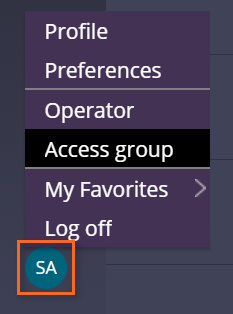
- In the lower-left corner, open the Access Group for the SSA@TGB operator to display the Edit Access Group form as shown in the following image.
Note: Rulesets added to the Production Rulesets list require that specific access is granted through the Access Group.
- On the Edit Access Group form, on the Advanced tab, add the HRDelegatedRules:01-01 Ruleset to the Production Rulesets list.
 Caution: In this challenge, you confirm access to the production Ruleset for one Access Group. For an application in a production environment, you must update each Access Group to reference the production Ruleset.
 - Save your changes.
This Challenge is to practice what you learned in the following Module:
Available in the following mission:
If you are having problems with your training, please review the Pega Academy Support FAQs.
Want to help us improve this content?