
Configuring a common phrase
Archived
2 Tasks
15 mins
Beginner
Agent Desktop
English
Scenario
Your company wants to set up a consistent greeting for customer service agents to use when sending emails to customers. The message thanks the customer for their inquiry.
| Role | User name | Password |
|---|---|---|
| Customer Service Administrator | CSAppAdmin | password123! |
| Customer Service Representative | cacsr | password123! |
Your assignment consists of the following tasks:
Task 1: Create the common phrase in App Studio and associate it with email
Create the common phrase in App Studio and associate the message with email by using the following information:
|
Property |
Value |
|
Phrase name |
|
|
Phrase category |
Greeting |
|
Channel |
|
|
Phrase text |
Hello, thank you for your inquiry over email. |
Task 2: Send an email to [email protected]
(*Hint: Go to the exercise system starting page (http://<exercise system IP address>), and then click the Email link.)
Task 3: Confirm your work
Observe that the common phrase is displayed as an option when you reply to the email.
Challenge Walkthrough
Detailed Tasks
1 Create the common phrase in App Studio and associate it with email
- Log into the App Studio with the User name CSAppAdmin and Password password123!.
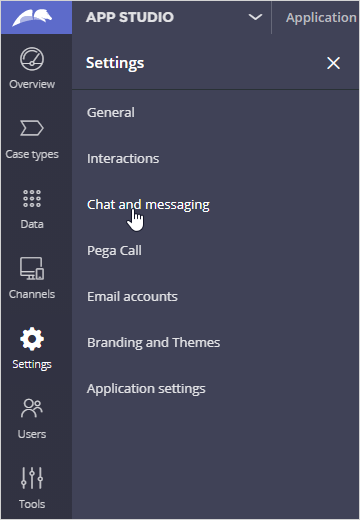
- Click Settings > Chat and messaging to create a new common phrase.
- Select Common phrases to configure common phrase settings.
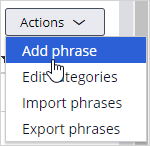
- Click Actions > Add phrase to create a new phrase.
- Use the following table to complete the new phrase.
Property
Value
Phrase name
Email
Phrase category
Greeting
Channel
Email
Phrase text
Hello, thank you for your inquiry over email.
- Click Submit to add your phrase.
- Click Save.
2 Send an email to [email protected]
- Go to the exercise system landing page (http://<exercise system IP address>), and then click the Email link to open the email client.
- (Optional) If not logged in already, log in with the User name customer1 and Password password.
- Click Mail to access the Inbox.
- Click Write mail to compose a new email.
- Send the email to [email protected].
- Enter any subject and some content for the email.
- Click Send message.
- In the left pane, click Log off, and then click Log off again to leave the email client.