
Designing background processing
4 Tasks
1 hr 30 mins
Advanced
English
Scenario
In the MDC product delivery scenario, the business partner membership must be renewed every six months. Partners can upgrade or downgrade their membership during renewal. Renewal can be initiated at any time before the membership expires. The system triggers a notification 15 days before the membership expiration date, and a message is displayed on the portal until the membership is renewed.
The delivery service requires emails to be processed efficiently.
The following table provides the credentials you need to complete the challenge:
| Role | User name | Password |
|---|---|---|
| Admin | admin@deliveryservice | rules |
Note: You might be practicing the challenges that use the Pega challenge instance provided with the LSA training on Pega Academy. Note that this instance is preconfigured and includes complete solutions for all challenges, along with the MDC Delivery Service application. If you want to practice and complete the challenges from scratch, use a Pega Lab instance or a VM, and refer to the provided solutions.
Detailed Tasks
1 Identify design options
As you develop your implementation, rely on the Rules in Pega Platform™. Consider the following approaches to addressing the requirements:
- Option 1: Create a single-node job scheduler that queries business partners whose expiration date is less than 15 days and sends an email to each business partner to renew their membership.
- Option 2: Create a single-node job scheduler with spun-off queue processors to send emails.
- Option 3: Open the business partner registration case and configure a Service-Level Agreement (SLA) that sends an email notification with a deadline of 15 days.
2 Evaluate design options
| Design | Pros | Cons |
|---|---|---|
| Create a single-node job scheduler |
|
|
| Create a single-node job scheduler with spun-off queue processors |
|
|
| Create an SLA in an open Case |
|
|
3 Recommend the best design option
The single-node job scheduler with spun-off queue processors is the recommended approach because of its better performance.
4 Tasks to perform
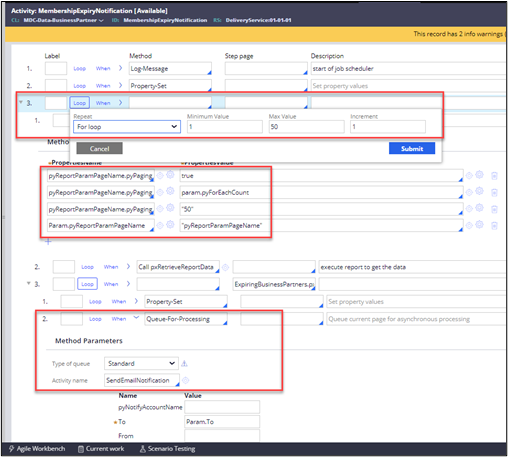
- Query the business partners whose expiry dates are less than or equal to 15 days (about two weeks).
- Use the report definition and its pagination settings to query 50 records at a time incrementally.
- Queue every record to the standard queue processor to send an email.
- Optional: To use the Create and send email automation processing email in the background, set the Send in foreground parameter to false.

Available in the following mission:
If you are having problems with your training, please review the Pega Academy Support FAQs.
Want to help us improve this content?