
Implementing an effective Data Model
2 Tasks
45 mins
Advanced
English
Scenario
The Delivery Service team is currently in the design phase of their project within the MDC enterprise ecosystem. Their primary task is to evaluate the existing set of enterprise-level data classes created by the MDC center of excellence (COE) team and determine which data classes to include in the Delivery Service application's design.
During this review, the team might encounter data classes that the MDC COE team has not yet formally defined. When this occurs, the Delivery Service team must make a deliberate architectural decision:
- If the data class is enterprise-wide in scope and has potential for reuse across multiple applications or teams, the Delivery Service team must collaborate with the MDC COE team to formally define the class and incorporate it into the enterprise Data Model.
- If the data class is specific to the Delivery Service project and has limited reuse potential, the team should manage it internally in the scope of the Data Model of their own application.
This decision-making process requires evaluating three critical factors:
- Scope: Does the data class represent information used across the organization or only in a single application?
- Reusability: Would other applications or teams benefit from having access to this class at the enterprise level?
- Maintenance effort: Is the COE team in a position to govern and maintain this class at the enterprise level over time?
Ultimately, the team's careful review of the MDC COE enterprise-level data classes is essential to ensuring that the Delivery Service project aligns with the broader enterprise Data Model, which supports consistent data governance and management across the organization.
The following table provides the credentials you need to complete the challenge:
| Role | User name | Password |
|---|---|---|
| Administrator | Admin@MDC | rules |
Detailed Tasks
1 Analyze the MDC enterprise Data Model
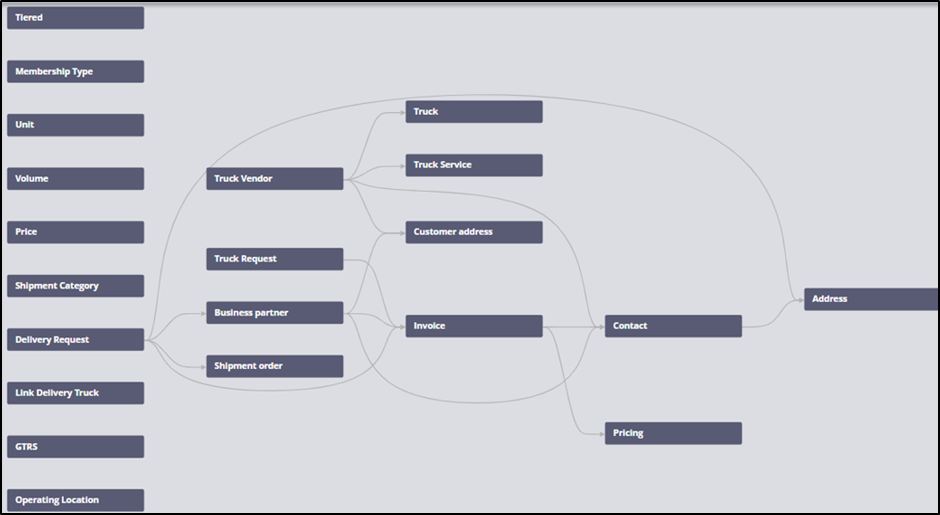
The following diagram shows the MDC enterprise Data Model, which details the relationships between shipment categories, truck vendors, and related entities:
- A Business Partner has a contact, one or more addresses, and an invoice.
- A Truck Vendor has a contact, an address, a service agreement, and one or more associated trucks.
- A Delivery Request has a pickup address, a delivery address, and an invoice.
- A Truck Request has an associated invoice.
- An Invoice has a contact associated with it.
The following table outlines the various classes in the system, along with their descriptions and roles in managing contacts, addresses, business partners, invoices, and truck-related data:
| Class | Description |
|---|---|
| MDC-Data-Contact | Contact of the Business Partner and the Vendor. |
| MDC-Data-Address | Address of the Business Partner, Vendor, Pickup, and delivery addresses. |
|
MDC-Data-BusinessPartner |
Holds the business partner data. |
| MDC-Data-Invoice | All the invoices paid and received. |
| MDC-Data-TruckVendor | Holds Truck Vendor data. |
| MDC-Data-TruckService | For each city where MDC operates, it defines the number of trucks supplied, the type of contract, and the minimum number of trucks. |
| MDC-Data-Truck | Truck and its associated VIN and size. |
| MDC-Data-LinkDeliveryTruck | A Delivery request can involve more than one truck, and a given truck can have delivery requests associated with it from various business partners. There is a many-to-many relation between a Truck request and a Delivery request. |
The following diagram shows the relationships between shipment categories, truck vendors, and related entities:

The following table presents various Cases and their associated DataObjects, along with comments that describe the purpose and context of each Case:
| Case | Associated Data Object | Comments |
|---|---|---|
| Partner |
|
Case for registration of a partner with MDC. |
| Vendor enrollment |
|
Case for vendor enrollment with MDC. |
| Truck service approval |
|
Child Case to Vendor enrollment for parallel approvals from city managers. |
| Delivery request |
|
Case for a delivery request by the Business Partner. |
| Truck request |
|
Case to track the delivery of the shipping orders from pickup to the delivery address in the given city. |
| Invoice |
|
Invoice to handle credits and debits. |
2 Complete the assignments
The definition of the Data Model must cover all classes in the system, not just Data- class extensions, but also the Data Model defined for each Case Type. This is a core LSA responsibility: ensuring the full Data Model is documented, consistent, and production-ready.
For each Data Model class, you must show:
- Full class name and the class it extends (its parent class in the Pega class hierarchy).
- Abstract or Concrete:
- Abstract classes define shared structure and are never instantiated directly. They serve as a foundation for child classes.
- Concrete classes hold actual data instances. For concrete classes, you must specify the database schema in which instances are persisted (for example,
pc_data_,pr_data_, or custom schemas).
- Properties used for data relationships, following Pega naming conventions:
- Use an Embedded Data Page for tightly coupled data that belongs exclusively to the parent (for example, .ContactEmbed for a single contact).
- Use a page list for one-to-many embedded relationships (for example, .AddressList for multiple addresses).
- For references to shared enterprise data objects, append Ref to the property name (for example, .InvoiceRef) and use the appropriate reference type (Single Record Reference or Value Reference).
- Use a Link class (such as
MDC-Data-LinkDeliveryTruck) to model many-to-many relationships, so that neither side of the relationship holds a direct embedded reference to the other.
- Critical scalar properties: The individual data fields that are essential to the business logic of the class (for example,
VINNumber,TruckSize,ContractType,MinimumTruckCount).
Note: An Interaction Diagram can help gain a better perspective about the problem domain, especially the timing of the inputs the system receives.
In Pega Platform, the Data and Integration Designer tool automates workflows for adding new entities and properties to the Data Model while managing integration with external systems of record. Lead System Architects should use this tool rather than manually configuring classes and connectors, because it enforces governance standards and reduces configuration errors.
Available in the following mission:
If you are having problems with your training, please review the Pega Academy Support FAQs.
Want to help us improve this content?