
Create an Intent When record
Archived
3 Aufgaben
20 Min.
Fortgeschritten
Englisch
Szenario
As a system architect, you have a requirement that an Open new account service case should be suggested when someone has a balance of greater to or equal than $10,000.
Use the following credentials to log in to the exercise system:
|
Role |
User name |
Password |
|
System Architect |
CASysadmin |
rules |
Your assignment consists of the following tasks:
Task 1: Create an Intent When rule
In Dev Studio, create an Intent When rule to determine if someone has a balance over $10.000.
Task 2: Use the new Intent When rule with the New Account service case
In Dev Studio, in the Open a new account service case, add the High Balance rule.
Task 3: Confirm your work
In the Interaction Portal, start an interaction with John Brown and verify that the Open new account case appears under Next Best Action.
Challenge-Schritte
Genaue Übungsschritte
1 Create an Intent When rule
- Log in as user name casysadmin with password rules.
- In the navigation pane of Dev Studio, click Records.
- Navigate to Decision > Intent When.
- Right-click, and then click Create.
- In the Create Intent When window:
- In the Label field, enter High Balance.
- In the Apply to field, enter or select PegaCA-Work-Interaction.
- In the Add to ruleset list, select PegaCS-Sample.
- Version: 08-06-02
- Click Create and open.
- Complete for the Intent When record.
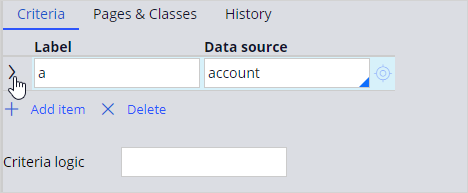
- Set the label to a.
- Set the Data source to account.
- Click the arrow at the Label field to expand the row.
- Set the FIELD to .AvailableBalance.
- Set the OPERATION to Greater/equal.
- Set the VALUE to 10000.
- Set the Criteria Logic to a.
- Click Save.
2 Use the new Intent When rule with the New Account service case
- In the navigation pane of Dev Studio, click Case types.
- Scroll down, and then click the Open a new account service case.
- On the Settings tab, click the Service request options section from the left panel.
- In Service request options window, complete the following steps
- In the Suggest service request when field, click Add new and select the Intent When rule High Balance.
- In the Action field, select Suggest.
- Click Save.
3 Confirm your work
- Click Launch portal > Interaction Portal.
- Click New > Demo Screen Pops > Demo Pop – BROWN to start an interaction.
- Observe that the Open New Account service case is displayed under Next Best Action.