

Manipulating application data in Dev Studio
1 Aufgabe
10 Min.
Anfänger
Data Integration
Englisch
Szenario
To ensure that customers are billed for only the services provided, the program manager wants the application to display a list of the services performed by the service provider. The list must include the following information:
- Name of the service performed
- Unit cost of the service
- Number of times the service was performed
- Total cost for each service
- Total cost of the services performed
The following diagram displays the relationships of the Selected Services Embedded Data type in the Assistance Request Case Type, and the Services data relationship in the Service Case Type to the Selected Services data type. This relationship has already been created and added to the Review service summary Step.
The following table provides the credentials you need to complete the challenge.
| Role | User name | Password |
|---|---|---|
| Application Developer | author@gogoroad | pega123! |
Hinweis: Your practice environment may support the completion of multiple challenges. As a result, the configuration shown in the challenge walkthrough may not match your environment exactly.
Challenge-Schritte
Genaue Übungsschritte
1 Configure the Transfer Data to Parent Case Data Transform
- In the Pega instance for the challenge, enter the following credentials:
- In the User name field, enter author@gogoroad.
- In the Password field, enter pega123!.
- In the navigation pane of App Studio, click Case Types > Service to open the Service Case Type.
- In the Run Data Transform Step, in the Run Data Transform label field, select Define new Data Transform.
- In the Data Transform Name field, enter Transfer Data to Parent Case and click Create.
-
Click Save to save the Service Case Type.
Hinweis: Saving the Case Type prevents needing to return to App Studio after configuring the Data Transform. - Click the Gear icon to edit the Data Transform.
- Click Open Data Transform in Dev Studio.
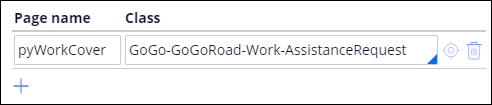
- On the Data Transform record, click the Pages & Classes tab to define the pyWorkCover page so that the Data Transform can resolve the SelectedServices and ServiceTotal property reference.
- In the Page name field, enter pyWorkCover as the name of the page to define.
- In the Class field, enter or select GoGo-GoGoRoad-Work-AssistanceRequest to define the context of the pyWorkCover page as the Assistance Request Case Type class.
- Click the Definition tab, in the Action list, select Set.
- In the Target field, delete the comment, and then enter pyWorkCover.ServiceTotal.
- In the Source field, enter or select .ServicesTotal.

- Click Add row
- In the Action list, select For Each Page In to repeat over the items in a list. A second, indented row labeled 2.1 is displayed on the record.
- In the row labeled 2, in the Target field, enter or select .Services to repeat over the items in the Services list.
- In the Source column, select the Also use each page as source context check box to use the Services page as the source context to resolve property references.
- In the row labeled 2.1, in the Actions list, select When to configure the Condition for selecting a row. A third, indented row labeled 2.1.1 is displayed on the record.
- In the row labeled 2.1, in the Target field, enter .Quantity>0 to only select rows with a quantity greater than zero.
- In the row labeled 2.1.1, from the Actions list, select Append to to append the contents of the selected row to a different list.
- In the row labeled 2.1.1, in the Target field, enter pyWorkCover.SelectedServices to copy the contents of the selected row to the Selected Services data relationship in the Assistance request parent Case.
- In the row labeled 2.1.1, from the Relation list, select current source page to copy the contents of the selected row in the Services data relationship in the Service Case.

- Click Save to complete the configuration of the Data Transform.
In dieser Challenge üben Sie, was Sie im folgenden Modul gelernt haben:
In der folgenden Mission verfügbar:
Wenn Probleme mit den Lerninhalten auftreten, lesen Sie bitte die Pega Academy Support FAQs.
Möchten Sie uns dabei helfen, diesen Inhalt zu verbessern?