
Reviewing log files
1 Aufgabe
15 Min.
Mittel
Enterprise Application Development
Low-Code App Development
Performance
Englisch
Szenario
Employees undergo an evaluation period to regularly assess their performance as new hires during the employee evaluation process. To check the status of the evaluation period in the employee evaluation case type, the IsEvalPeriodEnded when rule checks if the entered evaluation date is in the past. If the user enters an end date that is in the past, the case moves to the next process of Assess employee. When the user enters an end date that is in the future, the Assessment step is skipped, and the case moves to the Review stage.
At runtime, you notice the process is not returning the expected values. Review the logs to discover the cause of this discrepancy.
- Create an activity that uses the Log-Message method to write a message to the PegaRULES log file only when the IsEvalPeriodEnded returns false
- Add this activity in the Run activity field under the Actions tab in the IdentifyAssessmentPeriod_0 flow action
- Run the case and view the log file generated to see the message "Invalid Evaluation criteria End date"+ .EndDate
The following table provides the credentials you need to complete the challenge.
| Role | User name | Password |
|---|---|---|
| Senior System Architect | SSA@TGB | pega123! |
Hinweis: Your practice environment may support the completion of multiple challenges. As a result, the configuration shown in the challenge walkthrough may not match your environment exactly.
Challenge-Schritte
Genaue Übungsschritte
1 Create an activity to add a message to the log file
- In the Pega instance for the challenge, enter the following credentials:
- In the User name field, enter SSA@TGB.
- In the Password field, enter pega123!.
-
In the EmployeeEvaluation class, create an activity record named WriteToLog.
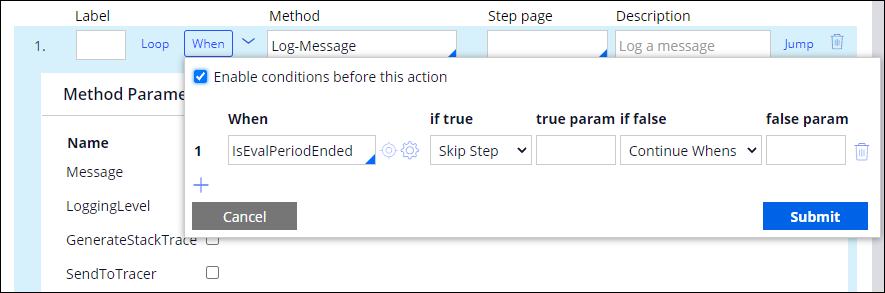
Tipp: To create an activity record, in the Application Explorer, right-click the class name and select Create > Technical > Activity. - In the first step of the activity, add an Enable when condition, and then set the following values:
- When: IsEvalPeriodEnded
- if true: Skip Step,
- if false: Continue Whens
- In the Method field, enter or select Log-Message.
- In the Message field, enter "Invalid Evaluation criteria End date" + .EndDate.
-
In the LoggingLevel field, enter InfoForced.
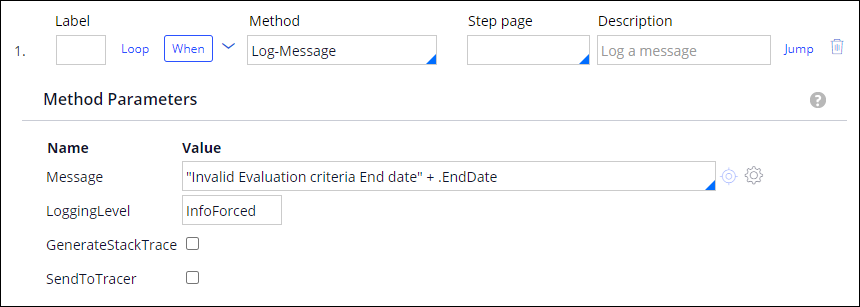 Hinweis: By default, the PegaRULES log only records messages with the logging level set to Error. Setting the level to InfoForced overrides this limitation without changing the logging level setting for the server.
 -
Save the activity.
Hinweis: Creating a new Activity prompts guardrail warnings. Justify the warnings before you check-in the record. -
In the Employee Evaluation class, open the IdentifyAssessmentPeriod_0 flow action.
Tipp: Flow action records are located in the Process category in the Application Explorer. - Click the Action tab.
- On the Action tab, in the Post-processing section, in the Run activity field, enter or select WriteToLog to add your activity to the flow action as a post-processing action.
- Save the flow action to commit your configuration change.
In dieser Challenge üben Sie, was Sie im folgenden Modul gelernt haben:
In der folgenden Mission verfügbar:
Wenn Probleme mit den Lerninhalten auftreten, lesen Sie bitte die Pega Academy Support FAQs.
Möchten Sie uns dabei helfen, diesen Inhalt zu verbessern?