

Simulating the truck rating response
5 Tasks
30 mins
Advanced
English
Scenario
When a vendor registers a truck, the Executive Manager reviews the registration and decides whether to approve or reject it. If the registration is approved, the City Manager ranks the companies that provide truck services for that city.
To rank these companies, the City Manager retrieves the truck rating by entering the vehicle identification number (VIN) into the external Global Truck Rating System (GTRS). The average rating of all trucks from a company becomes the company’s initial rating. Because the GTRS external system might not be available during development and testing, simulating its responses is essential.
In Pega Platform™, simulating an external data source provides enhanced features. If a Pega Blueprint™ does not have configured endpoints that connect to an actual data source, Pega Platform can automatically generate simulated Data Pages. With this feature, developers can run and validate business logic immediately, without waiting for the external system to become available. When the GTRS endpoint is ready for production, the live connection replaces the simulated source.
Simulating the external truck rating system is critical for ensuring the accuracy and reliability of the ranking process. By replicating the behavior of the GTRS in a controlled test environment, the City Manager can evaluate the ranking process under various conditions using precise and dependable test data.
The following table provides the credentials you need to complete the challenge:
| Role | User name | Password |
|---|---|---|
| Admin | admin@deliveryservice | rules |
Detailed Tasks
1 Identify design options
Option 1
Select the Simulate data source checkbox on the Data Page, and then create a Data Transform to simulate the response.
Note: The SimulateTruckRating Data Transform displayed in the preceding screenshot was not configured and is displayed for illustrative purposes only.
Option 2
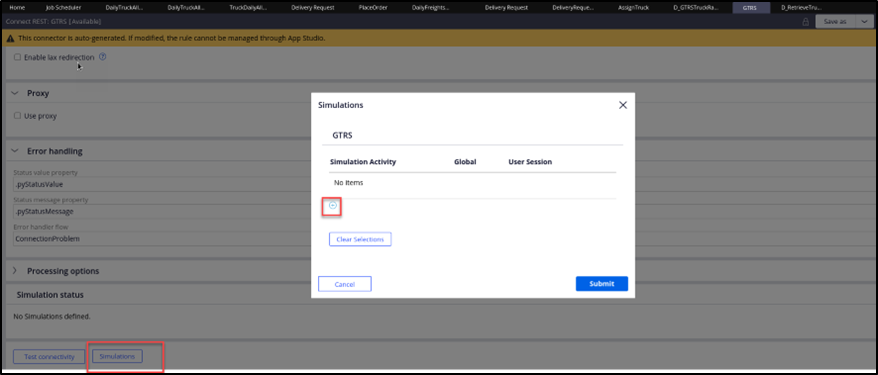
Associate a simulation activity with the rest connector:
- The simulation activity can be scoped to apply to a specific requestor session or to all requestor sessions to give architects fine‑grained control over when simulation is active.
- This approach is useful when simulation must be activated dynamically for specific testers or personas without affecting the entire development team.
- You must associate the simulation activity with a Ruleset version, which governs its availability.
Option 3
Create a REST service and get a rating for this service. Build a standalone, internal REST service that mimics the behavior of the GTRS external system and configure the application to consume it during development:
- This approach provides maximum control over the simulated endpoint URL, response structure, and data variability.
- However, it requires the most development effort because you must design, build, and maintain a fully functional mock REST service as a separate component.
2 Evaluate the design options
In the following table, review the pros and cons of each design approach:
| Design approach | Pros | Cons |
|---|---|---|
| Simulate data source |
|
|
| Connector simulation activity |
|
|
| Create REST service |
|
|
3 Recommend the best design option
For this scenario, simulating the data source is the recommended approach. It is the most efficient and flexible solution, where the Integration Designer provides a centralized, developer-friendly interface for managing simulation. The Data Transform source option is preferred because it supports reuse of the SimulateTruckRating Rule across multiple test Cases and is easy to update when different rating scenarios are needed.
4 Identify required configuration tasks
- On the Data Page that invokes the connector, toggle the simulation.
- To set the rating, update the source to a Data Transform or an activity.
5 Review the solution details
- Log in to the Pega instance for the challenge:
- In the User name field, enter admin@deliveryservice.
- In the Password field, enter rules.
- Switch to the MDC application.
- In the GTRS Data Type, locate the Retrieve truck rating Data Page.
- In the row for the Data Page, click More > Toggle simulation, as shown in the following figure:

Note: You can also select the Simulate data source checkbox in Dev Studio, as shown in the following figure:
Note: The SimulateTruckRating Data transform displayed in the above screen shot was not configured and is displayed for illustrative purposes only.
- To set the truck rating and other required properties, update the source to a Data Transform or an activity.
Once the GTRS external system is ready for production, simply clear the Simulate data source checkbox (or toggle simulation off via the Integration Designer) and update the Data Page with the live endpoint URL, REST connector, and authentication configuration. No other changes to the application logic are required.
Available in the following mission:
If you are having problems with your training, please review the Pega Academy Support FAQs.
Want to help us improve this content?