
Case creation overview
In high-volume customer service environments, customer service representatives (CSRs) often receive hundreds of emails daily, each requiring review, categorization, and routing before any work can begin. Manual processing at this volume introduces delays, inconsistencies, and missed details, particularly when critical information is buried in attachments or unstructured email bodies. Pega Email Bot™ automates the creation of Service Cases directly from incoming customer emails, reducing manual effort and improving response accuracy.
Overview
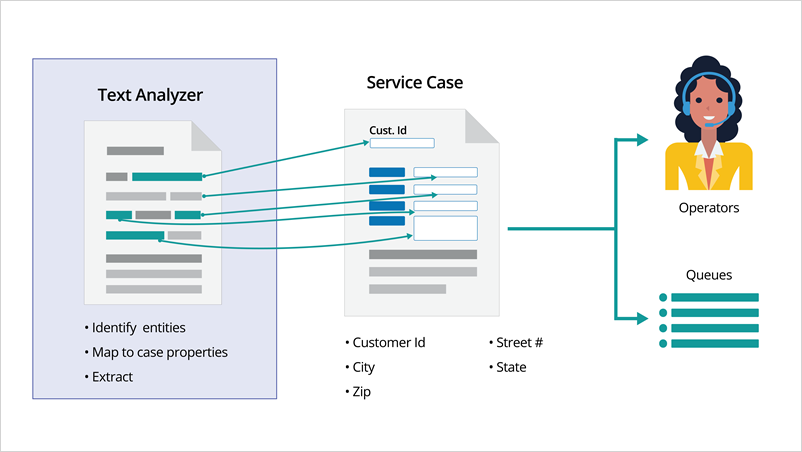
Pega Email Bot uses natural language processing (NLP) to analyze the content of an incoming email and automatically perform the steps required to create a Service Case. This process involves four interconnected functions: topic detection, entity identification, entity mapping, and Case creation through routing rules.
When a customer email arrives, Pega Email Bot first reads the subject line and body to determine the intent. It identifies the topic -- the subject of the request from the customer -- and associates it with the appropriate Case Type in the application. For example, if a customer sends an email requesting an address change, Pega Email Bot identifies the topic as "Address Change" and links it to the corresponding Case Type.
Beyond identifying the topic, Pega Email Bot also identifies entities, which are specific data points contained within the email. Entities include details such as account numbers, mailing addresses, full names, and primary email addresses. Pega Email Bot can extract these details not only from the email subject and body, but also from attachments, including scanned documents, using optical character recognition (OCR).
After identifying entities, Pega Email Bot maps them to the corresponding properties of the Service Case. For example, a street address such as "1 Rogers Street" extracted from the email body is automatically mapped to the Address Line 1 field in the Service Case. This mapping must be configured for each Case Type within the email channel before entity extraction can function.
Finally, a routing Rule determines when and how a Service Case is created. When the topic of an incoming email matches a configured condition, for example, an address change request, the routing Rule instructs Pega Email Bot to create the corresponding Case Type. Configure routing Rules in the Email Channel settings.
The following figure shows the Service Case creation process:
Topic detection
As an administrator, you configure the components for Case creation in Infinity Studio. Topic detection relies on keywords that you associate with a specific Case Type. You configure these keywords in the Email Channel on the Text analysis tab.
In this training, the MySupport Email Channel is preconfigured with suggested Cases and associated keywords, so you can focus on understanding the configuration rather than building it from scratch.
Note that while keyword-based topic detection is a suitable starting point, it has limitations at scale. As email volume grows, using a topic model is recommended to maintain detection accuracy.
The following figure shows keyword configuration in the Email Channel on the Text analysis tab:

Entity extraction
Entity extraction is an optional configuration that you add to a suggested Case within the Email Channel. When an incoming email matches a Case Type, Pega Email Bot extracts the configured entities from the email content and automatically assigns their values to the corresponding properties in the application.
For example, Pega Email Bot can extract a customer's street address, city, and state from an inbound email and populate the matching fields in the new Service Case. This process reduces the time that CSRs spend manually entering data and minimizes the risk of transcription errors.
To use entity extraction, configure mappings for each Service Case within the Email Channel.
The following figure shows entity extraction configuration in the Email Channel on the Mapping tab:

Using routing rules to create cases
A routing rule controls the conditions under which Pega Email Bot creates a Service Case. Configure routing rules in the Email Channel to define what action the bot takes when it detects a specific topic.
For example, when Pega Email Bot identifies that the topic of an incoming email is an address change, the routing rule directs it to create an Address Change Case. This automation removes the need for a CSR to manually review, classify, and route the email before work begins.
The following figure shows the configuration of routing rules in the Email Channel under the Intelligent routing section:

This Topic is available in the following Module:
If you are having problems with your training, please review the Pega Academy Support FAQs.
Want to help us improve this content?