

Data Pages
Case processing often requires access to data sourced from other applications or systems. Ensuring the accuracy of sourced data significantly reduces the chance of errors and undesirable outcomes for Cases. In Pega Platform™ applications, a Data Page retrieves data from a specified data source and caches that data in memory. A Data Page manages the integration to the data source, separating business processes from any integration details. This separation allows application developers to use sourced data in an application without knowing the data source and connection details.
In addition to retrieving reference data, Data Pages can support data persistence and service interactions by providing a structured data context for save operations and service invocations.
The following figure shows the working of a Data Page:
On-demand data access
Unlike most pages that are used in Pega Platform, applications attempt to populate the contents of a Data Page only when the page is accessed, rather than through an explicit Action. Due to the on-demand nature of Data Page content, Data Pages are considered a type of declarative Rule. Pega Platform automatically prepends the characters D_ to the name of a Data Page to differentiate the page from other pages in memory.
Note: Data Pages created in versions of Pega Platform before 7.1 begin with Declare_ instead of D_.
Match the numbers to the following image to explore how Pega Platform populates the contents of a Data Page:
- The developer creates the Data Page: A developer creates the Data Page by configuring the type, structure, and source of information to request from the data source.
- A user requests data from the Data Page: A user attempts an action that requires information from the Data Page. The system tries to retrieve the information from the Data Page.
- The system checks the cached data: The system checks whether the Data Page is present in memory. If necessary, the application accesses the cached data on the Data Page.
- The system queries the data source: If the Data Page is not in memory or is outdated, the system queries the data source specified on the Data Page for information.
- The data source returns the requested data (if necessary): The data source returns the requested information, thus filling in the Data Page.
- The app presents the data to the user: The system presents the requested information to the user.

Check your knowledge with the following interaction:
Data Page definition
When creating a Data Page, a developer must provide four key pieces of information:
- The structure of the page contents.
- The Object Type represented by the contents of the Data Page.
- The edit mode supported by the page.
- The scope of the Data Page.
Structure
The structure of the page determines whether the Data Page can contain one item or many items. Set the structure of a Data Page by selecting an option from the Structure drop-down list.
When using a list structure, the Data Page embeds the list items in an ordered array named pxResults. To access a specific record within the list, use the syntax DataPageName.pxResults(n), where n is the index of the ordered array that corresponds to the record.
Consider a Data Page that contains pricing information for a single stock. The structure is set to Page. However, if a Data Page contains pricing information for all the stocks in an investment portfolio, you set the structure to List.
Compare the page and list structures as displayed in the following image:

Object Type
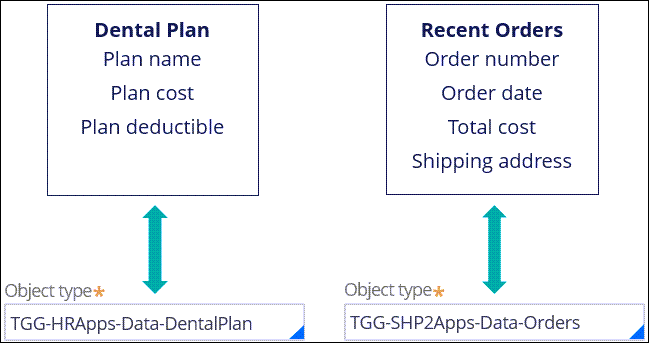
The Object Type of the page identifies the information contained by the Data Page. To set the Object Type for a Data Page, enter the class of the object in the Object Type field. The Object Type allows the Data Page to reference any property defined for the class. For example, a Data Page that lists dental insurance plans provided by an insurer contains the plan name, cost, and deductible and a Data Page that lists recent orders placed by a customer contains the order number, order date, total cost, and shipping address as shown in the following figure:
Edit mode
The edit mode of a Data Page indicates how or if an application can manipulate the information on a Data Page. Set the Data Page mode by selecting an option from the Mode drop-down list.
Set the edit mode to Read-Only to prevent an application from updating the Data Page except when loading and updating the contents from the data source. Read-only mode prevents you from editing information sourced from a system of record and ensures that the Data Page content always matches the content loaded from the system of record. For example, when accessing the accident history of an auto insurance customer from the Department of Motor Vehicles (DMV) database, state or national laws may prohibit editing the sourced data. To comply with this legal requirement, set the page mode to Read-Only.
Set the edit mode to Editable to allow an application to edit the Data Page contents. For example, a retailer allows customers to save one or more preferred shipping addresses when placing an order. The list of addresses is loaded from the customer database using a Data Page. To allow a customer to update an address during an order, you set the page mode to Editable.
Set the edit mode to Savable to configure a save plan that allows the application to push the page contents back to the data source. For example, after a customer updates a shipping address, the application copies the updated address to a savable Data Page configured to update the customer database. When the customer completes the order, the application follows the save plan to connect to the customer database.
Scope
The scope of a Data Page determines the Visibility of the page contents within the application. To set the page scope, select one of the supported options in the Scope drop-down: Thread, Requestor, or Node.
Thread Scope
Select Thread if the contents of a data page are unique to a single Case. Pega Platform populates an instance of a threaded data page for each Case in system memory, managing each instance to prevent a user from accessing data requested for a different Case.
Use Case: Caching data on stock prices and volumes during a buy or sell transaction.
Solution: Configure the scope of the Data Page on Thread to ensure that each transaction references the current price and volume data for the appropriate action when creating the transaction request.

Requestor Scope
Select Requestor if the contents of a data page are common to all of the Cases created by a single user or system. Pega Platform populates an instance of the data page for each user or system session. Any thread created during the session can access the data page instance.
Use Case: Caching a list of privileged shipping addresses.
Solution: Configure the scope of the Data Page on Requestor to use the list of shipping addresses for each order placed by a single customer. The customer can select the appropriate delivery address for each order without reloading the entire list each time.

Node Scope
Select Node if all users and system tasks on the system can share the contents of a data page. Pega Platform populates a single instance of the data page the first time a user or system action requests the page. All users or system actions that follow, access the cached page, rather than creating additional instances of the data page.
Use case: Caching a list of makes and models of vehicles to fill in a set of search fields to establish an auto insurance quote.
Solution: Configure the scope of the Data Page on Node, as the list of vehicle makes and models is common to all quotes.

Check your knowledge with the following interaction:
This Topic is available in the following Modules:
If you are having problems with your training, please review the Pega Academy Support FAQs.
Want to help us improve this content?