
Identifying Portals and landing pages
A Portal is the user interface of an application. Portals consist of landing pages that consolidate Case-related information within the application. Portals and landing pages combine to provide application users, such as customer service representatives, managers, or customers, with the tools each needs to work with a Case.
Portals
An application's user have different needs that align with the Tasks they perform during the Case Life Cycle. To facilitate their work, a web interface is designed to provide them with the information and functionality they require, and hide information that is not relevant to their role. This method contributes to a cleaner user interface and makes navigation quicker and more convenient.
End users experience a Portal through a browser, regardless of device type (such as a desktop or mobile device). Portal authoring is a simple and intuitive way to create an application web Channel. Portals are configured with predefined Portal templates to set the screen layout and required features. The templates support responsive application development and include a mobile-only layout option.
When you create a new Portal, there are two types of Portals:
- Standard work Portals that help professional users complete recurrent, complex workflows that require collaboration and in-depth data analysis.
- Self-service Portals that offer a minimalistic design and a more guided experience that helps users, such as employees and customers, complete occasional workflows without distraction.
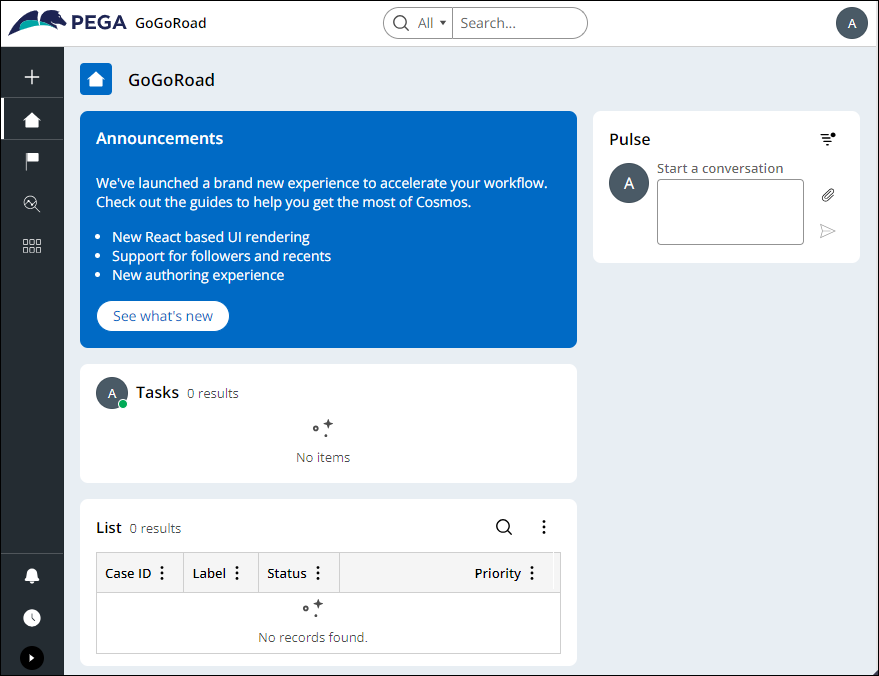
By default, Pega Platform™ has one Standard work Portal for application users: the Web Portal. The Web Portal provides a standard user interface for working on Cases. It is intended to be used by end users on desktop and mobile devices. For example, the Web Portal allows users to create and process Cases that are assigned to them. A preview of the Web Portal is displayed in the following figure:
Depending on the needs of the organization, you can set up a single Portal and control the Visibility of particular UI elements through Personas and access privileges or create separate Portals for individual user groups. In the case of multiple Portals, each version uses the same ready-to-use designs, which provide a reliable basis for a flexible user interface. The streamlined, single-design approach improves run-time performance and reduces development effort.
You, as a Pega Business Architect, work in conjunction with your Lead System Architect, to design the number and type of Portals that allow your users to complete their tasks most efficiently.
Note: Legacy fixed or custom Portals are no longer recommended in Pega Infinity™ as they do not support cross-browser or responsive design. Debugging tools might not work for these legacy Portals. Replace fixed or custom Portals that lack responsiveness with Pega Infinity Portals. To learn more about Portals, see Configuring Portals.
Landing pages
A Portal consists of landing pages that consolidate information for easy access. To build an application that matches the needs of your users, you create landing pages with lists of data, widgets, Views, and Insights. Landing pages allow you to present additional resources to users. You can create, configure, and add landing pages to menus within your application to display specific information.
Pega Platform provides out-of-the-box landing pages, including Explore Data, Home, and My Work. For example, the My Work landing page displays a table with a list of work items that are assigned to the user. As shown in the following figure, you can edit the My Work landing page from App Studio:

Note: For more information about configuring a landing page, see Creating a landing page for an application.
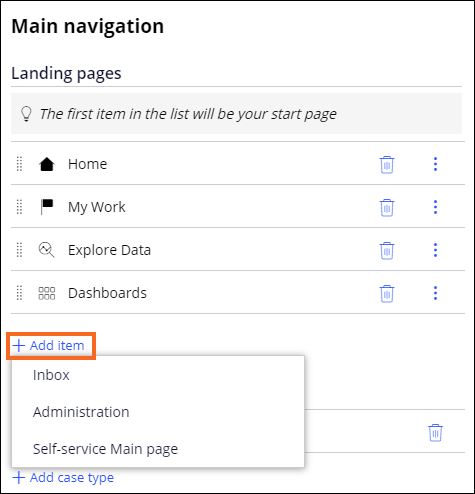
Landing pages added to a Portal menu are also added to the Portal. By managing the list of landing pages, you can configure the main menu and improve navigation and user experience. As shown in the following figure, you can modify the landing pages in the main navigation for a Portal:
As a Pega BA, you work with your client to identify the functionality needed by each Persona and role, and then collaborate with the System Architects to design the appropriate landing pages for their respective Portals.
Check your knowledge with the following interaction:
This Topic is available in the following Module:
If you are having problems with your training, please review the Pega Academy Support FAQs.
Want to help us improve this content?