
Monitoring adaptive models
3 Tarefas
10 min
Beginner
Inglês
Scenario
The models for the U+Bank implementation of cross-selling on the web of their credit cards have been learning for some time. Your task in this challenge is to inspect the models and report on which predictors are performing well, and which are not.
Use the following credentials to log in to the exercise system:
| Role | User name | Password |
|---|---|---|
| Data scientist | DataScientist | rules |
Your assignment consists of the following tasks:
Task 1: Inspect the adaptive models
Inspect the adaptive models by answering the following questions:
- Which model requires attention, and what is the performance of this model?
- What is the performance of the best-performing model?
- Which banner is the most successful?
Task 2: Inspect the predictors of the models
Inspect the predictors in the models by answering the following questions:
- Which predictor has the highest performance across all models?
- Which predictors are not used in any of the models?
Task 3: Inspect a specific adaptive model
Identify the model with the highest performance, then inspect it and answer the following questions:
- What are the top three predictors used in the model with the highest performance?
- Which predictor, currently relevant for the adaptive model, has the lowest performance?
- Which age categories show the highest and lowest interest in this banner?
Nota: The values you see in your exercise environment will differ slightly from the screenshots below.
Challenge Walkthrough
Detailed Tasks
1 Inspect the adaptive models
- On the exercise system landing page, click Pega Infinity™ to access Customer Decision Hub.
- Log in as a data scientist:
- In the User name field, enter DataScientist.
- In the Password field, enter rules.
- In the navigation pane on the left, click Intelligence > Prediction Studio to open the Prediction Studio portal.
- Click the Predict Web Propensity prediction tile to open the prediction.
- On the Models tab, in the Propensity to Click section, click Web_Click_Through_Rate_Customer to open the model.
- On the Monitor > Models tab, inspect the bubble chart.
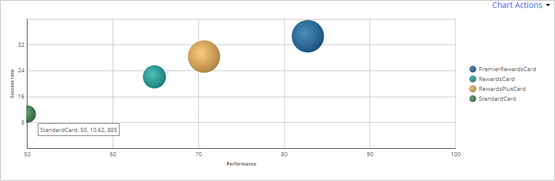
- Question - Which model requires attention, and what is the performance of this model?
- Hover over the green model in the chart.
Dica: Note the name of the model and its performance. The StandardCard model with a low performance of 50 requires immediate attention.
- Hover over the green model in the chart.
- Question - What is the performance of the best-performing model?
- Hover over the blue model in the middle of the chart.
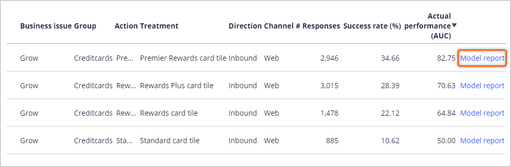
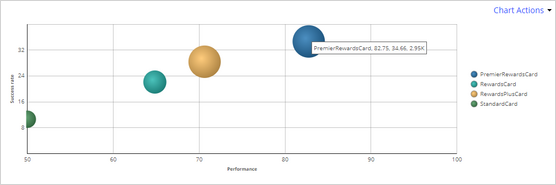 Dica: The best-performing model is PremierRewardsCard with a performance of 82.75Nota: In this web scenario, the success rate of the model is the click-through rate, the fraction of customers that clicks on the banner.
- Hover over the blue model in the middle of the chart.
- Question - Which banner is the most successful?
- Hover over the model with the highest success rate in the chart:
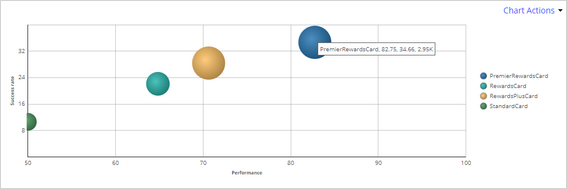 Dica: The PremierRewardsCard has the highest success rate of 34.66%.
- Hover over the model with the highest success rate in the chart:
2 Inspect the predictors of the models
- Question - Which predictor has the highest performance across all models?
- Click the Monitor > Predictors tab.
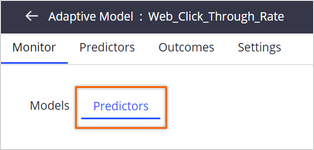
- Click the Average performance column header twice to sort by the average performance.
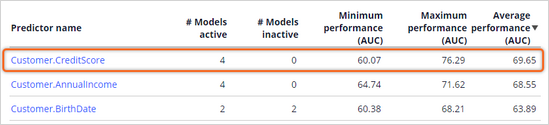 Dica: The best-performing predictor is CreditScore. This predictor is used in four models because the # Models inactive value is 0.
- Click the Monitor > Predictors tab.
- Question - Which predictors are not used in any of the models?
- Click the # Models active column header to sort the models in ascending order:
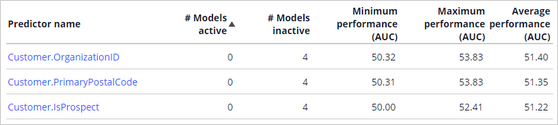 Dica: The predictors with a # Models active value of 0 are currently not used in any of the models as they are not predictive, for example OrganizationID, or are grouped with another predictor. The default performance threshold is 52.
- Click the # Models active column header to sort the models in ascending order:
3 Inspect a specific adaptive model
- Question - What are the top three predictors used in the model with the highest performance?
- Click the Models tab.
- Click the Actual performance (AUC) column header twice to sort the list of models in descending order.
- Click Model report in the first row.
- Click the Performance (AUC) column header twice to sort the predictors in descending order.
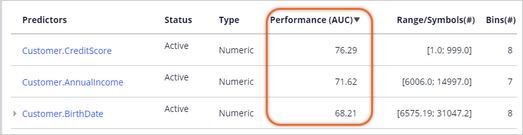 Dica: The top three best-performing predictors for this model are CreditScore, AnnualIncome, and BirthDate.
- Question - Which predictor, that is currently relevant for the adaptive model, has the lowest performance?
- Scroll to the bottom of the list.
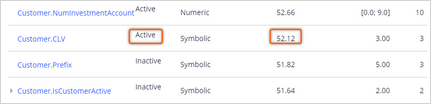 Dica: CLV is the active predictor with the lowest performance of 52.12, which is just above the default cutoff value.
- Scroll to the bottom of the list.
- Question - Which age categories show the highest and lowest interest in this banner?
- Click the BirthDate predictor.
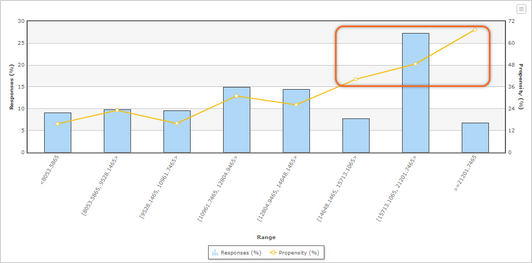 Dica: The highest interest for this banner is in the last bins, that contain the older customers.
- Click the BirthDate predictor.
Este Desafio serve para praticar o que você aprendeu nos seguintes Módulo:
Disponível na seguinte missão:
If you are having problems with your training, please review the Pega Academy Support FAQs.
Quer nos ajudar a melhorar esse conteúdo?