
Using Self-study Buddy in Pega Academy
2 Tarefas
10 min
Beginner
Inglês
Scenario
Help students navigate through Self-study Buddy, an intelligent assistant designed to support students in their learning journey, to engage and get answers to technical questions about the Pega Infinity™ software suite.
Your assignment consists of the following tasks:
Task 1: Log in to Self-study Buddy
On the exercise system landing page, log in to Self-Study Buddy by registering a new account or using your existing account.
Task 2: Engage with Self-study Buddy
Ask Self-study Buddy a couple of questions to explore the assistance that the buddy provides to students.
Challenge Walkthrough
Detailed Tasks
1 Log into Self-study Buddy
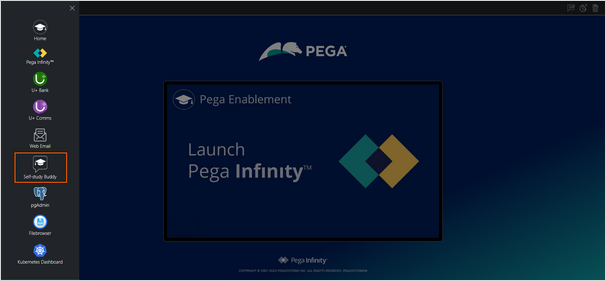
- On the Exercise System landing page, on the upper left, click the Application Switcher, and click Self-study Buddy icon to open the buddy.
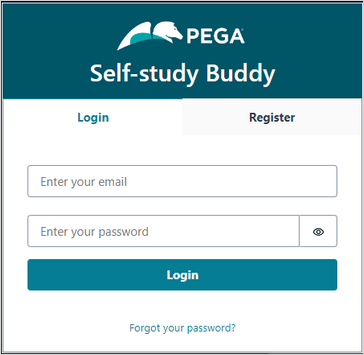
- Log in to Self-study Buddy:
- Enter your email ID.
- Enter your password.
- Click Login.
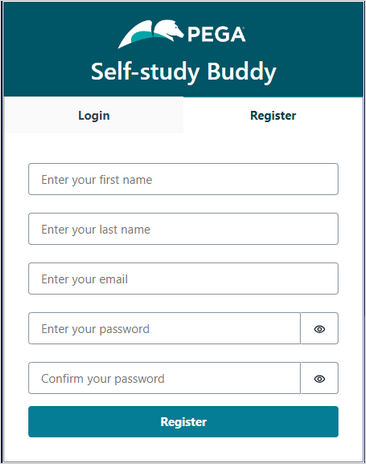
- If you are a new user, click the Register tab to create an account:
- Enter your first name.
- Enter your last name.
- Enter your email ID.
- Enter a password for your account.
- Confirm the password.
- Click Register.
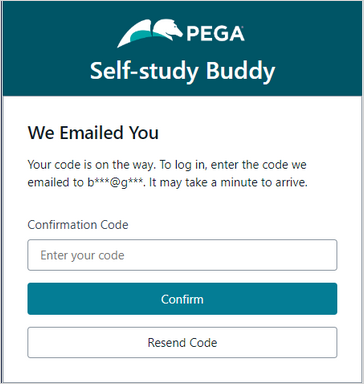
- In the the Confirmation Code field, enter the code sent to the email ID that you entered while registering an account.
- Click Confirm.
2 Engage with Self-study Buddy
- In the enter your own question section, enter What is Pega GenAI?.

- Click Ask to post the question.
After processing the question, Self-study Buddy generates the answer. In addition, the buddy provides links to Pega Academy and/or Pega documentation reference content.
- In the enter your own question section, replace the existing question with What are the key use cases of Pega GenAI in Pega Customer Decision Hub?.
- Click Ask to post the question.
Check the answer that Self-study Buddy generates.
You can ask as many questions as you want to learn more about the Pega Infinity software suite.
Este Desafio serve para praticar o que você aprendeu nos seguintes Módulos:
- Pega GenAI v2
- Getting started with Pega Customer Decision Hub Foundation v1
- Getting started with Pega Customer Decision Hub Foundation v2
Disponível nas seguintes missões:
If you are having problems with your training, please review the Pega Academy Support FAQs.
Quer nos ajudar a melhorar esse conteúdo?