
Authorization models
Authorization in Pega Platform™ controls user access to data and application features after login, based on roles and responsibilities. It follows authentication and ensures that users access only the information and tools necessary for their roles and responsibilities.
Pega Platform supports four complementary authorization models:
- Role-based access control (RBAC): Grants access based on predefined roles.
- Attribute-based access control (ABAC): Uses dynamic attributes to make context-aware decisions.
- Client-based access control (CBAC): Enforces privacy rules for personal data access.
- Basic access control (BAC): Validates UI-layer requests without using dynamic context.
These models define which rules users can create or modify and which tools they can access during application development.
Role-based access control
Pega Platform applications typically combine many Personas (user roles) to complete work. Roles include Customers, Call Center Workers, Managers, and Administrators. Most users fulfill one of the roles that apply to a given application. Use RBAC to define the Actions that one role has authorization to perform on a class-by-class basis, including:
- Class-wide Actions, such as running activities or reports.
- Record-level Actions, such as opening, modifying (create and update), and deleting.
- Rule-specific Actions that are governed by privileges.
Review of role-based access control Rule types
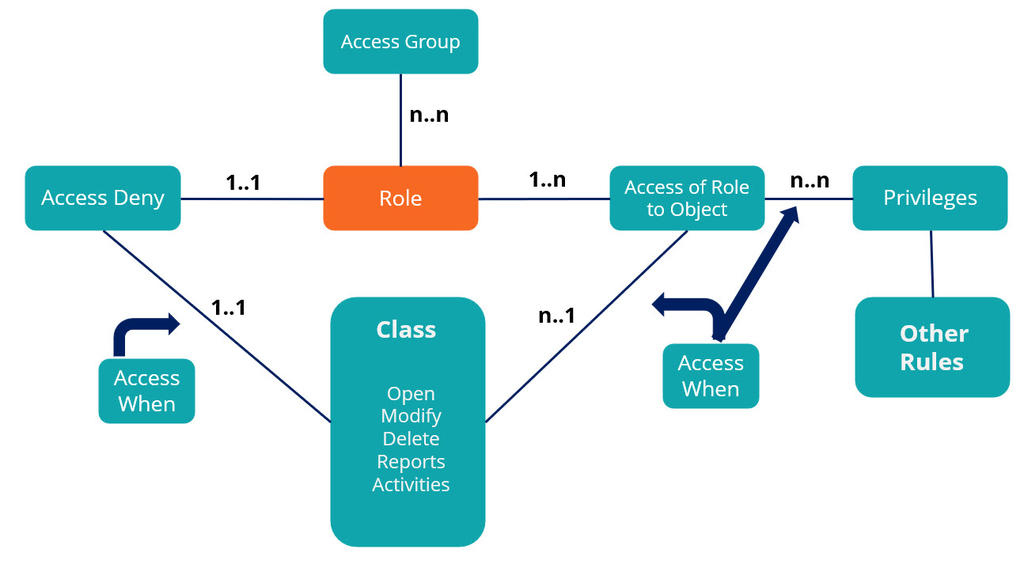
Each application has distinct roles that form the basis for authorization. You configure RBAC by using the following Rule types:
- Access Group: The collection of Access Roles that, when aggregated together, form the role-based access control portfolio for a single Persona (role).
- Access Role: A collection of Access of Role to Object and Access Deny Rules that define all role-based access control settings. The settings govern what access the system grants (and denies) to users who receive the Access Role.
- Access of Role to Object (ARO): Connection of an Access Role to the operations that holders of that Access Role are granted or denied to perform on an object (such as a class instance).
- Privilege: A Rule that can be attached to certain Rule types (or parts of them) to authorize who can run(part of) that Rule. For example:
- Only holders of an ApprovePR privilege can perform the Approve Purchase Request flow Action.
- Only holders of a ShowPR privilege can see a Show Purchase Requests menu item configured in a Navigation Rule.
- Class: The type of data that is subject to authorization.
- Access When Rule: A Rule that defines conditional access control (such as a When Rule), which typically evaluates one or more properties on the class that is subject to authorization. The intent is that the access control outcome from the Access When Rule varies between different instances of the same class. For example:
- Is the Purchase Request Case currently in the Approval Stage?
- Is the salary of an employee greater than USD 50,000?
- Access Deny Rule: Association of an Access Role to the operations that the system restricts holders of that Access Role from performing on an object
The following diagram summarizes the relationships of security Rules for RBAC. The Role Name and Rule-Access-role-Obj (RARO) Rules are central to RBAC. There is a many-to-many relationship between Access Group and Role and a many-to-many relationship between RARO and Privilege. Access Deny Rules require Access When Rules but are optional for RARO and Privilege Rules.
The following features enhance RBAC controls further:
- Dependent roles: Enables Access Roles that you can configure and resolve at run time based on a dependency hierarchy of Access Roles.
- Privilege inheritance: The system grants privileges to a class for an Access Role (by its ARO) to include the privileges that are specified on AROs of its superclasses in the same Access Role.
- Short-circuited access checking: Access Roles that yield an explicit grant or deny outcome can immediately return this outcome without checking subsequent Access Roles on the Access Group when the eventual access control decision is to grant access, particularly in the Case of an explicit grant.
App Studio-managed authorization
App Studio provides a basic authorization configuration feature that complements the RBAC foundation provided by Dev Studio. In App Studio, you can select the Enable page access configuration checkbox in the Access Group to allow citizen developers to manage the Access Roles. Authorization management also occurs through a combination of Personas, Access Groups, and Authentication Services in App Studio. Personas organize types of run-time users and define their access levels to ensure that they interact only with relevant parts of the application.
Access Groups are associated with roles, and users can configure them to grant specific permissions and access to the application, specific features, and data elements.
To manage user authentication, you configure authentication services. Administrators with the pzAdvancedSecurityUser privilege can map authentication services to an application.
The importance of privileges
Privileges provide better security because they can be used to control access to individual Rules or parts of individual Rules.
Privileges are a critical component of your authorization strategy because they enable the explicit authorization of specific Rules to be run "just in time. Privileges complement the security and access control features of Access Roles and Ruleset lists by restricting access to specific Rules rather than entire classes or RuleSet versions. Use privileges to differentiate the abilities of different groups of users within your application and prevent the unintended running of a Rule with unforeseen use of the application.
Run-time role resolution and privilege inheritance
When you define ARO Rules on a class basis, Pega Platform navigates the class hierarchy and determines the most specific ARO relative to the class of the object for that role. The system ignores any less specific AROs in the class hierarchy for that role. If the most specific ARO permits the operation, the system allows users to perform it. If users have multiple roles, the system determines the most specific ARO Rules for each role. Pega Platform performs the operation if the operation is allowed in any of the most specific AROs.
Privileges can provide more granular security because individual Rules define them. For example, to run a flow Action secured by a privilege, the user requires the privilege. The system grants the privilege through the most specific AROs for the class of the object. However, there is an option for the role to inherit privileges in AROs defined in the class hierarchy. With this option, users receive all the privileges granted by the AROs defined for the classes in the class hierarchy of the object.
In the following example, the role has the option to inherit the selected privileges. If the user works on an Expense Report Case, the access rights are defined in the TGB-HRApps-Work-ExpenseReport row. The role inherits additional privileges from the class hierarchy (TGB-HRApps-Work and Work-).
|
Access |
Read |
Write |
Delete |
Read |
Write |
Delete |
Execute |
Execute |
Privileges |
|---|---|---|---|---|---|---|---|---|---|
|
Work- |
5 |
5 |
|
5 |
|
|
5 |
5 |
AllFlows(5) |
|
TGB-HRApps-Work |
5 |
5 |
|
5 |
|
|
5 |
5 |
ManagerReports(5) |
|
TGB-HRApps-Work-ExpenseReport |
5 |
5 |
5 |
5 |
|
|
5 |
5 |
SubmitExpenseReport(5) |
Note: If a user has multiple Access Roles, the system joins the Access Roles with an OR condition so that only one of the most specific AROs for each Access Role is necessary to grant access to perform the operation.
Attribute-based access control (ABAC)
ABAC complements RBAC through Access Control Policies to control access to specific attributes of a record (as long as RBAC grants access to the record), regardless of the location of those attributes in the application (for example, on a screen or in a report). You can also use ABAC to define record-level access control (additional to RBAC), where the role that the user fulfills for the application does not determine the conditions for accessing those records. The following table shows the authorization types with the associated Rules and access controls:
| Authorization type | Rules | Control |
|---|---|---|
| RBAC |
|
|
| ABAC |
|
|
Use of ABAC in an application is optional; ABAC compares user information to Case data on a row-by-row or column-by-column basis. You configure ABAC by using Access Control Policy Rules that specify the type of access. Access Control Policy Condition Rules define policy conditions that compare user properties or other information on the clipboard to properties in the restricted class.
You define Access Control Policies for classes that inherit from Assign-, Data-, and Work-. You can use the full inheritance functionality of Pega Platform. Access Control Policy conditions are joined with an AND operation when multiple Access Control Policies of the same type exist in the inheritance path with different names. The system allows access only when all defined Access Control Policy conditions are satisfied.
Discovery
The discovery feature in the Access Control Policy allows users to view limited data.
For example, a discovery policy is applicable when the application has a policy of restricting access to the personal data of a customer, except for a few authorized users. However, there might be instances where a customer service representative needs to view certain customer details to ensure that the system records their information. In this case, the representative should have minimal access to view only the necessary data, rather than all customer details. This scenario is where the discovery policy comes into play. The read policy does not apply to this representative; only the discovery policy is applicable.
Mask data
Consider a financial application that stores sensitive customer data, such as Tax ID. In this scenario, users should not view the data; the best way to hide it is to mask it. Data masking is possible by using the PropertyRead action in the ABAC policy.
In the following example, if a user of an HR application wants to update a Purchase Case, the conditions for the Access Control Policies defined in the class hierarchy are joined with an AND condition. The user receives access to update the Purchase Case only if WorkUpdate AND HRUpdate AND HRPurchaseUpdate evaluate to true.
| Access class | Read | Update | Delete | Discover | PropertyRead | PropertyEncrypt |
|---|---|---|---|---|---|---|
| Work- | WorkRead | WorkUpdate | WorkDiscover | |||
| TGB-HR-Work | HRUpdate | HRDelete | HRDiscover | HRPropRead | ||
| TGB-HR-Work-Purchase | HRPurchaseRead | HRPurchaseUpdate | HRPurchasePropRead | HRPurhCasePropEncrypt |
Typically, RBAC is more about granting access based on user roles and applies across the entire organization. At the same time, ABAC is context-based because it provides access rights based on the user and or the attributes. The system automatically enforces ABAC after a user defines it; however, it entails too many policies to fulfill user security requirements because of the complexity of the requirements.
Note: When both RBAC and ABAC models are in place, an AND operation joins the policy conditions in the models. The system grants access only when both the RBAC policy conditions AND the ABAC policy conditions are met.
The following table shows actions supported by RBAC and ABAC:
| Action | Description | RBAC | ABAC |
|---|---|---|---|
| Open/read instances | Open a case and view Case data in reports and searches | Yes | Yes |
| Property Read in instances | Restrict data in a Case that the user can open | Not applicable | Yes |
| Discover instances | Access data in a Case without opening the case | Not applicable | Yes |
| Modify/Update instances | Create and update a Case | Yes | Yes |
| Delete instances | Delete and update a Case | Yes | Yes |
| Run report | Run reports | Yes | Not applicable |
| Execute activity | Runs activities | Yes | Not applicable |
| Open rules | Open and view a rule | Yes | Not applicable |
| Modify rules | Create and update a rule | Yes | Not applicable |
| Privileges | Runs rules requiring specified privileges | Yes | Not applicable |
Client-based access control
Another access control feature in Pega Platform is client-based access control (CBAC). CBAC focuses on tracking and processing requests to view, update, or remove personal customer data that Pega Platform holds across your applications, such as the data that EU GDPR (and similar) regulations require. It does not influence the authorization considerations for lead system architects when designing a Pega application.
For example, a financial institution uses a Pega application to manage customer data. This data includes sensitive personal information such as names, addresses, and account details. Under regulations such as the General Data Protection Regulation (GDPR), customers have the right to access, modify, or delete their personal data. To comply with these regulations, the institution can use CBAC in Pega. When a customer requests to view, modify, or delete their data, the Pega application receives the request.
CBAC rules in the application define how the system locates personal data in the data store and control the type of access that the client receives for each data instance. When a customer requests to view personal data, the CBAC rule identifies the storage location in the Pega database and retrieves the data for display. When a customer requests to modify or delete personal data, the CBAC rule directs the system to perform the requested operation. This approach helps a financial institution comply with data protection regulations and maintain control over access and management of personal data in the Pega application.
For more information about CBAC, see Defining client-based access control Rules.
Basic access control
BAC in Pega Platform is a security feature that protects your application from unauthorized requests that originate from the user interface layer, such as sections, custom controls, and harnesses. It verifies requests at the Application Layer and provides additional request verification when you use autogenerated controls.
Decision framework for authorization models
Align authorization strategies with business needs, regulatory requirements, and technical complexity. Use this framework to determine when to apply RBAC, ABAC, CBAC, or a combination.
Apply RBAC when access aligns with job roles
Use RBAC to assign access based on organizational hierarchy and job functions.
Indicators:
- Roles are clearly defined (for example, Teller, Loan Officer, Branch Manager)
- Access patterns are stable and tied to roles
- User interface fields and workflows vary by role
- You can enforce least privilege through role assignments
- The system makes access decisions at login
Example:
In banking, Tellers access transaction features. Loan Officers access credit tools. Branch Managers inherit Teller access and gain supervisory functions.
Apply ABAC when fine-grained, contextual access is required
Use ABAC to enable dynamic, data-sensitive access control based on user and data attributes.
Indicators:
- Access depends on data traits (for example, region, sensitivity)
- Row-level and column-level security is required
- The system makes runtime access decisions using multiple attributes
- Complex conditional logic drives access decisions
Example:
In healthcare, physicians access only their patients’ records. Sensitive fields (for example, HIV status) are visible only to qualified clinicians. Billing staff see only financial data.
Combine RBAC and ABAC when layered security is required
Use both RBAC and ABAC to manage broad and granular access.
Indicators:
- Feature-level and data-level access are both required
- Different roles use the same interface but view different data
- Functional and data authorization must work together
- Regulatory requirements demand multi-layered control
- Separating interface and data security improves maintainability
Example:
In customer service, RBAC controls interface access. ABAC filters customer account visibility by region, segment, or investigation status.
Apply CBAC when regulatory compliance is central
Use contextual-based access control (CBAC) to manage personal data in compliance with regulations such as the General Data Protection Regulation (GDPR) and the California Consumer Privacy Act (CCPA).
Indicators:
- The application stores personally identifiable or regulated data
- Data subject access requests (DSARs) must be supported
- Jurisdiction-specific privacy rules apply
- Audit trails for data access are required
- Channel-specific access rules must be enforced
Example:
In European retail, customers can request data access, correction, or deletion. CBAC tracks data instances, processing activities, and enforces channel-specific restrictions.
Check your knowledge with the following interaction:
This Topic is available in the following Module:
If you are having problems with your training, please review the Pega Academy Support FAQs.
Want to help us improve this content?