
Basics of a Data Model
A Data Model is the visual representation of all the data elements of an organization and the connections between them.
A well-designed Data Model provides your application with several benefits, including:
- Efficient reuse.
- Easy maintenance.
- Increased adaptability and scalability.
Data Model design is as critical to a successful Pega Platform™ application as process redesign. Throughout the design and development stages of a project, teams collaborate with stakeholders to define, refine, and evolve the application’s Data Model to ensure it supports business outcomes and solution requirements.
All applications require the right data at the right time to operate effectively. The primary purpose of the Data Model is to define the data the application needs to achieve the intended business outcome. Before exploring the different variations of the Data Model, it is important to understand the context in which data modeling begins. The approach taken depends on whether the application starts with an existing data foundation or is designed without prior constraints.
Greenfield Data Modeling
Greenfield data modeling is the approach used when a Data Model is created without being constrained by an existing schema or predefined model. It applies when no prior foundation, industry, or marketplace model needs to be extended or conformed to, or when existing models do not adequately represent the organization’s data.
In greenfield scenarios, data modeling is driven by business outcomes, beginning with identifying the data required to support those outcomes and evolving as understanding increases, progressively shaping how data is structured and refined into implementation-ready forms.
Greenfield data modeling follows the same three‑level progression used in all data modeling efforts:
- The Conceptual Data Model
- The Logical Data Model
- The Physical Data Model
This progression ensures that data design remains business‑driven early and becomes implementation‑ready only after requirements are clearly understood.
Note: Greenfield data modeling differs from extending an existing Data Model. When an existing Data Model is available, design decisions must align with and build upon that established data foundation, rather than starting from a clean design baseline.
Check your knowledge with the following interaction:
The Conceptual Data Model
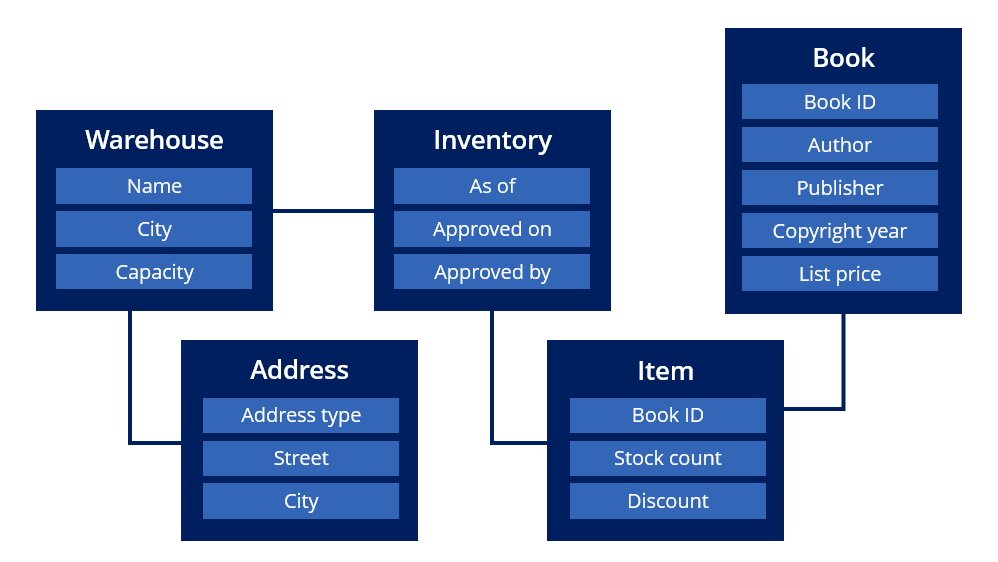
The Conceptual Data Model is developed collaboratively with stakeholders and documents the data entities and attributes used to process work, along with the relationships between those data elements.
The following diagram represents a Conceptual Data Model for books stored in a warehouse. The illustration shows the basic entities, attributes, and relationships between the key elements of the book warehouse inventory model. In this example, Warehouse is the entity, while Name, City, and Capacity are the attributes. Additionally, Warehouse has a direct relationship with the Address and Inventory entities:
Consider the Conceptual Data Model as a living document. Use the Conceptual Data Model when meeting with business stakeholders to discuss your design for the business process, as it helps them visualize the data entities you have identified. This visualization makes gaps in the process or data easier to identify.
As you construct the Conceptual Data Model, you do not need to model every single piece of data required to achieve the business outcome, but a time spent in data design early in the project can save time later if you find that the data requirements of the business are not fully understood.
Overall, the Conceptual Data Model helps to mitigate the risk of rework due to misunderstandings in the early stages of the project. Of course, as the project progresses and the team obtains additional insights, the Conceptual Data Module might change. Still, this Conceptual Data Model is a solid starting point for discussions on application development.
The Logical Data Model
The Logical Data Model is the Conceptual Data Model translated and refined for a Pega Platform application.
The Logical Data Model converts the data entities and attributes of the Conceptual Data Model into Data Objects and fields, respectively.
In Pega, fields are reusable UI components that consist of a name and a Field Type. The Field Type determines the format of the data that can be entered into the field. Each field stores a value that is associated with a Case. A Data Object is a structure for describing an entity by grouping related fields. Data Objects are reusable across all of an application's Case Types.
The following image shows how Data Objects and fields combine to define the application's Logical Data Model:

The Logical Data Model shows the Data Objects within a selected Case Type and how they relate to each other, highlighting fields, data relationships, and relationship types (one-to-one, one-to-many, or many-to-many). Selecting a data object or related object updates the left pane to display its fields and associated relationships.
Note: For more information on Data Objects and fields, see Data Objects overview and Fields in your application.
The Physical Data Model
The Physical Data Model represents how data is stored, accessed, and managed within an application.
It focuses on the technical configuration required to interact with organizational data, including data persisted within the application’s local data store and data accessed from external systems of record.
The Physical Data Model brings together data entities, their relationships, access mechanisms, and integration points, providing a unified view of how application data is connected and sourced across the overall system landscape.
Note: For more information on designing the Data Model, see Designing the Data Model.
Check your knowledge with the following interaction:
This Topic is available in the following Module:
If you are having problems with your training, please review the Pega Academy Support FAQs.
Want to help us improve this content?