
Best practices for team-based development
Large-scale application development involves multiple teams working in parallel, each owning distinct components, such as a full customer Microjourney® or an enterprise-wide feature such as fraud detection. Even within a single feature, small pods of developers share tasks. This distributed approach drives agility and scalability but also introduces complexity and risk. Without a unified vision and strong technical governance, efforts become fragmented, which results in poor user experiences, duplication, and technical debt. In this environment, the Lead System Architect (LSA) plays a critical role in maintaining coherence and quality.
LSA responsibilities in multi-team application development
In any large-scale Pega Platform™ project, multiple teams work in parallel. In this dynamic environment, the LSA serves as the technical and strategic anchor, ensuring that all teams contribute to a unified, scalable, and high-quality application. The LSA role is not just about writing code; it is about providing architectural governance and technical leadership that enables teams to work efficiently and effectively.
The following table provides a summary of LSA core responsibilities in a multi-team setup:
| Responsibility | Description |
|---|---|
| Architectural governance |
The LSA defines and enforces the application architecture, including standards for Data Models, class structures, interface integration, and security protocols. The goal is to ensure that design decisions align with the architectural vision and long-term maintainability. |
| Technical leadership and mentoring | The LSA acts as the lead technical expert and mentor for development teams. This process involves guiding them through complex challenges, promoting Pega best practices, and fostering continuous learning. |
| Quality assurance and gating | The LSA establishes and enforces quality gates throughout the development lifecycle. This process includes peer reviews, adequate test coverage, and ensuring that guardrail scores meet acceptable limits before merging code. |
| Conflict resolution |
With multiple teams, technical disagreements are inevitable. The LSA serves as the final decision-maker to resolve conflicts, guiding solutions that align with the architectural vision and the best interests of the project rather than team preferences. |
| Fostering collaboration | The LSA standardizes communication channels, promotes shared documentation, and makes teams aware of each other’s work to prevent redundant efforts and integration issues. |
Best practices for multi-team development
To support efficient team-based development that produces a high-quality application, LSAs must champion and enforce the following best practices:
| Best practice | LSA perspective and rationale |
|---|---|
| Use multiple built-on applications | Advocate for modular design using smaller, componentized built-on applications. This strategy simplifies management, testing, and deployment, which reduces the impact of changes and provides teams with greater autonomy. |
| Isolate work with branches | When multiple teams contribute to a single application, the LSA mandates the use of branches to isolate changes. This approach is critical for preventing conflicts and ensuring that incomplete or risky work does not destabilize the main application. |
| Enforce peer reviews and quality gates | Ensure no code is merged without scrutiny. Use tools such as Branch Explorer to check quality metrics and guardrail scores. |
| Implement continuous integration and rebasing | Drive continuous integration and continuous delivery (CI/CD) practices and require teams to regularly rebase Branches to stay synchronized with the main codebase. |
| Demand automated testing | Require Pega unit testing to validate application data and functionality. Automated testing provides rapid feedback and confirms that new changes do not break existing features. |
| Use feature toggles for incomplete work | Enable frequent merges without exposing unfinished work by using feature toggles. This decouples deployment from release. |
| Lock down Rulesets | Prevent direct development in unlocked application rulesets. By locking Rulesets, all modifications undergo proper Branch review and merge processes, which helps prevent accidental changes and maintain architectural integrity. |
| Establish clear communication channels | Standardize communication and documentation tools, such as Pulse. This approach ensures that all team members, regardless of location, stay informed about the status of branches and features, promoting transparency. |
Anti-patterns in multi-team development
An LSA must identify and correct the following common anti-patterns:
| Anti-pattern | Description and impact |
|---|---|
| Siloed teams | Leads to redundant work, inconsistent implementations, and integration issues. Break down silos and enforce collaboration. |
| Big Bang integration | Waiting until the end of a cycle to integrate work is a risky approach. Advocate for continuous integration to resolve conflicts early. |
| Architectural drift | Without governance, architecture degrades as teams make short-sighted decisions. Conduct regular architecture reviews. |
| Inconsistent tooling | Different tools create friction. Standardize the development toolchain for consistency and efficiency. |
The strategic impact of Blueprint
Pega Blueprint™ is a transformative tool for multi-team development, enabling alignment and acceleration from the start of a project. It generates a comprehensive application design (including Case Types, Data Models, and Personas) from a simple problem statement. This approach gives all teams a consistent architectural foundation.
Blueprint fosters collaboration by allowing LSAs to invite business analysts, product owners, and team leads to contribute to the design in a shared space. Team members can comment, suggest modifications, and refine the structure in real time, which reduces ambiguity and rework downstream.
Multiteam development flow
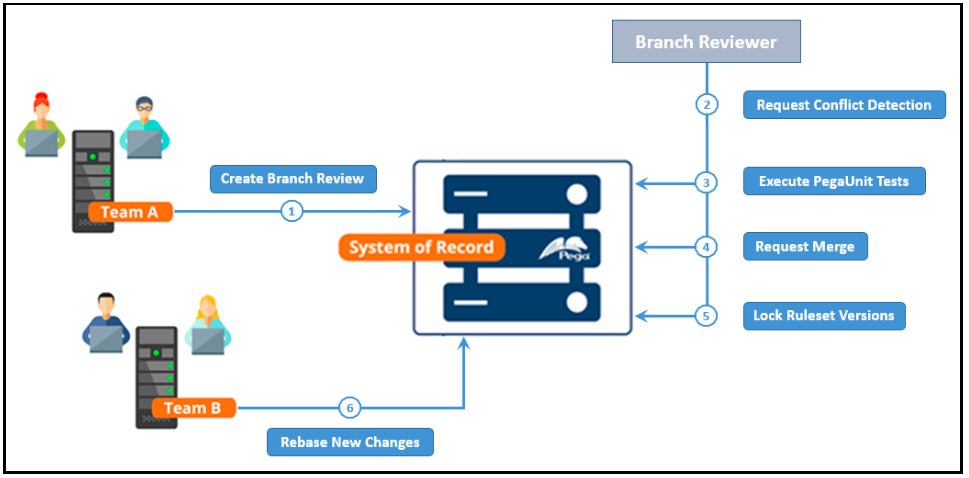
The following diagram illustrates how multiple development teams interact with the system of record (SOR). Team B relies on the code developed by Team A. Both teams use the same database as the system of record (SOR) for their code. Team A and Team B develop code on different servers, which is then uploaded to and downloaded from their shared SOR. A branch review is required to move Team B's code from branch Ruleset versions to new versions with the main rulesets, so Team B uses the "lock-new-versions-after-merge" approach. Because the new ruleset versions are locked, Team B can pull those new versions into the non-SOR server by using a rebase operation.
- The process begins when Team A requests a Branch review against the SOR.
- A Branch Reviewer first requests conflict detection, then runs the appropriate Pega unit testing. If the Branch Reviewer detects conflicts or any Pega unit testing fail, the reviewer notifies the developer who requested the Branch. The developer stops the process to fix the issues.
- The Pega unit testing runs.
- If the Pega unit testing run successfully, the Branch merges into the SOR.
- The Ruleset versions that are associated with the Branch are then locked.
- Remote Team B can now perform an on-demand rebase of the Rules of the SOR application into their system. A rebase pulls the most recent commits made to the SOR application into Team B's developer system.
For more information, see Development workflow in the DevOps pipeline.
Check your knowledge with the following interaction:
This Topic is available in the following Module:
If you are having problems with your training, please review the Pega Academy Support FAQs.
Want to help us improve this content?