

Cascading approvals
Approvals vary depending on the Case Type. An auto insurance Case Type might need approval from the company underwriter. Some Case Types, such as a purchase request or an expense report, may require a series of approvals. Cascading approvals model a series of approvals.
When configuring a cascading approval, consider the following questions:
- Who needs to perform the approval?
- How many approvals are required?
- Is approval by the entire reporting structure required, or only a subset of the hierarchy?
- Are approvals outside the reporting structure required?
The two cascading approval models are reporting structure and authority matrix.
Cascading approvals with a reporting structure
Cascading approvals based on the reporting structure require approval from a user's direct manager and higher-level managers. You can also configure business logic to set thresholds to determine the number of required approvals.
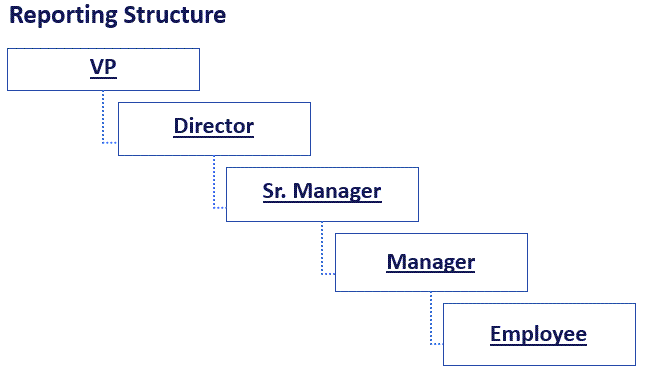
For example, an expense report requires manager approval before the accounting department can process the payment. As shown in the following figure, depending on the total of submitted expenses, the expense request may also require approval from a Senior Manager, a Director, and a Vice President. If the expense report is USD3000, the Manager, Senior Manager, Director, and VP must all review the report.
Cascading approvals with a reporting structure options
You configure cascading approvals by adding an Approve/Reject Step to the Case Life Cycle and selecting the Cascading option. You select the Reporting structure option to configure a cascading approval based on the reporting structure.
The reporting structure approval generates a set of approvers using the information on the user's operator ID record. Either the user's Reporting Manager or the Workgroup Manager completes the approval. At run time, Pega Platform™ looks up the appropriate approver based on the current user.
Number of approvers
- One – The Reporting Manager or the Workgroup Manager. The image below shows the Reporting Manager reporting structure in the expense report reimbursement example.
- All – The entire manager hierarchy. In the expense report example, if you select All, the approval is routed to the Manager, then the Senior Manager, then the Director, and then the VP.
- Custom – Number of levels that are needed to evaluate When Rules. In the expense report example, you create four levels and four When Rules that route the approval to additional members of the reporting structure depending on the total of the expenses.
Cascading approvals with an authority matrix
A cascading approval based on an authority matrix is more flexible than a reporting structure. You use the authority matrix model when configuring a Process that requires approvals from multiple entities, at least one of which is outside the reporting structure. A set of Rules directs the approval chain to entities outside of the reporting structure, within and external to the user's organization.
For example, the following image shows an expense report that requires approvals outside of the reporting hierarchy to accounts payable, and uses an authority matrix model:

Authority matrix data structure population
A cascading approval with an authority matrix requires configuring a data structure that identifies approvers. The application queries the structure for each approval until the listed approvals are exhausted. Pega Platform provides several ways of populating the data structure: a Decision table, Data Page, activity, or Data Transform.
One common approach is to configure a Decision table to identify the approval levels and corresponding parties. The application evaluates the Decision table to populate the data structure. Each satisfied row or Condition adds the results to a list of approvers. Approval Assignments are routed to approvers in the order they appear in the list.
In the expense report example shown in the following image, the Decision table identifies each party in the approval process and the Conditions that determine when each party must provide approval. The first Condition states that Accounts Payable must approve any billable expense. The three When Conditions that follow are based on the expense amount. If a consultant submits an expense report for USD 700 that includes billable time, the application creates an authority matrix with three approvals: Accounts Payable, the consultant's manager, and the director who oversees the consulting department.

Tip: When using a Decision table as part of an authority matrix, configure the Decision table to evaluate all rows to return a list of results. Otherwise, the Decision table returns only one result.
Check your knowledge with the following interaction:
This Topic is available in the following Module:
If you are having problems with your training, please review the Pega Academy Support FAQs.
Want to help us improve this content?