

Dev Studio
Robust, enterprise-grade Pega Platform™ applications depend on cooperation between two key groups of application developers. Domain experts — Business Analysts, Citizen Developers, and front-end developers — provide valuable insight into processes and user needs. Implementation experts — System Architects, full-stack developers, database administrators, and security administrators — provide the expertise needed to address critical use cases that require complex configurations.
In App Studio, domain experts can access core application development features (Case design, data management, and user experience) and apply their knowledge to improve development outcomes. To support advanced Rule configuration in applications, Pega Platform provides implementation experts with a second development environment, Dev Studio. In Dev Studio, implementation experts access Rule forms directly to address complex or less-common configuration requirements. In addition, Dev Studio provides features for configuring security permissions and access control, managing Rules to promote reuse, and addressing the performance limitations of an application. By providing two development environments, Pega Platform supports each group of application developers with an environment tailored to their skill level and optimized for the tasks they perform.
Match the numbers to the following image to examine some of the options available for Service-Level Agreements (SLAs) in Dev Studio, beyond the basic goal and deadline configuration available in App Studio:
- Initialization behavior: In Dev Studio, customize the initial Urgency for an SLA and delay the start of the goal and deadline timers if the Assignment is held before being sent to a Worklist or Work Queue.
- Variable interval length: In Dev Studio, apply programmatic, rather than explicit, interval durations to adjust SLA behavior on a Case-by-Case basis.
- Goal interval and Urgency adjustment: SLA goal interval options configurable in App Studio.
- Account for business days: In Dev Studio, exclude non-business days when calculating SLA intervals to account for holidays and weekends.
- Additional escalation actions: In Dev Studio, configure additional escalation options beyond notifications, such as reassigning a Task or resolving a Case.
Check your knowledge with the following interaction:
Co-develop solutions
Business Analysts and Citizen Developers understand business needs. System Architects understand the capabilities of Pega Platform. To help these two groups work together, Pega Platform enables a co-development approach that embraces the strengths of each group. This co-development approach empowers Business Analysts and Citizen Developers as core members of a development team, leveraging their knowledge to design better business processes. By working together, domain experts and implementation experts can create better solutions more quickly.
Match the numbers to the following image to examine how a Business Analyst and System Architect can work together to design a positive user experience when providing a shipping address for an order:
- Business Analyst: A Business Analyst designs the Views in App Studio to capture the billing and shipping address for an order. Users must enter the shipping address manually, even if the address matches the billing address.
- System Architect: A System Architect adds functionality to automatically copy the billing address to the shipping address when prompted by the user. In addition, the System Architect creates test cases to ensure that the feature works as intended and identify regression errors in future releases of the application.
- User: During checkout, a user clicks the check box on the completed View to ship the order to their billing address.

Promote reuse throughout the organization
In App Studio, developers configure Rules such as Processes, Views, Correspondence, and service levels for a single Case Type. In Dev Studio, developers access all the layers of an application and can extend the Rule scope from a single Case Type to an application, division, or even the entire organization to create a library of standardized, reusable Rules. Citizen developers and Business Analysts can use these tested and proven Rules to reduce development time for later releases.
Match the numbers to the following image to examine how a System Architect can extend the scope of an approval process to improve application quality and reduce time-to-market by allowing a Citizen Developer to reuse the Process in other applications:
- Design approval Process: Using App Studio, a Business Analyst designs an approval Process for insurance claims as part of a policy management application for property insurance.
- Extend Process: Because the approval Process is consistent across many types of consumer insurance products, a System Architect extends the scope of the Process to the entire consumer division using Dev Studio.
- Re-use Process: Using App Studio, Business Analysts re-use the approval process in policy management applications for travel and automobile insurance, reducing time-to-market, and improving application quality.

Switch between studios as needed
Application developers can switch between App Studio and Dev Studio as needed to configure Rule behavior. The upper-left corner of each studio contains a menu listing all the studios available to the user. To switch to another studio, select the studio name from the menu.
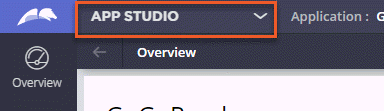
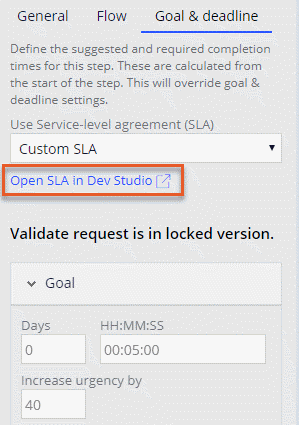
In addition, from App Studio, you can open specific Rules in Dev Studio. For example, after you configure a goal and deadline in App Studio, you can open the underlying SLA record in Dev Studio.
Naming differences between studios
In Dev Studio, developers can access the Rules created by Citizen Developers, Business Analysts, and front-end developers in App Studio, though these Rules often carry different names. The following table illustrates some common App Studio elements and the different names used for those elements in Dev Studio.
| App Studio | Dev Studio |
|---|---|
| Field | Property |
| Goal and deadline | Service-Level Agreement (SLA) |
| User | Operator |
| Team | Work Group |
Note: For example, In App Studio, you add fields to Data Models and Views. The system creates a corresponding property that you can modify in Dev Studio. For more information, see Extending a Data Model for a Case. To learn more about terminology differences between the two studios, see Differences in naming between App Studio and Dev Studio.
Check your knowledge with the following interaction:
This Topic is available in the following Modules:
If you are having problems with your training, please review the Pega Academy Support FAQs.
Want to help us improve this content?