
Rules and Rule Types
A Rule is the basic building block of a Pega Platform™ application that defines its behavior. Each Rule is an instance of a Rule Type. The Rule Type determines the type of behavior modeled by the Rule.
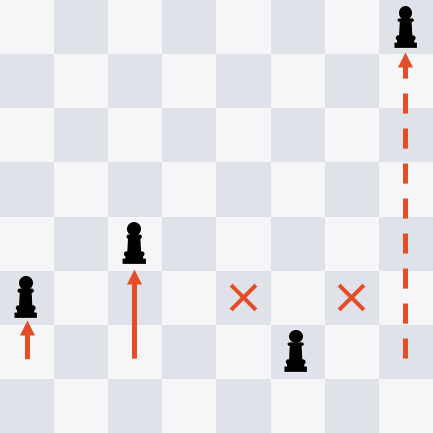
When you play a game of chess, you and your opponent agree to follow a specific set of instructions. These instructions govern gameplay, such as how each piece moves on the game board. For example, on its first move, the pawn can move one or two spaces forward. These basic instructions are the rules of chess.
When you model a Case Type in a Pega Platform application, you configure the application with instructions to create, process, and resolve a Case. These instructions are Rules. Rules describe the behavior for individual Cases, such as how the user interface is displayed and when work Urgency increases. Pega Platform uses the Rules you create to generate application code in the background.
Pega Platform provides many Rule Types to use as templates for creating a Rule. Each Rule Type models a specific type of behavior, such as automated Decisions or UI design. For example, you use a specific type of Rule called a Flow Rule to model a Process.
Note: To learn more about Rules in Pega Platform, see Rules management.
Automated Rule creation
Pega Platform provides a simplified interface that automatically creates and manages the underlying Rules while allowing developers to focus on business tasks. For example, when you configure a Case Type, you use the Case Lifecycle and Configuration panels to add Processes, define Steps, and configure Views. In the background, Pega Platform creates and manages the Rules that define the Process flows, Tasks, and UI.
Application modularity with Rules
The use of individual Rules makes your application modular. By describing Case behavior with modular, Task-focused Rules, you can combine and reuse Rules as needed. For example, you create a Rule to describe the content of a customer email regarding the status of a change of address. By creating the email message as a separate Rule, rather than embedding the message in the Case Lifecycle, you can update the content of the email without impacting the rest of the business process.
This modularity provides three significant benefits: versioning, delegation, and reuse.
| Versioning | Developers create a new version of a Rule whenever Case behavior needs to change. Pega Platform maintains a history of changes to a Rule, allowing developers to review the change history and undo changes if needed. Because each Rule describes a specific Case behavior, the rest of the Case remains unaffected. | For example, a developer updates a UI form with instructions and removes a critical field. You can review the history of the form and revert to the version before the developer made the changes without changing other Rules in the application. |
|---|---|---|
| Delegation | Developers delegate Rules to business users to allow business users to update Case behavior as business conditions change. The business user updates the delegated Rule, while other parts of the application remain unchanged. | For example, expense reports that total USD25 or less receive automatic approval. You create a Rule to test whether an expense report totals USD25 or less and delegate the Rule to the Accounting department. The Accounting department can then update the Rule to increase the threshold for automatic approval increases to USD50 without submitting a change request for the application. |
| Reuse | Developers reuse Rules whenever an application needs to incorporate existing Case behavior. Otherwise, you must reconfigure the behavior every time you need the behavior. | For example, you create a UI form to collect policyholder information for auto insurance claims. You can then reuse this UI form for property insurance claims and marine insurance claims. |
Rule creation
If you need more control over how a Rule is created and reused, you can create a Rule using the New Record form. When you create a Rule manually, the New Record form prompts you to provide four pieces of information:
- Rule Type: Specifies the function. For example, is the Rule for a Report Definition, field value, Data Type, or Flow Action?
- Ruleset: Specifies the Ruleset in which to organize the Rule to improve the reusability of Rules across your applications.
- Apply to: Specifies the class that the Rule applies to, for example, whether the Rule applies to the Work, Integration, Data, or another class.
- Label: Specifies the name that you want to use. The name helps you find the Rule during development and testing.
These four pieces of information identify the Rule as unique within your application. With this combination, an application can call the correct Rule during Case processing through a process called Rule resolution. With Rule resolution, Pega Platform determines the appropriate Rule to run when an application calls a Rule.
Match the numbers to the following image to learn more about the New Record form:
1. Open the new Rule: Once you create and open the new Rule, the Rule definition displays the identifying information you entered in the New Record form. For example, the Facilities flow Rule definition displays the Rule Type, class (CL), identifier (ID), and Ruleset (RS) in the Rule header.
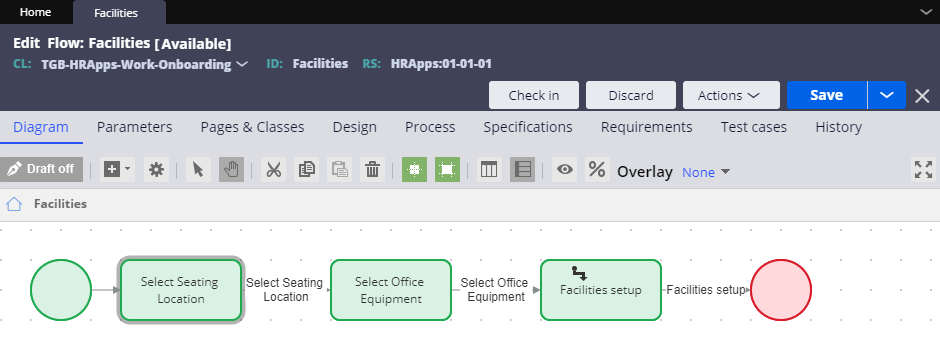
2. Rule Type: The Rule Type determines the type of behavior modeled by the Rule. Each Rule Type models a specific type of behavior, such as automated Decisions or UI design.
3. Identifier: The identifier, or ID, identifies the purpose of the Rule. For example, to model the Process for approving insurance claims, you use an identifier such as ClaimsApproval. This identifier allows you to differentiate the approval Process from a submission Process. Pega Platform determines the identifier from your entry in the Label field.
4. Class: The Class identifies the Scope of the Rule. You specify the Class of a Rule in the Apply to field. The Class you select determines the extent of how you can use the Rule: within one Case Type or across Case Types.
5. Ruleset: The Ruleset is the container for the Rule. The Ruleset identifies, stores, and manages the set of Rules that define an application or a major portion of an application.

Check your knowledge with the following interaction:
This Topic is available in the following Module:
If you are having problems with your training, please review the Pega Academy Support FAQs.
Want to help us improve this content?