
Security auditing
By tracking the changes to your system, you can understand how your system functions and be alerted of any potential problems. By default, Pega Platform™ tracks many types of security events, such as failed logins and password changes.
You can enhance this feature by using field-level auditing. Field-level auditing enables you to monitor changes to important data values in your cases. From a security perspective, it is useful to track modifications when sensitive data is involved.
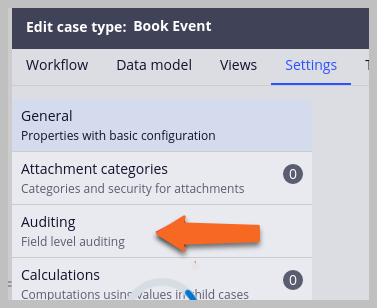
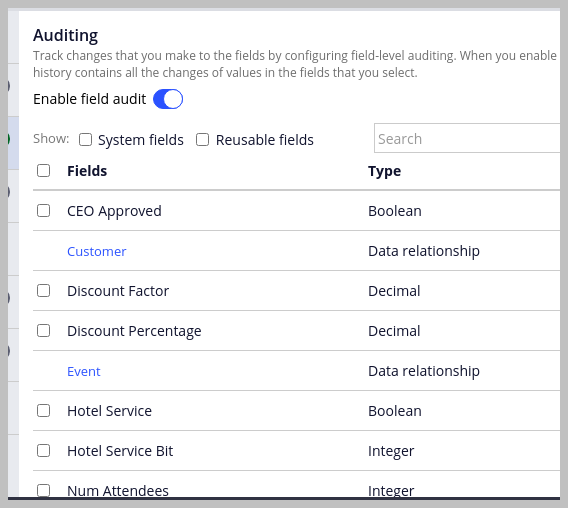
You can easily configure fields in App Studio or Dev Studio to track changes in a case type. As a result, you maintain compliance and follow changes to critical information in cases that are critical. The following figures shows how to access field-level auditing and enable or disable field-level auditing to track the changes for important data fields.
Note: Only standard Pega Platform applications support field-level auditing. Applications that you build on Constellation do not support this feature.
The system captures field-level tracking and changes that you make in an instance of a rule in the History- class. The system saves changes to data instances in a subclass of the History-Data- class.
For example, the system records changes to access groups (Data-Admin-Operator-AccessGroup) in instances of the History-Data-Admin-Operator-AccessGroup class.
An audit entry shows the old value, the new value, who made the change, and when the change occurred. There might be two audit entries for data fields: one for modifying the initial value and another for adding a new value.
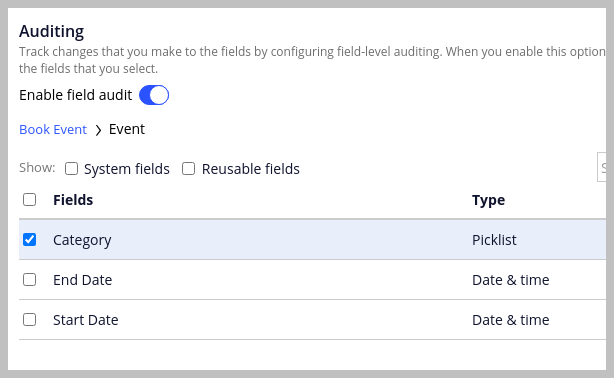
If you want to enable fields in a data relationship, click the name of a data relationship, and then select the checkboxes next to the fields that you want to enable for auditing, as shown in the following figure:
Note: Enabling auditing tracking on each property causes adverse impacts to the performance of the application. Enable the audit tracking only for the important data fields that are critical for the business.
Check your knowledge with the following interaction:
If you are having problems with your training, please review the Pega Academy Support FAQs.
Want to help us improve this content?