

Creating a SOAP connector
1 Task
20 mins
Intermediate
English
Scenario
You are a Solution Builder working on the TGB HRApps application. HR business partners need latitude and longitude values for a ZIP code to locate employee discount services through a legacy application. You will extend HRApps to retrieve coordinates by integrating with a SOAP-based ZIP code lookup service.
To accomplish this, build a SOAP Integration Rule and an XML Parse Rule to extract the coordinates from the response. To support configurability across environments, you will store the endpoint URL, timeout, and authentication profile as Application Settings. Finally, you will configure a Data Page to invoke the connector and expose the lookup to the application.
Note: This challenge has been configured with Single sign-on (SSO) using your Pega Academy credentials. If you are not automatically signed-in to the challenge environment after initializing the instance, you may use the credentials provided.
The following table provides the credentials you need to complete the challenge:
| Role | User name | Password |
|---|---|---|
| Solution Builder | SSA@TGB | pega123! |
After completing this challenge, you should be able to:
- Create a SOAP Integration Rule from a WSDL URL.
- Create an XML Parse Rule to extract data from a SOAP response.
- Create Application Settings to store environment-specific connector configuration.
- Apply Application Settings expressions to a SOAP connector.
- Create and configure a Data Page with a SOAP data source and a request Data Transform.
Detailed Tasks
1 Creating a SOAP connector
Use the technical documentation linked in the Journey map above to complete the assigned tasks. The technical documentation might have more information than you need to complete the tasks.
Acceptance criteria
Task 1: Create the SOAP Integration Rule
- A SOAP Integration Rule is created using the WSDL URL https://graphical.weather.gov/xml/SOAP_server/ndfdXMLserver.php?wsdl.
- The endpoint URL is set to https://graphical.weather.gov/xml/SOAP_server/ndfdXMLserver.php.
- Only the LatLonListZipCode operation is enabled; all others are cleared.
- The Integration Rule record is configured as follows:
Field Value Name LatLongLkp Parent class TGB-IntApplication Layer HRAppsV2 Add to Ruleset Existing Ruleset HRAppsV2Int Version New Version 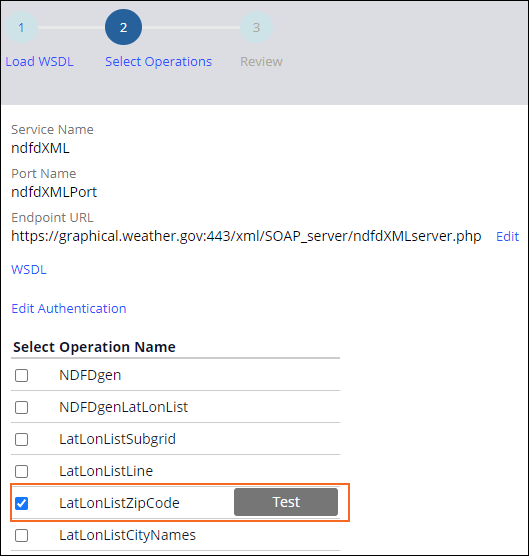
Task 2: Create the XML Parse Rule
- The LatLonListZipCode Connect SOAP rule is configured as follows:
- Style and use (Service tab): RPC/literal
- Request tab: First Map from Key is
.LatLonListZipCodeZipCodeList - Response tab: Map to is set to XML Parse Rule, Map to key is ParseLatLongResponseXML
- An XML Parse Rule named ParseLatLongResponseXML is created with the following configuration:
Field Value Root Element Name dwml Ruleset HRAppsV2Int (highest available version) - On the Mapping tab, an element is added under dwml with the following values:
Field Value Node Name latLonList Property .LatLonListZipCodeListLatLonOut - The LatLonListZipCode Connect SOAP rule Response tab Map to key field is set to ParseLatLongResponseXML dwml.
Task 3: Create Application Settings
- Three Application Settings records are created with the following configuration:
Field Value Owning Ruleset HRAppsV2Int Application Layer HRAppsV2 Add to Ruleset HRAppsV2Int, highest available unlocked version - The three records are configured with the following labels and values:
Label Identifier Value Service endpoint URL ServiceEndpointURL https://graphical.weather.gov:443/xml/SOAP_server/ndfdXMLserver.php (all environments) Response timeout ResponseTimeout 120000 Authentication Profile AuthenticationProfile (blank) - The LatLonListZipCode Connect SOAP rule Service tab Connection section is configured with the following expressions:
Field Expression Service endpoint URL =D_pxGetApplicationSettingValue[OwningRuleset:HRAppsV2Int, Purpose:ServiceEndpointURL].pySettingValueResponse timeout =D_pxGetApplicationSettingValue[OwningRuleset:HRAppsV2Int, Purpose:ResponseTimeout].pySettingValueAuthentication Profile =D_pxGetApplicationSettingValue[OwningRuleset:HRAppsV2Int, Purpose:AuthenticationProfile].pySettingValue - Guardrail warnings on the LatLonListZipCode Connect SOAP rule are cleared after applying the settings.
Task 4: Create and configure the Data Page
- A Data Page named LatLongLookup is created with the following configuration:
- Apply to:
TGB-Int-LatLongLkp-ndfdXML - Ruleset: HRAppsV2Int (highest version)
- Apply to:
- The Definition tab Data Source is configured as follows:
- Type: SOAP
- Name: LatLonListZipCode
- Request Data Transform: LatLongRequest
- A Data Transform named LatLongRequest is created with the following step:
Field Value Action Set Target .LatLonListZipCodeZipCodeListRelationship equal to Source Param.ZipCode - The Request Data Transform parameter is set to Pass current parameter page.
- The LatLongLookup Data Page Parameters tab includes the following parameter:
Field Value Name ZipCode Description Please enter a zip code for which you want to fetch the latitude and longitude Data type String Required Yes In/Out In - The LatLongLookup Data Page Load Management tab is set to Limit to a single Data Page.
Directions
- Navigate to Configure > Integration > Connectors and create a new SOAP Integration by uploading the WSDL from the URL defined in the Acceptance criteria.
- Select only the LatLonListZipCode operation and configure the record as detailed in the Acceptance criteria.
- Open the LatLonListZipCode Connect SOAP rule and configure the Service, Request, and Response tabs as detailed in the Acceptance criteria.
- Create the ParseLatLongResponseXML XML Parse Rule and configure the Mapping tab as detailed in the Acceptance criteria.
- Return to the LatLonListZipCode Connect SOAP rule Response tab and set the Map to key field, and then save your changes.
- Create the three Application Settings records as detailed in the Acceptance criteria.
- Open the LatLonListZipCode Connect SOAP rule and apply the Application Settings expressions to the Connection section of the Service tab as detailed in the Acceptance criteria.
- Create the LatLongLookup Data Page, configure the Definition tab with the SOAP data source, and create the LatLongRequest Data Transform as detailed in the Acceptance criteria.
- Add the ZipCode parameter on the Parameters tab and configure Load Management as detailed in the Acceptance criteria.
Available in the following mission:
If you are having problems with your training, please review the Pega Academy Support FAQs.
Want to help us improve this content?