

Securing an application using attribute-based access control
1 Task
30 mins
Intermediate
Security
English
Scenario
You are a Solution Builder working on TGB's HRApps application. The Candidate Case contains a Taxpayer Identification Number (TIN), sensitive personal data. The HR department wants the TIN masked for users outside the HR or Recruiting org units, while remaining accessible during the first Step of the Case Life Cycle.
You will create an Access When record to test org unit membership, configure an Access Control Policy Condition with two conditional logic branches, create an Access Control Policy to restrict and mask the TIN property, and update the Collect Candidate Details process to capture the operator at case creation.
Note: This challenge has been configured with Single Sign-On (SSO) using your Pega Academy credentials. If you are not automatically signed in to the challenge environment after initializing the instance, you may use the credentials provided.
The following table provides the credentials you need to complete the challenge:
| Role | User name | Password |
|---|---|---|
| Solution Builder | SSA@TGB | pega123! |
After completing this challenge, you should be able to:
- Create an Access When record to test user attributes.
- Create an Access Control Policy Condition with conditional logic.
- Create an Access Control Policy to restrict and mask a property.
- Update a Flow to capture the creating operator.
Detailed Tasks
1 Securing an application using attribute-based access control
Use the technical documentation linked in the Journey map above to complete the assigned tasks. The technical documentation might have more information than you need to complete the tasks.
Acceptance criteria
Task 1: Create the IsHROrRecruiting Access When record
- An Access When record is created with the following configuration:
Field Value Label Is HR Or Recruiting Apply to TGB-FW-HR-Data-Candidate - The Access When record contains two conditions joined by OR:
OperatorID.pyOrgUnit= HROperatorID.pyOrgUnit= Recruiting
Task 2: Create the HR or Recruiting Access Control Policy Condition
- An Access Control Policy Condition is created with the following configuration:
Field Value Label HR or Recruiting Apply to TGB-FW-HR-Data-Candidate - The conditional logic is configured as follows:
Logic Column Source Relationship Treat Empty As Null Condition A, When: IsHROrRecruiting .pxCreateOperatoris not null Selected Condition B, Otherwise .pxCreateOperatoris null Selected - The Pages & Classes tab is configured with:
Field Value Page name OperatorID Class Data-Admin-Operator-ID
Task 3: Create the Restrict TIN Access Control Policy
- An Access Control Policy is created with the following configuration:
Field Value Label Restrict TIN Action PropertyRead Apply to TGB-FW-HR-Data-CandidatePermit access if HROrRecruiting
Note: Please use PropRead as value if Action field is displayed as Text box instead of Dropdown
- The
.TINproperty is added with a full mask configured as follows:Field Value Restriction Method Full Mask Masking character * Display length is fixed Selected Display characters length 9
Task 4: Update the Collect Candidate Details process
- In the CollectCandidateDetails_0 Flow, the Collect Personal Details connector is updated with a Set Properties Step:
Field Value Name .Candidate.pxCreateOperatorValue .pxCreateOperator
Directions
- Create a new Access When record named Is HR Or Recruiting applied to
TGB-FW-HR-Data-Candidate, and configure the two OR conditions as detailed in the Acceptance criteria. - Create a new Access Control Policy Condition named HR or Recruiting applied to
TGB-FW-HR-Data-Candidate, and configure the conditional logic and Pages & Classes tab as detailed in the Acceptance criteria.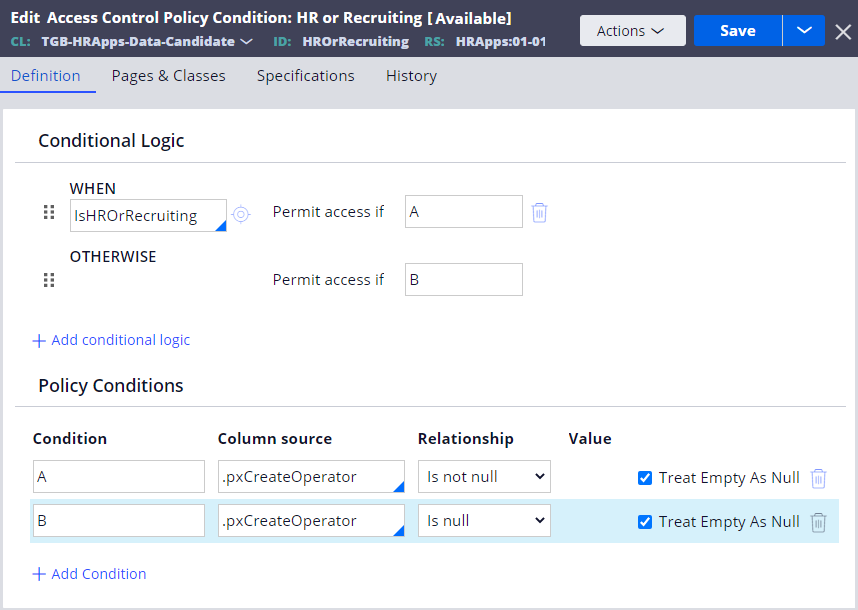
- Create a new Access Control Policy named Restrict TIN for PropertyRead on
TGB-FW-HR-Data-Candidate, set the permit condition to HROrRecruiting, add the.TINproperty, and configure the masking options as detailed in the Acceptance criteria.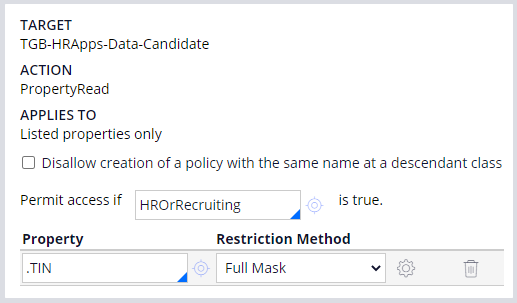
- Open the CollectCandidateDetails_0 Flow in the Candidate Case Type, open the Collect Personal Details connector, and add the Set Properties Step as detailed in the Acceptance criteria.
- Save your changes.
Available in the following mission:
If you are having problems with your training, please review the Pega Academy Support FAQs.
Want to help us improve this content?