

Data Transforms
The purpose of a data transform is to manipulate data in an application. Data transforms copy or manipulate data into the fields that you require. You can use data transforms to convert data from one type to another, iterate over page lists or page groups, and copy entire pages at a time.
In the following image, click the + icons to explore how Pega Platform™ uses data transforms to improve the checkout process of a purchasing application:
Converting data using data transforms
You can use data transforms to convert data from one type to another type. For example, you receive an order delivery date input from another system as a string value, such as "December 4, 2021." Use a data transform to copy and convert the stored string format of the delivery date into the date value property, 12/04/2021.
To convert a string into a number, open the expression builder, click the Configure icon, and then use the out-of-the-box functions that are available in Pega Platform. In the credit card number example, you can use the toInt() function.
Calling data transforms in flows
You can call a data transform from a flow. In a flow, click the connector to open the Connector properties window. In the Set properties section, select Apply data transform.
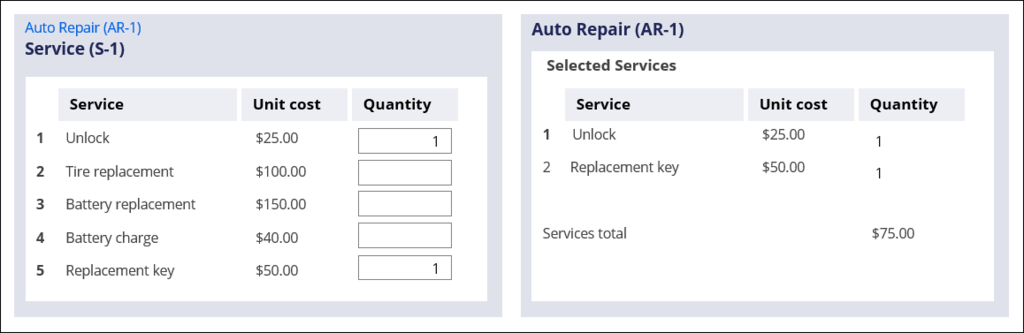
Consider another example. An auto repair parent case has a child case that manages providing the necessary repairs. The child case contains a menu of possible items and available services, including unit costs. The items and services that are provided are copied to the parent case for invoicing. Use a data transform to iterate over the list of possible items and services and copy only those entries with a quantity greater than zero.
Tipp: When you access information in a parent-child case relationship, consider referencing data, rather than copying it. Referencing data helps to avoid synchronization issues if the data changes in the parent case and this should be reflected in the child case.
Check your knowledge with the following interaction:
Wenn Probleme mit den Lerninhalten auftreten, lesen Sie bitte die Pega Academy Support FAQs.
Möchten Sie uns dabei helfen, diesen Inhalt zu verbessern?