

Field-level auditing
Pega Platform™ automatically tracks Actions performed, for example, tracking which operators worked on a Case and when. By default, Pega Platform maintains a history of Actions performed on Cases (Work- instances), such as when the Case Status changes, when the Case is routed to an operator, or when the time to run a Service-Level Agreement expires.
You can enhance this capability by using field-level auditing. Field-level auditing enables you to monitor changes to important data values in your Cases. From a security perspective, it is useful to track modifications when sensitive data is involved.
You can use field-level auditing to track changes that users make to fields and data fields. Actions for the field are automatically recorded in the History dialog box in the Field History tab. For example, you may want to know if an employee's salary has changed. The following image shows an updated field value for Salary that is tracked by using the field-level audit feature. This update affects the tax withholding amount in the next stage:
Hinweis: Field-level tracking, and changes made in an instance of a Rule, are captured in the History- class.
An audit entry shows the old value, the new value, who made the change, and when the change occurred. There may be two audit entries for data fields: one entry for modifying the initial value and another entry for adding a new value.
Field-level audit implementation
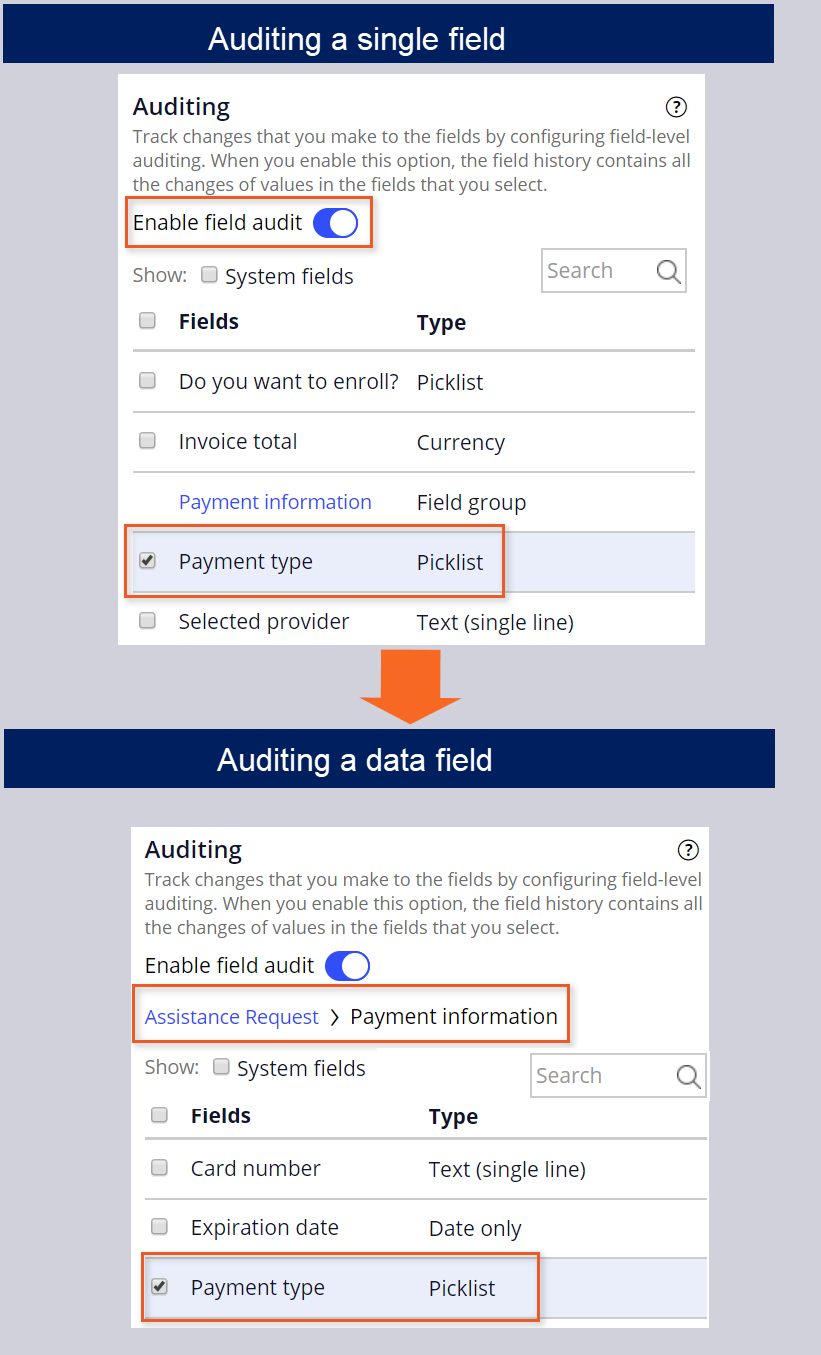
To track updates to field values in your application, you use the Settings tab on the Case Type landing page. Enable field auditing and select the field you want to audit.
Hinweis: To audit a data field, select the link to access the embedded field you want to audit. If you want to audit properties in inherited classes, select the System Fields check box.
In the following image, compare the differences between field-level auditing for a single field and a data field property:
Check your knowledge with the following interaction:
Dieses Thema ist im folgenden Modul verfügbar:
Wenn Probleme mit den Lerninhalten auftreten, lesen Sie bitte die Pega Academy Support FAQs.
Möchten Sie uns dabei helfen, diesen Inhalt zu verbessern?