
Auditing changes to the value of fields
1 Tarea
5 minutos
Principiante
Security
Inglés
Escenario
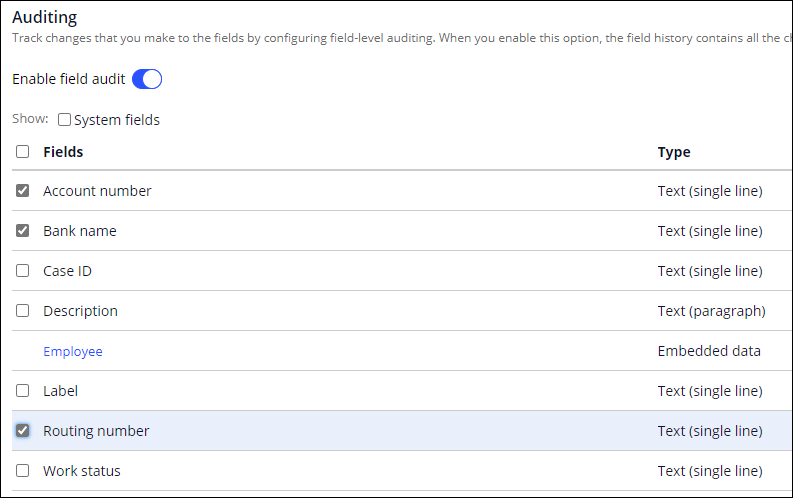
HRApps provides payroll setup for employees. For the Payroll Setup Case Type, an employee provides their bank information for direct deposit. When the employee changes the payment information, the auditing team wants to record the change in the Case history for availability during a potential audit. Configure HRApps to record changes to the Bank name, Account number, and Routing number fields in the Payroll Setup Case Type.
The following table provides the credentials you need to complete the challenge.
| Role | User name | Password |
|---|---|---|
| Senior System Architect | SSA@TGB | pega123! |
Nota: Your practice environment may support the completion of multiple challenges. As a result, the configuration shown in the challenge walkthrough may not match your environment exactly.
Recorrido del Reto
Tareas detalladas
1 Configure the application to track changes
- In the Pega instance for the challenge, enter the following credentials:
- In the User name field, enter SSA@TGB.
- In the Password field, enter pega123!.
- In the navigation pane of App Studio, click Case types > Payroll Setup to open the Payroll Setup Case Type.
- Click Settings > Auditing.
- Turn on the Enable field audit switch to display the fields section.
- In the list of fields, select the following checkboxes:
- Account number
- Bank name
- Routing number
Este Reto es para practicar lo aprendido en el siguiente Módulo:
Disponible en la siguiente misión:
If you are having problems with your training, please review the Pega Academy Support FAQs.
¿Quiere ayudarnos a mejorar este contenido?