
Creating a real-time container
2 タスク
5 分
初級
英語
シナリオ
The infrastructure team at U+ Bank is about to enable the website to communicate with Pega Customer Decision Hub™. To proceed, they must agree with the business team on a critical detail: the name of the real-time container. This name is used by the website’s API to retrieve next best actions from the Customer Decision Hub. The infrastructure team suggests using the name TopOffers.
There is also an agreement that Customer Decision Hub must capture an impression whenever it receives a container request, and when a click-through is received, an action flow does not initiate.
Use the following credentials to log in to the exercise system:
| Role | Username | Password |
|---|---|---|
| Decisioning Analyst | CDHAnalyst | rules |
Your assignment consists of the following tasks:
Task 1: Create a real-time container
Create a real-time container called TopOffers and leave all options at the default values.
Task 2: Verify the newly created real-time container
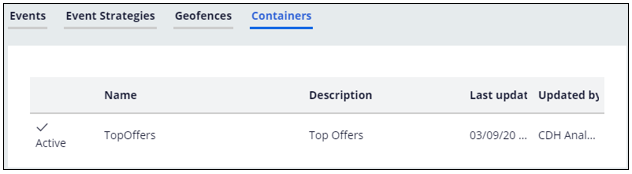
In the Containers tab, notice that the newly created container is listed.
チャレンジ ウォークスルー
詳細なタスク
1 Create a real-time container
- Log in to Customer Decision Hub as the Decisioning Analyst with user name CDHAnalyst using password rules.
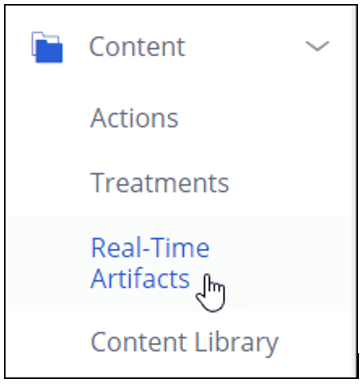
- In the navigation pane on the left, click Content > Real-Time Artifacts.
- On the Real-time Artifacts landing page, in the upper right, click Create > Container
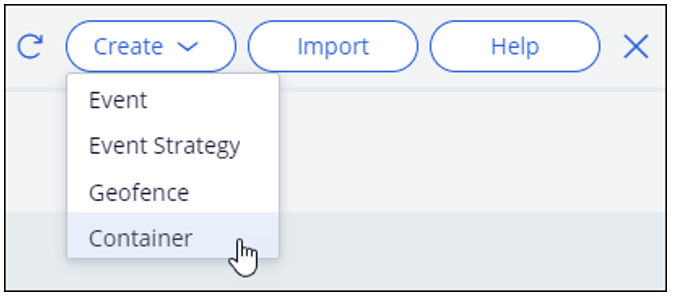
- On the Create Real-Time Container landing page, enter the following information:
- Short description: Top Offers
補足: If there is a Development branch, make sure [No branch] is selected from the list.
- Click Create and open to create the container.
- Examine the three options. Leave them to their default values.
- Click Save to confirm the values.
- Close the container.
2 Verify the newly created real-time container
- Refresh the Real-time Artifacts landing page.

- In the Containers tab, notice that the newly created container is listed.
このチャレンジは、下記のモジュールで学習したことを実践するための内容です。
このモジュールは、下記のミッションにも含まれています。
トレーニングを実施中に問題が発生した場合は、Pega Academy Support FAQsをご確認ください。