
Reusing the standard queue processor
5 タスク
1時間
上級
英語
シナリオ
When the city manager updates the delivery status of a truck, the associated delivery request progresses to the next Step in the flow.
When the accountant reviews and finalizes the invoice, the delivery request advances to the payment collection Step for the business partner.
When the accountant completes payment to the truck vendor, the city manager receives a request to collect feedback on the truck.
The following table provides the credentials you need to complete the challenge:
| Role | User name | Password |
|---|---|---|
| Admin | admin@deliveryservice | rules |
| CityManager | SpringfieldCityManager@MDC | rules |
| CityManager | BostonCityManager@MDC | rules |
| CityManager | WorcesterCityManager@MDC | rules |
補足: You might be practicing the challenges that use the Pega challenge instance provided with the LSA training on Pega Academy. Note that this instance is preconfigured and includes complete solutions for all challenges, along with the MDC Delivery Service application. If you want to practice and complete the challenges from scratch, use a Pega Lab instance or a VM, and refer to the provided solutions.
詳細なタスク
1 Identify design options
Option 1: Standard queue processor
Your application can resume the Processes of other Cases as required by reusing the standard queue processor. This option allows for optimal use of resources and enables Case processing to continue asynchronously in the background.
Option 2: Job scheduler
Create a job scheduler and set it to run at frequent intervals to process the waiting assignments.
Option 3: Advanced agents
Create an advanced agent to resume the waiting assignments and update the agent schedule to run at a recurring periodic interval.
2 Evaluate design options
The following table provides the pros and cons of each design option:
| Design | Pros | Cons |
|---|---|---|
|
Standard queue processor |
|
|
|
Job scheduler |
|
|
| Advanced agents |
|
|
3 Recommended best design option
Use a standard queue processor to process the waiting Assignments of sibling Cases.
4 Review solution details
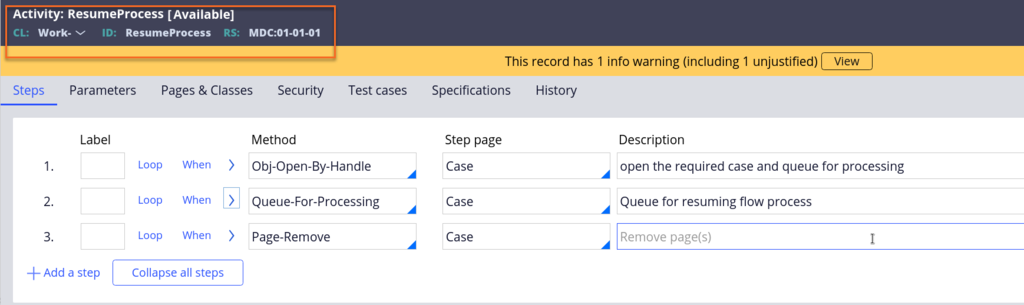
The system invokes the standard queue processor by using a reusable utility called ResumeProcess, which you configure in the enterprise Ruleset, as shown in the following figure:
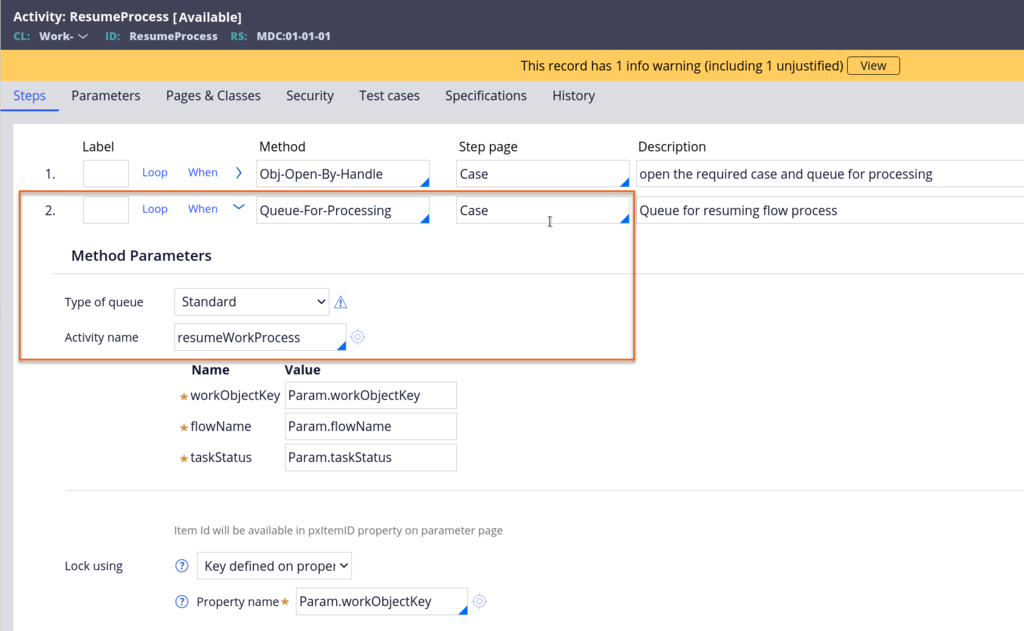
The activity to run through the Queue-For-Processing method is the standard resumeWorkProcess utility, as shown in the following figure:
5 Perform the following tasks
To complete the assignment, accomplish the following tasks:
- Create a Delivery Request Case and assign a truck to the delivery.
- Log in as a city manager who corresponds to the city in the delivery request.
- Update the delivery status of the truck request from Pickup to Delivery. This action returns the delivery request to Delivery status.
このモジュールは、下記のミッションにも含まれています。
トレーニングを実施中に問題が発生した場合は、Pega Academy Support FAQsをご確認ください。