

Background processing
Background processing is useful when a process-intensive task or automation is required. Executing tasks in the background allows users to continue the case or other work and improves system scalability and performance.
For example, a company needs users to regularly process and upload batch files to an external content management system. Users need to perform uploads while processing new cases without experiencing delays in performance. In Pega Platform™, you can configure a rule to automate file upload activity in the background, either on a different system or at a time of lower utilization. By moving tasks to dedicated nodes or off-peak hours, users can continue to process cases without any impact caused by the uploading operations.
Clusters and nodes
A Pega Platform installation often spans a set of servers called a cluster. Within this cluster, each server, or node, can be designated a node type for specific processing tasks.
The system can then allocate background tasks to one node while processing user interactions on a different node. As a result, the system can optimize performance on each node for the types of interactions that the node supports.
Check your knowledge with the following interaction:
Types of background processing
Pega Platform has two options for performing system tasks on objects in the background: queue processors and job schedulers.
Queue processors
A queue processor queues tasks for background processing, identifying which tasks to queue.
- Tasks can be queued using either a Run in Background automation or the Queue-For-Processing method in an activity.
- Tasks can be queued immediately or the queue can be delayed.
- Tasks are defined with an activity that runs on the queued item.
For example, a queue processor is configured to batch process file uploads to a database. When the queue processor is invoked during processing, the task is queued and performed according to the configuration of the queue processor.
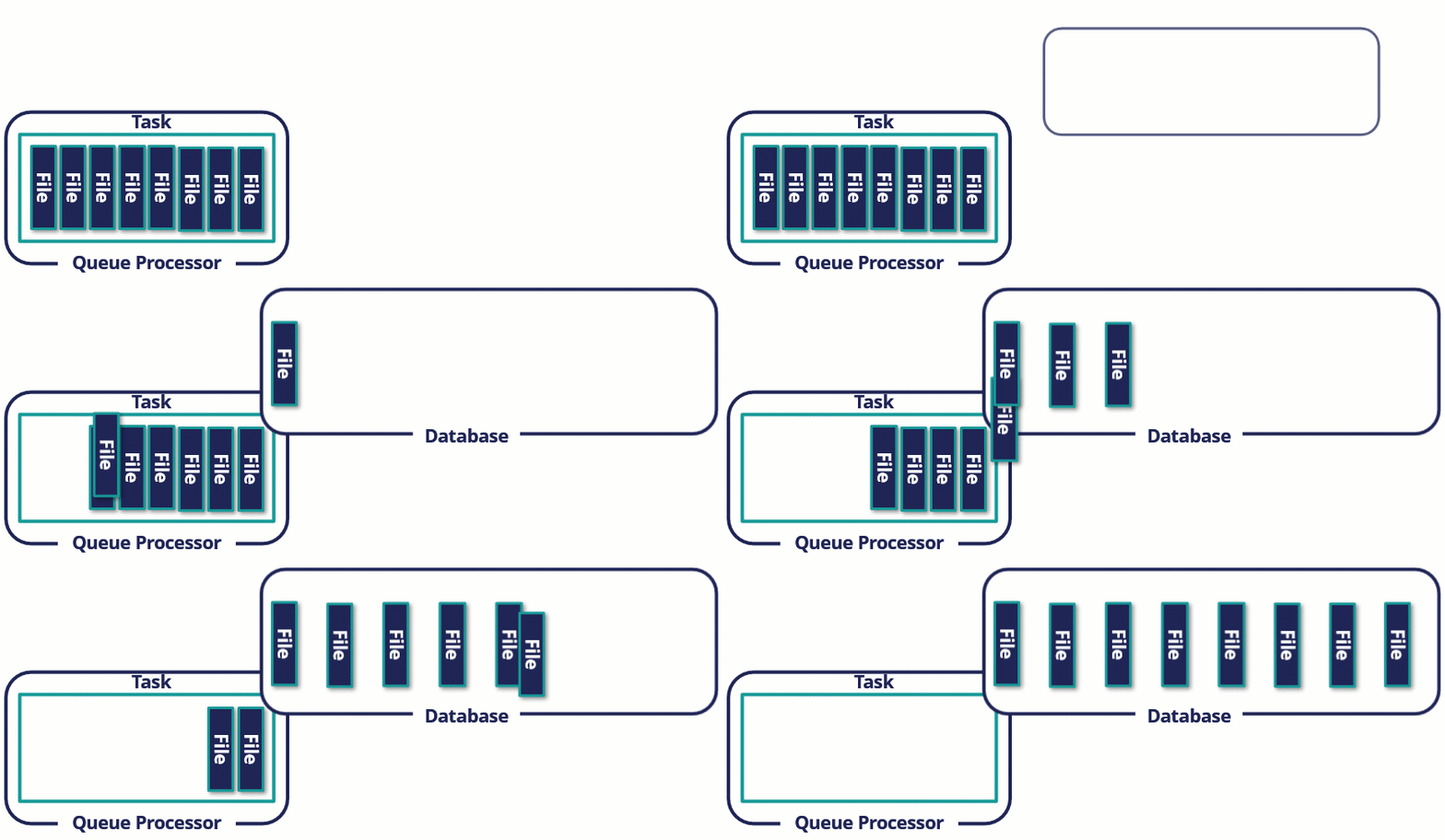
When you begin to configure a queue processor, you decide whether the queue processor immediately runs when the object is queued or if the run is delayed.
Scaling
Specify the number of processing threads to allocate to the task and the number of nodes that can run background tasks. The options affect the throughput or scalability of the queue processor.
- Vertical scaling — The number of threads
- Horizontal scaling — The number of nodes
- Each thread is assigned on each node of the specified node type
For example, the three threads on background processing nodes and three background processing nodes in the cluster allow you to run nine available threads for processing.

Standard and dedicated queue processor
Call the queue processor using either a Run in background step or Queue-For-Processing method in an activity. The parameters for each option differ depending on whether you use the standard queue processor or a dedicated queue processor.
Standard queue processor
- Used for simple queue management to processes real-time messages
- Specify the activity to run on the queued item
- Choose a locking option
- Specify an optional access group to establish context (optional)
Dedicated queue processor
- Supports higher throughput scaling
- Used for customized or delayed queue management. For delayed queuing, provide a Date time property for the queued object, at which time the system processes the queued item.
- Specify the queue processor
- Configure and enable the queue processor rule
Queue Processors support dynamic autoscaling of background threads based on real-time message volume, eliminating the need for manual tuning and ensuring efficient resource use during both peak and idle periods. When the number of messages is high, Pega Platform scales the thread number up to help complete queued tasks more quickly. When the number of messages is low, Pega Platform scales the thread number down to help ensure that threads are available for other processes.
On the Queue processor rule form, you may also need to configure the Processing retries section.
- Max Attempts – The number of attempts to retry a queued process.
- Initial Delay – The number of minutes before the second attempt of a queued process.
- Delay Factor – The multiplier for the delay between attempts. For example, if the initial delay is 1 minute and the delay factor is 2, the retries would be 1, 2, 4, 8, and so on, minutes apart.
In the Alerts and health check configuration section, the Maximum Time Before the Queued Process is Interrupted field allows you to set a threshold time after which Pega Platform interrupts the activity run by the queue processor. This feature helps ensure that long-running activities do not impact system performance, and enhances the reliability of your background processing.
Nota: For more information, see Creating a queue processor Rule and When should I use dynamic thread adjustment?
Choose a queue processor configuration based on the workload
Use a standard queue processor for straightforward processing that requires low latency and high throughput. Standard queue processors use a predefined node and partition strategy, including six nonconfigurable partitions.
Use a dedicated queue processor when the workload requires customized processing behavior, delayed processing, or configurable scaling.
Avoid using a single thread and single partition solely to preserve processing order. This configuration limits performance and scalability. If sequential processing is a business requirement, document the tradeoff before selecting this configuration.
Job schedulers
A job scheduler schedules a recurring task that runs at a specified interval and identifies the tasks to process at that time. Job schedulers are most suitable for tasks that recur on a regular basis, such as overnight batch jobs.
For example, a company that wants to prompt a customer to renew their insurance policy requires a process that automatically sends an email one month before an insurance policy is set to expire. You can handle the requirement with a job scheduler configured to run daily to identify all policies that expire in one month. The following image illustrates how this job scheduler works:
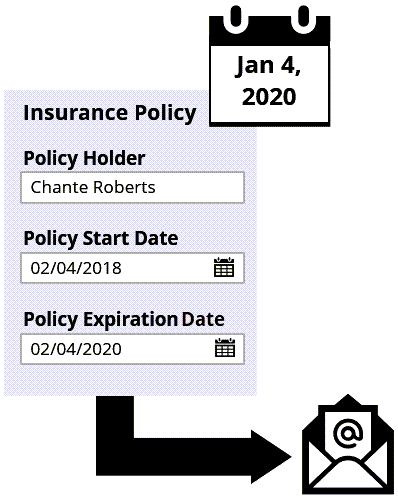
In the header of Dev Studio, click Create > SysAdmin > Job Scheduler to create a job scheduler rule. Match the numbers to the following image to learn more about the configuration options for job scheduler rules:
1. Associated with node type: Used to select the node type that will process this task type
2. Runs on:
- All associated nodes – The job scheduler runs in parallel on all selected nodes in the cluster.
- Any one associated node – Only one node (any node of the type selected) runs the job scheduler.
3. Schedule: Specify a schedule for the task. The scheduling options are repeating (for example, every two days), periodic (for example, the third Sunday of each month), and at startup. If specifying daily, weekly, monthly, or yearly options, you may also specify the time of day at which to run, including the time zone.
4. Context: Identify a context for the task. The context determines the privileges and permissions granted to the system when performing the scheduled task. You can select the System Runtime Context or specify an access group.

Nota: For more information about configuring a job scheduler rule, see Creating a job scheduler rule.
Background processing requirements
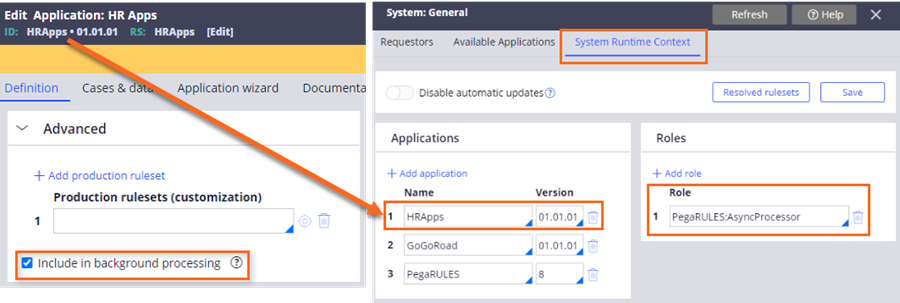
To enable background processing for an application, select the Include in background processing option on the application rule. Enabling this option for an application updates the System Runtime Context record to include the application when performing background processing tasks. The System Runtime Context automatically manages the resolution of background processes.
For Pega Platform updates, your existing context is migrated from the current ASYNCPROCESSOR requestor type to the System Runtime Context record. When creating a new application with the New Application wizard, the Include in background processing option is enabled by default.
Nota: For more information about enabling background processing, see General system settings and Including an application in System Runtime Context.
Match the numbers to the following image to learn more about the requirements to configure a background process:
1. Specify an activity to perform: The activity describes a sequence of steps that collectively make up the task to perform on the object.
2. Identify the class of the object: Configuring a task for background processing requires you to specify the class of an object either to queue or to schedule a job. The class that you specify must contain the activity that you want your Queue Processor or Job Scheduler to resolve.
3. Identify the nodes in the cluster: Configure the queue processor and job scheduler rules to run on a node type. By default, queue processor and job scheduler rules are processed on one or more Backgroundprocessing nodes. A node designated with the Universal node type supports queue processors and job schedulers configured to run on a Backgroundprocessing node. The Universal node type is commonly used on a single node installation to perform tasks queued and scheduled for any node.
4. Set the System Runtime Context: All queue processor and job scheduler rules resolve against the context specified in the System Runtime Context. The System Runtime Context must include the application rulesets to resolve and run Queue Processors and Job Schedulers. Configure the application record to include the application in background processing.

Check your knowledge with the following interaction:
This Topic is available in the following Modules:
If you are having problems with your training, please review the Pega Academy Support FAQs.
Quer nos ajudar a melhorar esse conteúdo?