
Default property values
When a user creates a Case, you might want to set default values for properties to known or commonly-entered values to reduce the time that users spend entering data. For example, in an insurance claim Case, you can set the default date of loss to today's date.
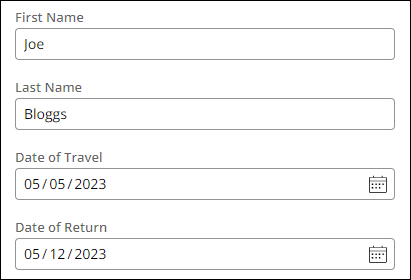
In other cases, you might want to use data from the operator record, such as the user's organization unit, to initiate property values. For example, in a travel booking application, you set the First Name and Last Name fields to the first and last name on the user operator record. In addition, you set the Date of Travel field to today's date and the Date of Return field to seven days in the future. The travel booking example is displayed in the following figure:
Setting default values can also be useful in a development environment. When you iteratively run a process to test your changes, you can save time by using a Data Transform to enter default values in required fields.
Data initialization page
You can edit default values in Pega Platform™ by using the Data initialization page on a Case Type's Settings tab. When you create a Case, you can select properties to set default values and you can assign exact values to each property. You can also set properties to another property within the same Case Type. Available actions and properties are shown in drop-down menus. In the example below, two data initializations are configured to perform specific actions when a Case is created:

At runtime, the Case instance displays the default values you specified on the Data initialization page, as shown in the following figure:

Check your knowledge with the following interaction:
pyDefault and pySetFieldDefaults
When you create a View for your Case Type for the first time, Pega Platform creates the pyDefault and pySetFieldDefaults Data Transforms. When you create a new Case, the pyDefault Data Transform is invoked to set the default values for that Case. The pySetFieldDefaults Data Transform runs when a View is loaded and is used to set default values for fields presented to a user.
The Data initialization page updates the pyDefault Data Transform. It is best practice to use the Data initialization page when possible and use the pyDefault Data Transform for more complex default values.
Cuidado: The pyDefault Data Transform invokes the pySetFieldDefaults Data Transform. The pySetFieldDefaults Data Transform is modified by the system when Views are being configured. You should not modify the pySetFieldDefaults Data Transform as changes applied by the system during View configuration risk overwriting these changes.
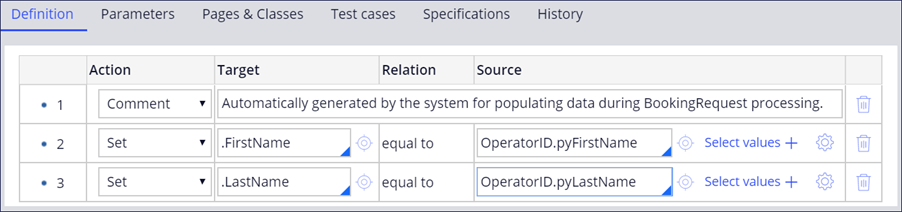
In the following image of the pyDefault configurations, the First Name (.FirstName) and Last Name (.LastName) fields are set to pyFirstName and pyLastName from the OperatorID Clipboard Page:
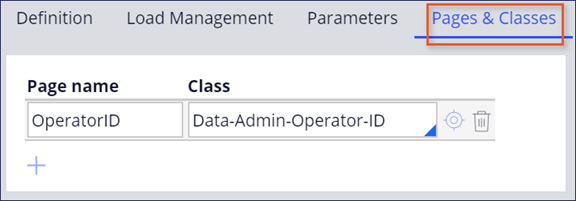
To reference the Data Page in the example above, you must add an entry to the Pages & Classes tab. The following image displays OperatorID Data Page added in the Pages & Classes tab:
Check your knowledge with the following interaction:
This Topic is available in the following Modules:
If you are having problems with your training, please review the Pega Academy Support FAQs.
Quer nos ajudar a melhorar esse conteúdo?