
Save Data Page Automation
Savable Data Pages provide a way to push data from a Data Page to a system of record (SOR). After you add a save plan to a Data Page, add a Save Data Page Automation Step to the Case Life Cycle to identify the point during Case processing that Pega Platform™ updates the SOR. The Save Data Page Step automates the update transaction using the save plan configured on the savable Data Page.
Save Data Page Automation configuration
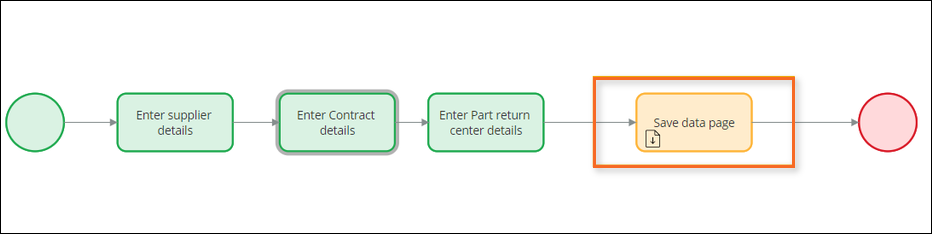
In a flow Rule, use a Save Data Page Automation after an Assignment to save data back to a system of record. For example, all parts suppliers for PartsRUs Auto must register to become authorized suppliers. A supplier must enter supplier details, part contract details, part return center details, and submit the registration. After entering all the details, a Save Data Page Automation is included in the flow where the developer must pass the Data Page with a key, to commit the data to the database.
Dica: To commit to multiple data sources, add multiple Save Data Page Automation Steps to the flow.
A Save Data Page Automation provides two options for specifying a savable Data Page:
- Specify the Data Page explicitly by entering or selecting the Data Page in the Data Page Name field.
- Reference the Data Page implicitly by selecting the Use associated property option and entering or selecting a page or page list property that is auto-populated using a savable Data Page.
The following image shows the configuration pane for a savable Data Page. Click the + icons to see detailed information about each configuration field:
Check your knowledge with the following interaction:
This Topic is available in the following Module:
If you are having problems with your training, please review the Pega Academy Support FAQs.
Quer nos ajudar a melhorar esse conteúdo?