

Activity structure
Activities are composed of one or more sequenced steps. Each activity step must specify a method that describes the action the system takes.
A step page is a page in memory on which the method is processed. By default, the activity runs in the context by which it is called. For example, an activity that is called from a utility shape during Case processing runs against the page assigned to the Case Type (pyWorkPage). If you enter a step page, you need to reference the page and associated class in the activity form.
Match the numbers to the following image to learn more about configuring an activity:
- Method Parameters: Each method accepts one or more parameters that allow you to pass necessary information, such as the name of a property and the value to set. A property that you adjust to increase or decrease the Case Urgency, .pyUrgencyWorkAdjust, is referenced by the Flow Action UrgencyAdjust.
- Method: For example, the Property-Set method sets the value of a specified property, while the Page-Remove method deletes a specified Clipboard Page that is no longer needed.
- Step page: The step page allows you to set a different context for a step. For example, to copy a specific order from a list of previous orders in memory, you set the step page to the appropriate page in the page list of results.
- Description: When you enter a Method, the Description field autopopulates with text that explains to other developers the Action that the step performs.
Note: To learn more about preconditions, see Activity form - Completing the Steps tab - Entering Method parameters.
Action activities
Activities run steps in numbered order. Loop, When, and Jump indicates an Action or Condition when you want to repeat steps or alter the sequence in which steps run.
Match the numbers to the following image to learn more about activity actions and conditions:
- Label: The label acts as an identifier for the step in the pre- (When) and post- (Jump) processing Actions and describes the purpose of the activity. To comment out an activity step line, enter two forward slashes (//) in the Label field to skip a step for testing purposes at runtime.
- Loop: A loop repeats a step a specified number of times. Loops iterate over the elements of a value list, value group, or page group. For example, a loop supports iterating over items in a page list to update a property value on each page in the page list. When defining a loop, you can also create nested (child) steps. To add a nested step, right-click the step number, and then click Add child.
- Pre-processing Actions (When): For pre-processing Actions (When), a Condition is evaluated before the step runs. Based on the result, the step is either performed or skipped.
- Post-processing Actions (Jump): For post-processing Actions (Jump), a Condition is evaluated after the step runs. Based on the result, the activity jumps to an alternate step or ends.

Note: To learn more about loop options, see Repeating steps in an activity. To learn more about preconditions, see Activity form - Completing the Steps tab - Entering preconditions.
Methods to call other activities
Activities can call other activities, which allows a developer to create modular activities and potentially reuse standard activities. Pega Platform™ provides two methods to run another activity: and .
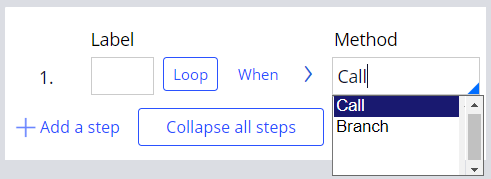
Call
Pega runs the specified activity, then returns control to the calling activity when the called activity Process finishes. Consider two activities, A and B: If A calls B, then control returns to A when B finishes.
Branch
Pega Platform runs the specified activity, but the control returns to the rule that calls the first activity. The original activity ends when the branched activity is complete. Consider two activities, C and D: If C branches to D, when D (the branched activity) is complete, the control returns to the Rule that called activity C. The following image displays the Call and Branch method options:
Note: To learn more about the methods to call other activities, see Calling another activity and Branching to another activity.
Parameters
Parameters define variables that input data to, or return data from, an activity.
Parameters make activities more reusable by allowing you to pass arguments when the activity is called, rather than upfront during development.
- Activity parameters are defined on the Parameters section on the Activities form.
- Use the notation param.<ParamName> to reference a parameter value.
- Parameter names and values are held on a special Clipboard Page, known as the parameter page, which is not visible with the Clipboard tool.
The following image displays the parameters configuration options within an activity Rule:

Security
To better protect your application, limit how and for whom an activity can run by configuring activity-specific access control. Use the settings on the Security tab of an activity Rule to specify the activity type and optionally restrict which users (or other requestors) can run the activity. The following image displays the security configuration options for an activity Rule:

Restrict access
Use the security settings in the Restrict access section to restrict how — or if — users run the activity at run time.
Select the Allow invocation from browser check box to allow users to start this activity directly through user input processing, such as a Submit button or a pyActivity= element in an URL. Clear this if you intend this activity to start from only another activity, through a Call, Branch, or other means.
Caution: For most activities, leave this check box cleared to promote the security of your application. Allowing activities to be started from a URL or other user input (whether the requestor is authenticated or a guest) may let users bypass necessary checking, security, or setup Steps.
Select the Require authentication to run check box to require that only authenticated requestors can start this activity. Clear the check box to allow guest users to run this activity if they meet other security and access criteria.
Note: Require authentication to run is selected by default on new activities. In most cases, you do not need to change this selection.
Identify one or more privileges to restrict the users and other requestors that can run this activity. At runtime, if the user does not belong to an Access Group that provides access to one of the identified privileges, the execution of the activity fails.
Note: To learn more about using the settings in the Restrict access section of the Security tab on an activity, see Securing an activity.
Activity type
Select an activity type for the activity to determine whether and how this activity can be referenced in other Rules. For example, selecting the Route activity type restricts the use of the activity to routing Assignments in the Case workflow. The Activity type list provides the following options:
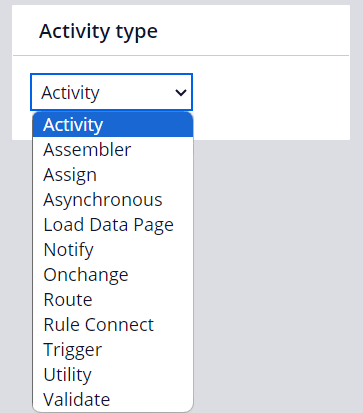
| Activity type | Description |
|---|---|
| Activity | Select when no more specific value is applicable. Activities with this value cannot be referenced directly in flow Rules. |
| Assembler | Deprecated, do not use. |
| Assign | Select if the activity is referenced from an Assignment shape in a Flow Rule. Assign activities are used to create the Assignment and differ from other activity types that may be called from an activity, such as Notify and Route activities. |
| Asynchronous | Select if the activity runs in a background thread asynchronously. The activity can call only these step methods: Load-DataPage, Connect-Wait, and Call-Async-Activity (step instruction to allow a user to load an asynchronous activity). |
| Load Data Page | Select if the activity adds values to Data Pages. Reference this activity on the Definition tab of a Data Page Rule. |
| Locate | Deprecated. Only available for existing activities that use locatable pages. |
| Notify | Select if the activity is used to notify a user or users of a pending Assignment. |
| Onchange | Select if the activity is run automatically by a Declare OnChange Rule. |
| Route | Select if the activity is used to route an Assignment in a Flow Rule. |
| Rule Connect | Select if the activity calls a connector rule to interface with an external system. |
| Trigger | Select if the activity is run automatically by a Declare Trigger rule. |
| Utility | Select if the activity is called from a Utility shape in a Flow Rule. |
| Validate | Deprecated, do not use. |
Note: To learn more about setting the activity type for an activity called from a Flow Rule, see Security tab on the Activity form.
Activity best practices
General
- Whenever possible, use alternative Rule Types, such as using a Data Transform to set a property value.
- Avoid using hard-coded reusable values in properties, for example, URLs or classes. Instead, use Data Pages, Decision tables, or map values.
- Keep activities short. Limit your activities to fewer than 25 steps and focus each activity on completing one task.
- Use reusable activities.
- Use the Description field to describe what each activity step does.
- Set an appropriate Activity type in the Security tab to remove warnings. For example, Utility (default), Validate, and Load Data Page.
Steps
- Reduce or eliminate the use of duplicate loops to improve application performance.
- Remove commented lines before merging your Rules unless the commented lines help clarify the details of the activity.
- Avoid using deprecated activity methods.
- Limit hand-coded Java. Avoid Java Steps in activities when standard or custom Rule Types, library Functions, or activity methods are available.
Caution: The Java method allows you to add custom Java code to an activity. Use this method with extreme caution. The use of a custom Java code in activities is a severe violation of Pega application development best practices because it introduces maintainability issues. Use the Access Control Check landing page to identify activity calls that require mitigation. To learn more about the Access Control Check landing page, see Using Access Control Checks.
Parameters
- Use parameters to clearly define the inputs and outputs so that system architects understand how the activity is used and increase application maintainability. If the activity needs a specific value to process, pass a scalar parameter rather than a complete page reference.
Check your knowledge with the following interaction:
This Topic is available in the following Module:
If you are having problems with your training, please review the Pega Academy Support FAQs.
Want to help us improve this content?