
Application roles and access groups
Each user in an application has a defined Persona that determines how they interact with Cases. Some roles are responsible for creating and processing Cases, while others handle approvals or rejections.
For example, in a Purchase Request application, any user can submit a request, but only Department Managers can approve it. Each user group has specific responsibilities and plays a distinct role in completing and resolving Cases.
Design considerations for Access Roles
An Access Role defines responsibilities or job functions within an application. For example, a role can specify the capabilities of a loan officer or a call center supervisor. Assign Access Roles through an Access Group to grant permissions, such as modifying instances of a specific class.
Before creating Access Roles, evaluate role-based access control (RBAC) needs:
- Determine the number of distinct roles required.
- Assign clear, descriptive names that reflect the authorization each role provides.
Each Access Role defines the actions its holder can perform in the application. For example:
- A manager can approve and modify customer orders.
- A fulfillment operator can open customer order records.
- A clerical worker or auditor has read-only access.
Users can hold multiple Access Roles simultaneously. Collectively, these roles define the full set of actions a user can perform.
Design Access Roles for an ordering application to meet the access control requirements of fulfillment operators and managers. Ensure that correct permissions are assigned to each role while maintaining flexibility and simplicity. The following table compares three design options for configuring Access Roles and Access Groups in an ordering application:
|
Name |
Option 1 |
Option 2 |
Option 3 |
|
Ordering:FulfillmentOperator Access Role |
Grants Open access to the customer. |
Grants Open access to the customer. |
Grants Open access to the customer. |
|
Ordering:Manager Access Role |
Grants Open and Modify access to the customer. |
Grants Modify access to the customer.
|
Grants Modify access to the customer and specifies Ordering:FulfillmentOperator as a dependent role.
|
|
Ordering:FulfillmentOperators Access Group |
References the Ordering:FulfillmentOperator Access Role, granting only Open access to customer objects. |
References the Ordering:FulfillmentOperator Access Role by granting only Open access to customer objects.
|
References the Ordering:FulfillmentOperator Access Role by granting only Open access to customer objects.
|
|
Ordering:Managers Access Group |
References the Ordering:Manager Access Role, granting only Open and Modify access to customer objects |
References both the Ordering:FulfillmentOperator and Ordering:Manager Access Roles by granting Open (from Ordering:FulfillmentOperator) and Modify (from Ordering:Manager) access to customer objects. |
References both the Ordering:FulfillmentOperator and Ordering:Manager Access Roles, granting Open (from Ordering:FulfillmentOperator) and Modify (from Ordering:Manager) access to customer objects.
|
To choose the appropriate option, the Lead System Architect (LSA) must determine whether the access control needs for the manager are typically based on, or represent a superset of, the access control needs for the fulfillment operator:
-
Option 1 enables the access control needs of each Persona (user role) to evolve independently of each other, which results in some maintainability overhead because some access control settings are duplicated across each Access Role.
-
Option 2 requires that the access control needs for the manager always represent a superset of the access control needs for the fulfillment operator, because a grant from the FulfillmentOperator Access Role (without more advanced RBAC configuration) is sufficient to grant access to the Managers Access Group, even if the Manager Access Role denies access.
-
Option 3 allows the access control needs of the manager to be predominantly based on the FulfillmentOperator Access Role, while allowing the Manager Access Role to have manager-specific access control settings as well as override settings that the dependent FulfillmentOperator Access Role specifies.
Solution: Option 3 typically generates the intended authorization design with the fewest AROs and the lowest likelihood of duplication. This option promotes a maintainable and understandable solution and has the flexibility to adapt as you add more journeys that inevitably invalidate some of the authorization decisions in earlier application versions.
Note: The use of Access Deny Rules or the Stop access checking once a relevant Access of Role to Object instance explicitly denies, or grants access option for an Access Group can help option 2 achieve the same outcome as option 3. However, this approach adds more Rules and complexity to the design.
With the introduction of dependent roles, the best practice is to create application-specific access roles that specify the foundation access roles as dependencies.
The naming convention for access roles is <ApplicationName>:<RoleName> , where RoleName has the singular form.
To create new application-specific roles, you use the Roles for Access landing page in Dev Studio.
Design considerations for Access of Role to Object Rules
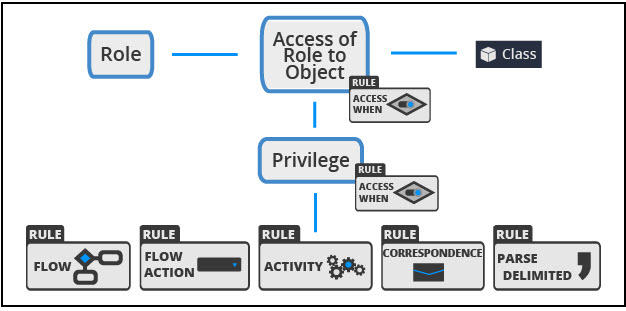
Use ARO to grant access permissions to objects (instances) of a given class and named privileges to a role. You can grant access permissions and named privileges up to a specific production level, ranging from 1 to 5. Level 1 is Experimental, Level 2 is Development, Level 3 is QA, Level 4 is Staging, and Level 5 is Production, or conditionally with Access When Rules. The following figure summarizes the usage of Access When rules in AROs and privileges to grant access to the rules:
When you plan a set of AROs for an access role name, consider the following aspects:
-
Does the Access Role to which the AROs apply inherit authorization from dependent roles? If yes, you can limit the AROs for your Access Role to those AROs that alter the authorization outcomes otherwise derived from its dependent roles.
-
Does the Access Role use privilege inheritance? If not, you might need to respecify some privileges from superclass AROs in the subclass AROs in the same Access Role.
-
If you leave settings blank in an ARO, Pega Platform™ defers to superclass AROs and dependent roles to determine the authorization for that setting. This behavior is a legitimate, object-oriented approach to configuring authorization.
Setting Rules
In Pega applications, a setting Rule controls access to different parts of your application. You can create different settings for different roles, and these settings determine what each role can access. These settings are linked to users through their Access Group, which is identified in their Operator ID. As a result, you can control access to various parts of your application based on the role of the user. Rule-Access-Setting is unrelated to application settings Rules (the Rule-Admin-System-Settings Rule Type), or dynamic system settings (the Data-Admin-System-Settings class). The following figure shows configuration interface for defining a rule-based setting in the application.

For more information on settings, see Using setting rules, Defining access settings for an Access of Role to Object rule
Design considerations for Access Deny Rules
Use an Access Deny Rule to explicitly restrict authorization before evaluating any ARO grants for the same class and role.
Key points
The following key points summarize important considerations when configuring Access Deny Rules to ensure proper authorization control:
- Roles that contain only Access Deny Rules are called Access-Deny-Only roles.
- Place Access-Deny-Only roles first in the Access Group.
- Enable Stop access checking once a relevant ARO explicitly denies or grants access to ensure that denial takes precedence.
- Rule resolution does not apply to Access Deny Rules:
- You can create only one Access Deny rule for each class-role combination.
- Class inheritance does not apply. Create a Rule for each affected class.
- You cannot use Access Deny to override privileges granted by AROs in any role inthe Access Group.
Typical use case
Apply this strategy when a new Persona requires similar access to an existing role but with restrictions.
Example: An Associate Manager role that can open orders only below a certain value.
Implementation
Use the following process to implement Access Deny Rules in a Pega application to enforce role-based restrictions effectively:
- Create an Access-Deny-Only role (for example,
Ordering:AssociateManagerDeny). - Define an Access When Rule on the Order class to check the order value.
- Create an Access Deny Rule for this role on the Order class, and apply the Access When Rule to the Read Instance setting.
- Create an Access Group (for example,
Ordering:AssociateManagers), and add the following roles:Ordering:AssociateManagerDeny(restricts access based on business rule)Ordering:Manager(grants standard manager permissions)
- Enable Stop access checking once a relevant ARO explicitly denies or grants access for the Access Group.
Design considerations for Access Groups
Access Groups define the Access Roles that determine which actions users can perform. Link each user to an Access Group through the Operator ID record.
Use the following naming convention for Access Groups: <ApplicationName>:<GroupName>. Ensure that GroupName is plural. For example, HRApp:Customers.
Create Access Roles that support specific capabilities when multiple user roles share responsibilities. For example, in an HR application, the user roles include:
- Employee
- HR generalist
- HR manager
- Executive
Both HR managers and executives can update delegated Rules. To support this shared capability, create an Access Role named <ApplicationName>:DelegatedRulesAdmin. Add this role to the Access Groups for HR managers and executives. This configuration allows both roles to update delegated Rules while maintaining their primary responsibilities.
Pega Platform includes fine-grained Access Roles that grant privilege-based capabilities to specific access groups. Examples include:
PegaRULES:BasicSecurityAdministratorPegaRULES:AgileWorkbench
Use these predefined roles to streamline access control and ensure consistent security practices.
Access roles and groups implementation differences
When you implement access roles and access groups in Pega Constellation™ applications, be aware of several practical differences compared to traditional user interface implementations.
UI-agnostic authorization
In traditional UI architectures, authorization rules are often tied to specific components or harnesses. The component-based architecture of Constellation promotes abstraction. Define Access Roles based on business capabilities rather than user interface elements.
For example, instead of controlling access to a specific section or harness, define access to features such as viewing customer financial data or approving high-value transactions.
API-level security
Because Constellation uses Pega Digital Experience API for all data interactions, authorization Rules must support API-level security. Ensure that Access When Rules, privilege Rules, and attribute-based access policies work correctly when data is accessed through APIs rather than through traditional activity processing.
The Pega Platform authorization engine evaluates these Rules consistently, regardless of the access path. However, test authorization in the context of API calls is required to confirm expected behavior.
Performance impact
Constellation applications are client-orchestrated, which means authorization checks can affect perceived performance more than in server-rendered user interfaces. When designing Access Role structures, consider the performance impact of complex Access When Rules that are evaluated repeatedly during user interaction.
To improve performance:
- Cache authorization decisions when appropriate.
- Avoid complex conditional logic in rules that are evaluated frequently.
Check your knowledge with the following interaction:
This Topic is available in the following Module:
If you are having problems with your training, please review the Pega Academy Support FAQs.
Want to help us improve this content?