
Best practices for team-based development
Pega Platform™ developers use agile practices to create applications in a shared development environment by using version control branches (such as in GIT) to commit changes. This enables multiple developers to work on the same application simultaneously, without interfering with each other's work.
Agile practices involve breaking down the development process into small, manageable tasks that can be completed quickly and efficiently, so that teams can respond quickly to changing requirements and deliver high-quality applications in a timely manner.
The use of branches in a shared development environment enables developers to work on different features or components of the application without affecting the work of other developers. Each developer can create their own branch to work on a specific feature or component, and then merge their changes back into the main branch when they are ready.
This approach allows for greater collaboration and flexibility in the development process, as developers can work independently on different parts of the application while still maintaining a cohesive codebase. It also enables easier tracking of changes and version control, as each branch can be tracked and managed separately.
Overall, the use of agile practices and branches in a shared development environment is an effective way to develop high-quality applications efficiently and collaboratively.
Apply the following best practices to ensure that team-based development using Pega software is efficient, effective, and produces high-quality applications:
- Utilize multiple built-on applications: Develop smaller applications that are easier to manage, test, and maintain.
- Use branches for collaboration: When multiple teams contribute to a single application, use branches to isolate changes. This helps in managing conflicts and ensures that incomplete or risky work does not affect the main application.
- Peer reviews and branch merging: Conduct peer reviews before merging branches. Use tools like the Branches explorer to view quality metrics and guardrail scores. This ensures that only reviewed and tested code is integrated.
- Continuous integration and rebasing: Implement continuous integration practices. Regularly rebase branches to keep them up to date with the main codebase. This minimizes integration issues and keeps all teams aligned.
- Automated testing: Create unit test cases to validate application data and functionality. Automated tests help in quickly identifying issues and ensuring that new changes do not break existing functionality.
- Toggles: Use feature toggles to hide incomplete features. This enables teams to merge branches frequently without exposing unfinished work to end users.
- Locking rulesets: Avoid developing in unlocked rulesets. Lock rulesets to prevent accidental changes and ensure that all modifications go through the proper review and merge process.
- Clear communication and documentation: Maintain clear documentation and communication channels. Use tools like Pulse for collaboration and to keep everyone informed about the status of different branches and features.
Multiteam development flow
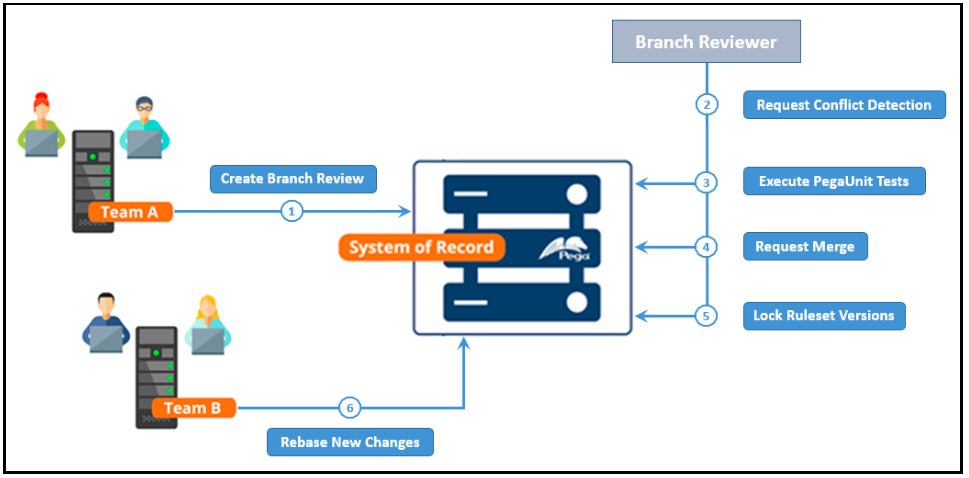
The following diagram illustrates how multiple development teams interact with the system of record (SOR). Team B relies on the code developed by Team A. Both teams use the same database as the system of record (SOR) for their code. Team A and Team B develop code on different servers, which is then uploaded to and downloaded from their shared SOR. A branch review is required to move Team B's code from branch ruleset versions to new versions with the main rulesets, so Team B uses the "lock-new-versions-after-merge" approach. Because the new ruleset versions are locked, Team B can pull those new versions into the non-SOR server by using a rebase operation.
- The process begins when Team A requests a branch review against the system of record.
- A Branch Reviewer first requests conflict detection, then runs the appropriate PegaUnit tests. If the Branch Reviewer detects conflicts or any PegaUnit tests fail, the reviewer notifies the developer who requests the branch. The developer stops the process to fix the issues.
- The PegaUnit tests runs.
- If the PegaUnit tests run successfully, the branch merges into the system of record.
- The ruleset versions that are associated with the branch are then locked.
- Remote Team B can now perform an on-demand rebase of the rules of the SOR application into their system. A rebase pulls the most recent commits made to the SOR application into Team B's developer system.
For more information, see Development workflow in the DevOps pipeline.
Check your knowledge with the following interaction:
This Topic is available in the following Module:
If you are having problems with your training, please review the Pega Academy Support FAQs.
Want to help us improve this content?