
Decision tables
A Decision table is a Business Rule that evaluates a combination of property values and returns a result used to drive behavior in a Case, such as calculating a value or determining a path. If you are asking a yes/no question when using an automated Decision Process, such as "Does this purchase order require additional approval?", then a When Rule serves the purpose. However, if you need to test the values of multiple properties to answer questions, such as “What promotional offer should the company offer?”, you can use a Decision table.
The following video describes the structure of a Decision table and how Decision tables evaluate information:
Transcript
A Decision table consists of a table of Conditions and results. You define a set of Conditions – for example, property values that must fall within a certain range – and the results to return when the conditions are true. Each set of Conditions contains a corresponding result. You can add columns for each Condition you want to test against – either a property reference or an Expression – and rows for each combination of Conditions you want to test.
When the system evaluates a Decision table, it starts with the top row and evaluates each Condition in the row. If all of the Conditions are true, the system returns the result for that row. If not, it advances to the next row, and evaluates the Conditions in that row. And if none of the combinations returns a result, the system returns the otherwise result at the bottom of the table. This ensures that the Decision always returns a result.
You have reached the end of the video.
Check your knowledge with the following interaction:
Decision table logic
A Decision table evaluates conditions to determine an outcome. In its simplest form, it returns a single result based on the logic that best matches the input.
Depending on how the logic is designed, a Decision table can operate in two ways:
- Return the first matching result, where evaluation stops once a matching set of conditions is found.
- Evaluate all conditions and return multiple results, applying outcomes for every scenario that meets the defined criteria.
This flexibility allows a Decision table to either produce a single outcome or return multiple outcomes when conditions are not mutually exclusive, such as determining all applicable Rules, roles, or actions.
In addition to returning results, Decision tables can associate outcomes with related information. This allows the logic to not only determine what applies, but also define additional values or updates that should occur alongside the decision.
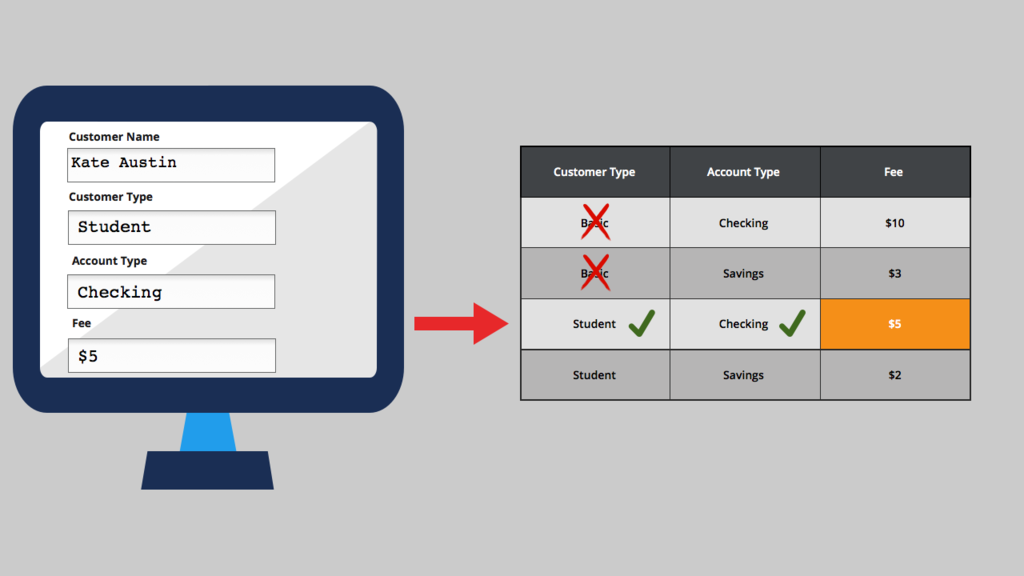
Decision tables are a good approach when you use a set of properties or Expressions to arrive at a Decision. For example, a banking application might determine a monthly maintenance fee by comparing account type and customer type. Each row evaluates a specific combination of values, and when a match is found, the table returns the corresponding fee. For instance, if the account type equals "Checking" and the customer type equals "Basic", then the system returns USD10.
The following example shows how the Decision evaluates based on account type and customer type property values:
By default, a Condition uses an equal comparison operator. When working with numeric Conditions, you can also use greater than, less than, or range-based comparisons. For example, you might define a Condition so that if a savings account balance is greater than USD1000, the customer is not charged any fees. You can also define ranges, such as charging a fee only when the balance falls between USD500 and USD1000.
Decision tables are commonly used to evaluate thresholds across multiple Conditions. For example, you can determine discount eligibility based on customer spending and tenure. Customers who purchase more than USD1000 in the previous year and have been with the company for five or more years might receive a 20 percent discount for purchases greater than USD50. Customers who meet the same spending criteria but have been customers for less than five years might receive a 15 percent discount on purchases greater than USD100. Customers who do not meet either Condition are not eligible for a discount.The following figure displays this Decision table:

Calculated fields with Decision tables
You can set up calculated fields using out-of-the-box basic Functions and simple custom Expressions. For example, in an online grocery application, you can use an Expression to multiply the quantity by the unit price to calculate the total cost of an item.
For complex calculations which involve multiple Conditions with varying results based on the Conditions, you can set up a calculated field that references an existing or custom Decision table.
Consider the example of a YPlus cargo courier company that charges a USD500 delivery charge for courier services. YPlus has decided to update the delivery charge calculation based on distance. Suppose the delivery address is within 100 miles. In that case, the delivery charge is USD50. If the address is within 500 miles, the delivery charge is USD100. If the address is within 1000 miles, the delivery charge is USD250, and if the delivery address is farther than 1000 miles, the delivery charge is USD500. You set up a calculated field that references the Decision table described to determine the delivery charge.
Check your knowledge with the following interaction:
Decision logic maintenance
Organizations can delegate the maintenance of certain Rules to stakeholders who manage a specific Process within a Case Lifecycle. These stakeholders, sometimes referred to as Process owners, understand the business environment and can quickly identify changes that might impact how users achieve the desired outcome for a Case. You can delegate a Decision table to a Process owner, who can update the Decision logic to meet the changing needs. This approach is most helpful for small changes.
For example, a logistics manager might decide to set the order threshold for expedited shipping of customer orders to USD500 in the first release of an application. As business conditions change, to match a competitor, the logistics manager might want to lower the threshold to USD400. Rather than submitting a request for a developer to update the application and release a patch to apply to the production system, a Process owner can immediately update the threshold in production through delegation.
Direct flow processing
The sequence of Steps in a Case can vary based on the circumstances of that Case. Decision logic is used within a Process to evaluate conditions and determine how the flow should progress. For example, Decision tables can be used to guide what happens next in a Process or to determine how work should be directed. This allows the Process to adapt dynamically based on input data.
Automated next Steps
Decision-driven logic enables a Process to branch into different paths based on defined conditions. Instead of following a fixed sequence, the flow can adjust to different scenarios, making it more flexible and responsive.
Assignment routing
Decision logic can also determine who should perform work. By evaluating relevant information, the system can route an Assignment to the most appropriate individual, team, or queue. For example, work can be directed based on factors such as location, type of request, or priority, ensuring that it is handled by the most suitable resource.
Check your knowledge with the following interaction:
This Topic is available in the following Module:
If you are having problems with your training, please review the Pega Academy Support FAQs.
Want to help us improve this content?