
Email routing in customer service
Many organizations manage high volumes of customers. Without a structured approach, incoming messages can overwhelm customer service representatives (CSRs) and lead to delayed responses and inconsistent customer experiences. Pega Email Bot™ addresses this challenge by applying natural language processing (NLP) to analyze incoming email. Pega Email Bot detects the topic or sentiment of each message and automatically routes it to the appropriate queue or CSR so that teams can process large volumes of email accurately and efficiently.
Discover how intelligent email routing works in Pega Email Bot, including how keywords, topic models, and routing Rules drive that process.
Natural language processing analysis
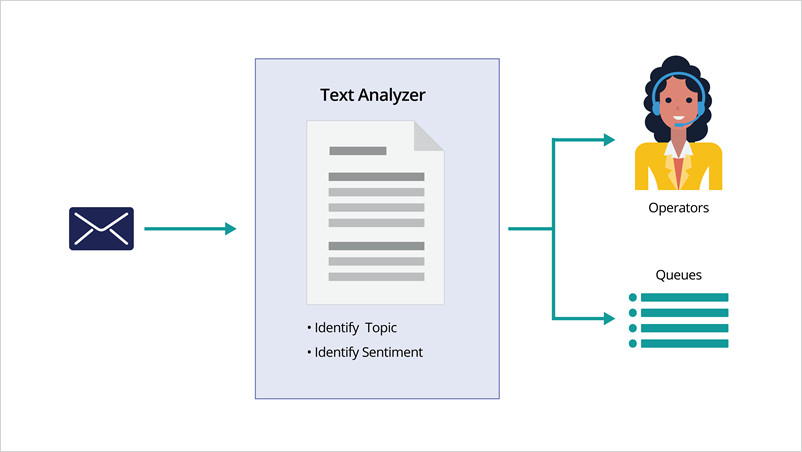
When an email arrives, Pega Email Bot uses NLP to analyze its content. The analysis identifies the topic of an email by comparing its content against predefined categories. For example, a message that contains phrases related to an address change is associated with an Address Change Case and routed accordingly.
NLP analysis also detects the overall sentiment of an email (positive, neutral, or negative), which can influence routing decisions. In addition to topic and sentiment, the system extracts specific entities such as mailing addresses or primary email addresses from the subject line and body. Pega Email Bot can also use the Optical Character Recognition (OCR) to scan attachments, including images, to extract relevant data.
Keywords and routing Rules that govern this behavior are configured in the Email Channel.
The following figure shows the NLP analysis:
Keywords and text analysis
Administrators can configure specific keywords for each Service Case to help the system identify the topic of inbound emails. When an email arrives, Pega Email Bot compares its content against the configured keywords. If the system finds a match, it associates the email with a suggested reply or a specific Service Case.
For example, an email that contains the phrase "disputed credit charge" is associated with a Dispute Transaction Case. Administrators configure the keywords in the Email Channel. In the Pega Customer Service™ training environment, an email channel named MySupport comes seeded with predefined keywords, so the bot can begin identifying topics and associating them with Service Cases immediately.
The following figure shows keyword configuration in the Email Channel on the Text analysis tab:

Topic models and text analysis
While keywords provide a useful starting point, topic models better support organizations that handle high email volumes. Unlike static keywords, a topic model improves over time by learning patterns from conversations between CSRs and customers and becomes more accurate as it processes more emails.
Pega Email Bot requires training for each topic added to a Channel. Training involves providing example emails and manually classifying them so that the NLP model learns to recognize and classify similar messages in the future. Data Scientists work with NLP models directly in Prediction Studio, while CSRs and administrators contribute to the training process in Pega Customer Service application.
Intelligent routing Rules
Routing Rules define how the system moves an email to a queue or CSR based on the results of text analysis. Each Rule can specify one or more conditions, including the identified topic, the presence of specific entities (for example, a new address), and the detected sentiment.
When you define multiple conditions, all conditions must be met before the system applies the routing action. If no conditions are met, the system performs a default action. For example, routing the email to an Inbound Correspondence queue.
Administrators can also set a confidence threshold for topic detection. For example, a Rule can require an 80% probability that an email relates to an address change before triggering the corresponding routing action. As the text analytics model processes more emails over time, its accuracy improves. Data Scientists configure and maintain these models in Prediction Studio.
The following figure shows the configuration of routing rules in the Email Channel in the Intelligent routing section:

This Topic is available in the following Module:
If you are having problems with your training, please review the Pega Academy Support FAQs.
Want to help us improve this content?