
High availability
High availability refers to the capacity of a system to function continuously without interruption for a predetermined time. High availability helps ensure that a system meets a set standard for operational performance. A high-availability architecture is a strategy to eliminate process and service breakdowns. Application outages can be costly to organizations. The organization loses business when the application is unavailable and might be subject to penalties and fines. An unplanned application outage can also damage the reputation of the organization.
Before implementing highly available systems, you must carefully plan and evaluate. All components must meet the specified availability level before planning, for example, a system. The ability to back up and fail over data is crucial for high-availability systems to achieve availability objectives. You must also carefully consider the data storage and access technology that system designers use.
The business impact of high availability
High availability in Pega Infinity™ extends beyond technical configuration. It is fundamentally about ensuring business continuity and meeting Service-Level Agreements (SLAs) that directly impact customer experience and organizational reputation. As a Lead System Architect (LSA), understand how system availability translates to business value and risk mitigation.
Business continuity framework
Enterprises rely on Pega applications for mission-critical processes such as customer service, Case Management, and decision automation. Even brief outages can result in:
- Revenue loss.
- Regulatory compliance issues.
- Decreased customer satisfaction.
The cost of downtime varies by industry; for example, downtime during peak hours can cost up to USD 5,600 per minute.
Service-Level Agreement considerations
When architecting high availability solutions, LSAs translate business requirements into technical specifications. Common SLA targets include:
- 99.9% availability: Up to 8.77 hours of downtime annually. Standard for most business applications.
- 99.95% availability: Up to 4.38 hours of downtime annually. Enhanced availability for critical systems.
- 99.99% availability: Up to 52.6 minutes of downtime annually. Required for mission-critical applications.
Design for high availability
Apply the following principles when designing high-availability systems:
-
Avoid a single point of failure. If an application has only a single database in place, the entire system can fail in the event of database failure. This event is called the single failure point. So, a backup database should always be in a passive place with a database copy from an active database. Copy the database every five minutes to a passive node. You can lose up to five minutes of data. Here, the copy action is the single point of failure.
-
Ensure reliable crossover. If a node fails, the system must switch from the failed node to a backup node without losing data. This process, known as failover, should be seamless to maintain system availability.
-
Ensure the detectability of failures. Failures must be visible; ideally, systems should have built-in automation to handle the failure independently. Include built-in mechanisms for avoiding common-cause failures, where two or more systems or components fail simultaneously from the same cause.
Architecture design decisions
Successful high availability implementation requires careful planning and architectural decision-making that balances availability requirements with performance, cost, and complexity considerations.
Capacity planning for high availability
When designing high-availability systems, account for additional resource requirements. Typical configurations require 50 to 100 percent additional capacity to handle failover scenarios while maintaining acceptable performance. Consider database sizing, network bandwidth, and storage capacity across multiple zones or data centers.
Load balancing strategy selection
Select a load balancing strategy based on application characteristics and availability requirements:
- Round-robin distribution for uniform workloads.
- Least connections for variable processing times.
- Session affinity for stateful applications requiring user session persistence.
- Health check integration to automatically remove failed nodes from rotation.
Configuration of high availability in Pega Platform
In Pega Platform™, the system achieves high availability through the configuration of multiple nodes in a cluster. If one node fails, the other nodes can take over and continue to provide uninterrupted service. The following process discusses how you can configure nodes for high availability in Pega Platform:
- Install and configure Pega clusters: Before configuring nodes for high availability, install and configure Pega Platform on each node. Ensure that all nodes are running the same version of Pega Platform and have the same configuration settings. Clustering involves organizing two or more Pega Platform servers to work together, which provides higher availability, reliability, and scalability than a single server. The application servers are in the cloud and must dynamically allocate servers to support increased demand.
Pega Platform servers support redundancy among various components, such as connectors, services, listeners, and search. The exact configuration varies based on the specifics of the applications in the production environment.
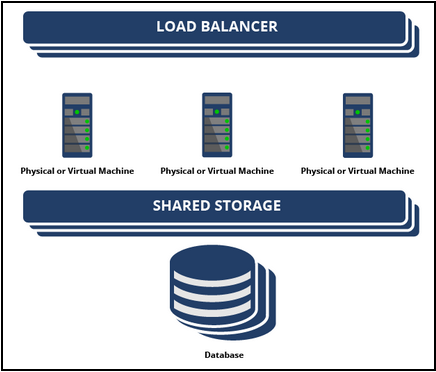
- Configure load balancer: The system uses a load balancer to distribute incoming requests across multiple nodes in a cluster, as shown in the following figure. Configure the load balancer to distribute requests evenly across all nodes in the cluster, which ensures that no single node is overloaded with requests.
- Configure database: Use a database that supports clustering or replication. This configuration helps ensure that if one database server fails, another server can take over and continue to provide service.
- Configure nodes: Ensure that each node communicates with the load balancer and the database. Use consistent settings for security, logging, and performance.
- Configure highly available integration services: Integration services are critical components of any Pega Platform application and help to maintain the performance and reliability of the application.
- Configure session affinity for slow drain: Session affinity, also known as sticky sessions, ensures that all requests from a specific client are routed to the same server during a session. This behavior is essential for applications that store session state information on the server, such as login sessions or shopping carts. Without session affinity, requests from the same client might be routed to different servers, which can cause inconsistencies if session data is not shared across the server pool.
Slow drain occurs when a server processes requests more slowly than others in the pool. This issue can result from hardware limitations, software defects, or resource contention. Slow drain disrupts session affinity and degrades overall performance.
To maintain reliability and performance, implement health checks, dynamic load balancing, and shared session state mechanisms such as in-memory grids or database-backed sessions. These strategies help reroute traffic without losing session continuity.
Session affinity improves performance by maintaining consistent stateful communication. However, when servers slow down, session affinity can introduce reliability challenges. Monitor server health and apply dynamic load balancing to manage these risks effectively.
- Configure shared file storage: In high-availability setups, Pega Platform stores session data in shared storage to support failover and quiescing. Supported options include shared disk drives, network file systems, and databases. Each option requires read-write access.
By default, Pega Platform uses database persistence. To use a custom storage solution, integrate the storage with Pega Platform and implement the CustomPassivationMechanism plugin. Proper configuration ensures session continuity during server transitions.
- Configure highly available deployments for application server maintenance for updates.
- Test high availability: Test the high availability configuration by simulating a node failure. You can shut down one of the nodes and verify that the other nodes continue to provide uninterrupted service.
For more information about configuring high availability, see Deploying a highly available system.
Check your knowledge with the following interaction:
This Topic is available in the following Module:
If you are having problems with your training, please review the Pega Academy Support FAQs.
Want to help us improve this content?