
Reporting and data warehousing
To make decisions in real time or near real time, organizations often need to combine data from various sources, including web applications, legacy applications, and other sources. Business intelligence software is commonly used to collect, format, and store data, and to provide software for analyzing this data to make informed decisions.
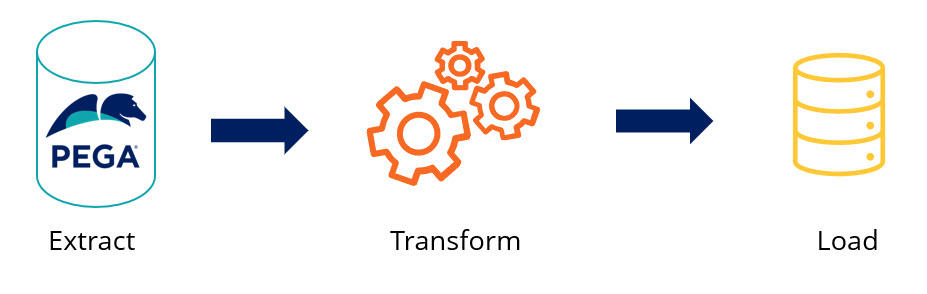
A data warehouse is a system designed for reporting and data analysis. It serves as a central repository of integrated data from one or more separate sources of data. The extract, transform, and load (ETL) process is used to prepare the data for use by the data warehouse. The following diagram illustrates a typical end-to-end process of extracting data from systems of record, storing the data in the warehouse, and then making that data available to reporting tools:
The ETL process is the core method for populating and maintaining data warehouses. Understanding each phase is essential for Lead System Architects who design reporting strategies that integrate Pega data with enterprise data warehouses.
Extract phase
Retrieve data from source systems, including Pega applications, legacy databases, third-party systems, and operational data stores. Design the extraction process to minimize impact on source system performance, especially for operational systems that support critical business processes.
For Pega applications, use one of the following mechanism, depending on your use case:
- Pega Business Intelligence Exchange™ (BIX) for batch extractions.
- Change Data Capture (CDC) for real-time extraction.
- Data Flows for complex scenarios that require transformation and enrichment during extraction.
Set extraction timing and frequency based on business requirements for data freshness. Some analytical use cases require near real-time data, while others work with daily, weekly, or monthly batch extractions. Balance the need for current data against the operational overhead of frequent extractions.
Transform phase
Convert extracted data into a format and structure optimized for analytical queries and reporting. Perform the following tasks during transformation:
- Cleanse data to support accuracy and consistency.
- Convert formats to standardize data types and structures.
- Aggregate data to precalculate summary information.
- Enrich data with calculated fields or reference data.
For Pega data, transformations might include:
- Converting the Pega class-based Data Model into a dimensional model for business intelligence tools.
- Denormalizing relationships to improve query performance.
- Calculating key performance indicators based on Case data.
- Mapping internal representations to business-friendly terminology.
Use Data Transform Rules to implement transformation logic within the platform. This approach helps ensure that data manipulation follows governance and version control processes.
Load phase
Load transformed data into the target data warehouse. Select a loading strategy based on data volume, update frequency, and warehouse structure:
- Full loads replace all data in target tables, which provides a complete refresh but requires more processing time and resources
- Incremental loads add only new or changed records, which improves efficiency for large datasets.
- Upsert operations update existing records or insert new ones to reflect the current state of source data.
Determine whether you design your reports in your Pega Platform™ application or use an external reporting tool that impacts application performance. For example:
- If your reporting requirements state that you must show how many Assignments are in a Workbasket at any given time, you can create a report on the Assignment Workbasket table.
- If you analyze multiple years of Case information to perform some trending analysis, use reporting tools suited for that purpose instead. You can link those reports from the End User Portal in the Pega Platform application.
Business Intelligence Exchange
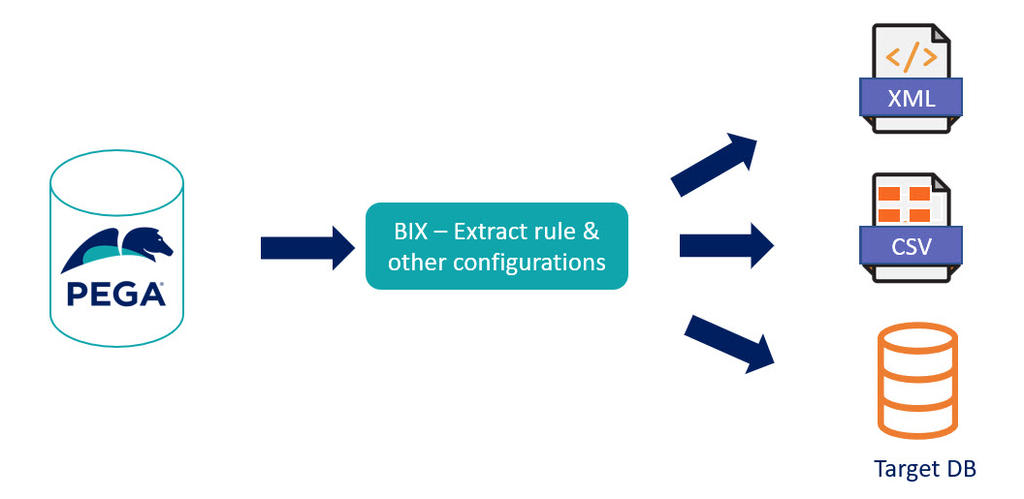
BIX is a tool that extracts data from a production application and format it for load into a data warehouse. BIX is an optional add-on product that includes a Ruleset and a standalone Java program, which you run from the command line. BIX can output data in XML or CSV formats, or output directly to a database. The following diagram illustrates the process that extracts data from the Pega database and prepares it for use by downstream reporting processes:
For more information, see Business Intelligence Exchange.
Check your knowledge with the following interaction:
This Topic is available in the following Module:
If you are having problems with your training, please review the Pega Academy Support FAQs.
Want to help us improve this content?