
Supporting functions for AIM
The AIM accelerator includes a set of supporting features to help drive end-to-end solutions. Event Driven Architecture (EDA) ensures that varying alerts and events can be received from generating systems, so that Alert Intake Cases can then be created. Data Link Analysis (DLA) drives the Merge and Visualization features, and links key Investigation data together. Finally, the Subject Profile provides separate 360-degree views of all available data for each Subject involved in an Investigation and Investigation Task let collect information and record activities for each Entity.
Event Driven Architecture
Receiving alerts is critical to AIM, which needs to manage alerts from different systems and modules to ensure continuous regulatory compliance. For this purpose, the AIM Accelerator includes the Event Driven Architecture (EDA) component, which facilitates the implementation of event-driven processes. The component manages the reception of alerts and events from different sources and routes them to the appropriate applications and processes in charge of their resolution.
See EDA for the full documentation of the Event Driven Architecture component.
In the AIM accelerator app, application configurations are managed through a console that you access by clicking Configure > Financial Services > Event Management > Alert and Investigation Management (AIM) > Configuration-Supplemental for AIM. Configuration settings are organized on different tabs:
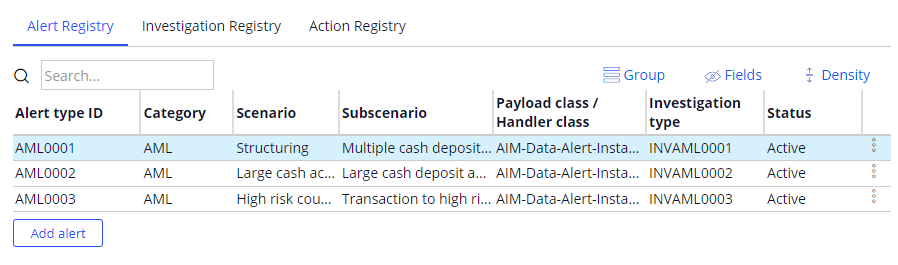
- Alert registry: The Alert registry tab shows all the alerts registered in the system for use by the AIM application. The alert registry provides information about the category of the alert, scenario, sub-scenario, payload class, and the type of Investigation Case that needs to be created for the alert.
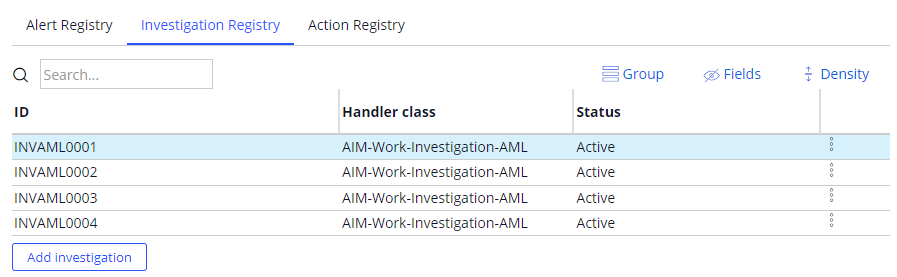
- Investigation registry: The Investigation registry tab shows several types of Investigation Cases that the AIM application can create for different alerts received by the system.
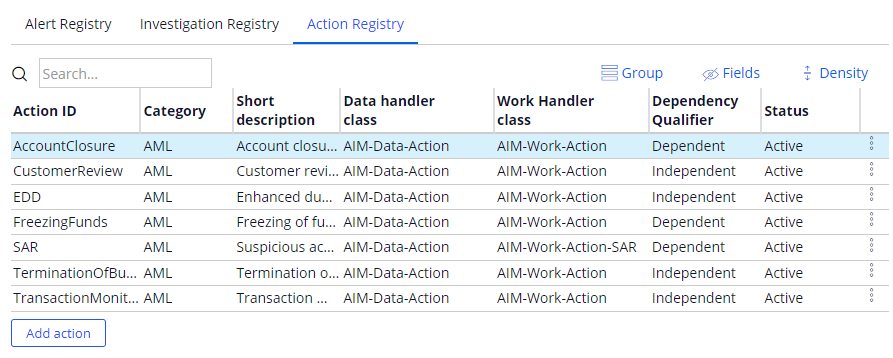
- Action registry: During the finalization of the Investigation activity in AIM, Investigators can select post-investigation actions to be carried out. For example, generating a Suspicious Activity Report (SAR) to the local regulator. The Action registry tab shows a comprehensive list of all possible actions that can be taken within the Actions stage of the Investigation Case.
Subject Profile
A Subject is an individual or organization that is included in an Investigation. The relationship that the financial institution has with a Subject impacts the amount of data that s initially available. Subjects are categorized as follows:
- An active customer
- A known related party of a customer, such as a beneficial owner of an existing customer
- An external party, unknown to the financial institution
During the Alert Intake Case, Subjects are extracted directly from the available data in the Alert. Subjects can also be added during the automated Enrichment Step in this process.
AIM consolidates the relevant available information into a composite view that enables investigators to get as complete a picture as possible for each Subject involved in the Investigation.
Investigation Task
The core function of the Investigation Task Case is to collect information and record activities that are external to the system and related to a specific Task. For example, information about the Source of Funds related to a transaction. This is facilitated using a Questionnaire linked to each Task. Tasks and specific Questions from each Questionnaire can be applied based on input driver data.
Below is the list of example Tasks provided with AIM:
- General assessment: This task is applicable to all Subjects, although normally the number of fields would vary for customer, Subjects that are related parties of the customer (and so present in the customer’s KYC file in the bank’s database), and Subjects that are external to the bank.
- Source of funds/assets: The source of funds/assets analysis is a separate task, due to its importance in the Investigation. This can be configured to easily skipped for certain alerts and/or certain customers: for example, for certain transactions (such as outgoing payment or cash deposit made by the customer themselves) or for certain Subjects (for example Low risk Subjects).
- Adverse media screening: This task consists of checking whether a Subject is present in negative news. Sources of this information can be online searching or more comprehensive services provided by third-party vendors.
- PEP screening: This task consists of checking whether a Subject is present in the Politically Exposed Parties lists available online or via a third-party vendor.
- Sanctions screening: This task consists of checking whether a Subject is present in any lists of sanctioned individuals or organizations, available online or via a third-party vendor.
- Internal watchlist: This task consists of checking if a Subject is present in the bank’s special "Not to do business with" list. This will only be applicable to Subjects of type External Party and potentially for Related Parties.
- Transaction history and profile: This task consists of checking the Subject profile for Product and Service risk and the previous account activity. This is only applicable for Subjects that are customers of the bank.
Data Link Analysis
The Data Link Analysis (DLA) module is an industry- and application-agnostic module that can be used to maintain link analysis structures and explore them in an efficient manner.
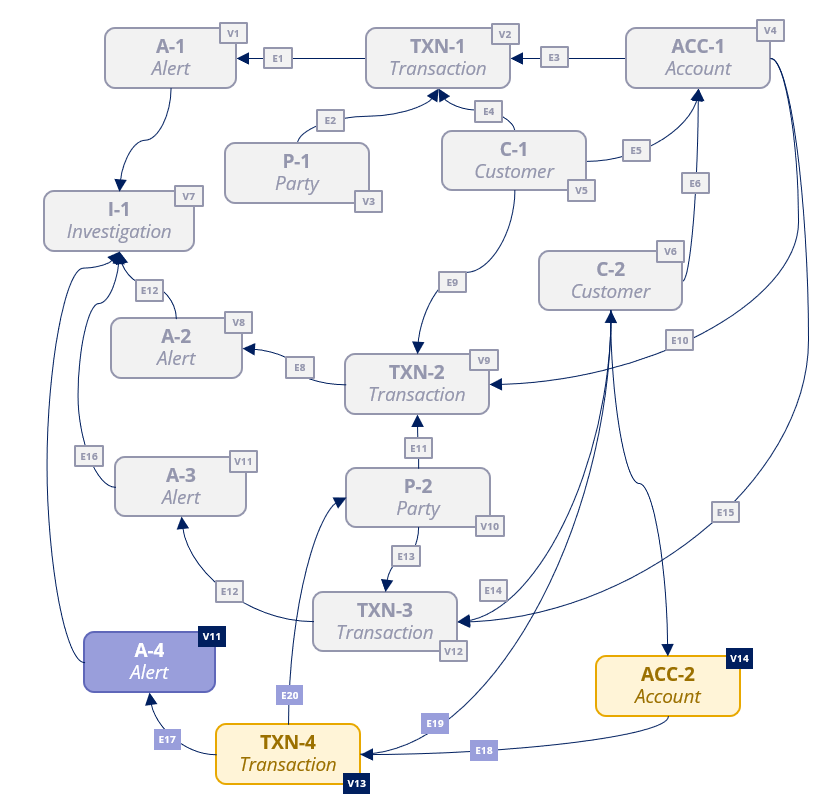
The module enables the creation of data structures, organized in a set of vertices that represent the data entities managed by the application, and a set of 'edges' that establish the relationships between those vertices. Example vertices could be a Subject, an Account, a Transaction, an Alert, or an Investigation. Example edges could be the link between a Subject involved in an Alert, or between a Transaction and its Account.
Main elements of the DLA module
The following section outlines the core elements of the DLA module:
- Vertex: A vertex represents one of the data objects managed by the application and can be anything of interest to the application. For example, a Subject, a Transaction, a Case, an address, or a date. A vertex will contain some descriptive information, as well as references to anything in the system that might provide additional information about it, for example, a customer identifier.
- Edge: An edge represents the relationship between two vertices. For example, Address A is the residential address of Subject C. The standard mode is unidirectional from one vertex to another, with an alternative bidirectional mode.
- Network: Different applications can manage their own set of vertices and edges. This set is called a network. Every vertex and edge in the system is associated to a given network. Exploration of data always takes place within the context of a given network. The data of different networks is segregated either logically (stored in the same table but marked with a certain network identifier), or physically (stored in different database tables). By default, the AIM application network is set as ‘AIM’ for all Vertices and is stored in a single table.
- Taxonomy: A taxonomy defines the different types of vertices, edges, attributes and related assets that can be used in each DLA network. For example, a network for Financial Crime can create a taxonomy to define vertex types such as Account, Transaction, and Card, and edge types such as Transaction recipient or Account holder. A different application might opt for a completely different taxonomy. Each DLA network should be associated to a given taxonomy.
Note: The concept of taxonomy is primarily used to build user interface elements, such as a graphical representation of a network, or a user interface, to maintain its data. While the taxonomy is not part of the DLA module, there is a set of classes for drafting how the taxonomy data could be structured and used later from related UI elements.
Investigation Reporting using Pega GenAI
During finalization of an investigation, the Investigator must review the full set of appropriate data, make a conclusion, and summarize the investigation. Assembling and formatting all this data is time consuming and difficult to enforce across departments. For this reason, AIM uses Pega GenAI™ to generate investigation reports and summaries to reduce time spent on this activity.
AIM carries out a comprehensive set of preparation steps to engineer the prompt that is sent to Pega GenAI to generate the investigation summary and reports. The steps that AIM follows are:
- Use predefined templates for generating the investigation summary and reports.
- Prepare the data objects, such as the Investigation, Alerts, Transactions, Accounts, and Subjects that need to be included in the summary and reports.
- Generate a new object with copies of all the data entities associated with the Investigation case. The object contains Personally Identifiable Information (PII) which if sent in this raw state could violate banking laws and end up being used for wider training models.
- Any of the PII data is therefore replaced with anonymized versions so that AIM can generate an object using all fake data entities.
- AIM connects through Pega GenAI and passes the data object with fake data entities as input.
- The response is de-anonymized by replacing the anonymized data with the original values. This response is then displayed on the user interface for the Investigator to review.
Check your knowledge with the following interaction:
This Topic is available in the following Module:
If you are having problems with your training, please review the Pega Academy Support FAQs.
Want to help us improve this content?