

Managing Application Settings
2 Tasks
30 mins
Intermediate
Data Integration
English
Scenario
During development, Human Resources (HR) business partners integrate with a legacy application to identify the latitude and longitude of a provided postal code. As the application is migrated from a development environment to a staging environment and then to a production environment, the endpoint URL requires an update.
Using the Application Settings simplify maintenance of the SOAP connector integration settings, implement the Application settings for endpoint URL, response timeout, and authentication profile. As the HRApps application is migrated from development to production, the integration settings can be updated by configuring Application Settings.
Note: The endpoint URL used in this exercise does not change, as the SOAP connector URL used in this challenge is the same across the development phases.
- Create a Category to manage a group of integration settings.
- Create Application Settings to store endpoint URL, response timeout, and authentication profile.
Note: The Application Settings you create are used in a later challenge to prevent guardrail warnings.
The following table provides the credentials you need to complete the challenge.
| Role | User name | Password |
|---|---|---|
| Senior System Architect | SSA@TGB | pega123! |
Note: Your practice environment may support the completion of multiple challenges. As a result, the configuration shown in the challenge walkthrough may not match your environment exactly.
Challenge Walkthrough
Detailed Tasks
1 Creating a Category
- In the header of Dev Studio, click Create > SysAdmin > Category to create a Category.
- In the Short description text box, enter SOAP connector for latitude and longitude identification.
- In the Name field, enter SOAP connector.
- Click Create and open to open the category.
- Save the category.
2 Creating Application Settings
- Click Create > SysAdmin > Application Settings to create an Application Settings record.
- In the Label field, enter Service endpoint URL.
- In the Owning Ruleset field, enter PegaHR.
- In the Add to ruleset field, select HR Apps, and then select the highest available unlocked ruleset version of a ruleset.
- Click Create and open to open the Application Settings form.
- In the Category field, press the Down arrow key, and then select SOAP connector from the list.
- In the Value fields for 2- Development, 3 - Quality assurance, 4 - Staging, and 5 - Production, enter https://graphical.weather.gov:443/xml/SOAP_server/ndfdXMLserver.php.
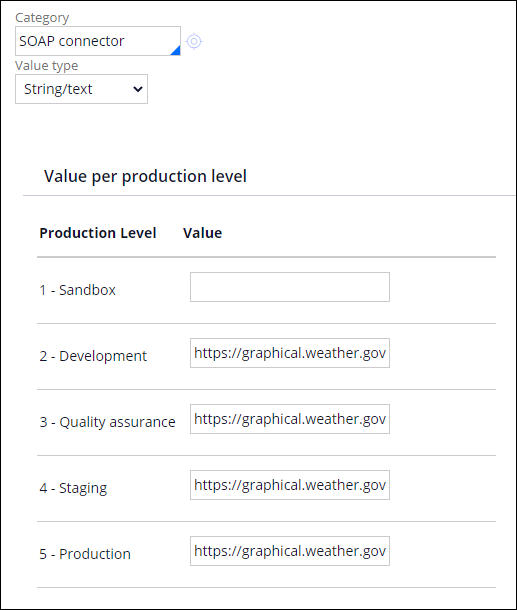 Note: You can edit the production level values if the specified value changes for different environments.
 - Save your changes to the Application Settings.
- Repeat steps 1-8 to create two new Application Settings with the details in the following table.
Label Value for Production level Response timeout 120000 Authentication profile <blank>
This Challenge is to practice what you learned in the following Module:
If you are having problems with your training, please review the Pega Academy Support FAQs.
Want to help us improve this content?