
Auditing changes to the value of fields
2 Aufgaben
5 Min.
Anfänger
Security
Englisch
Szenario
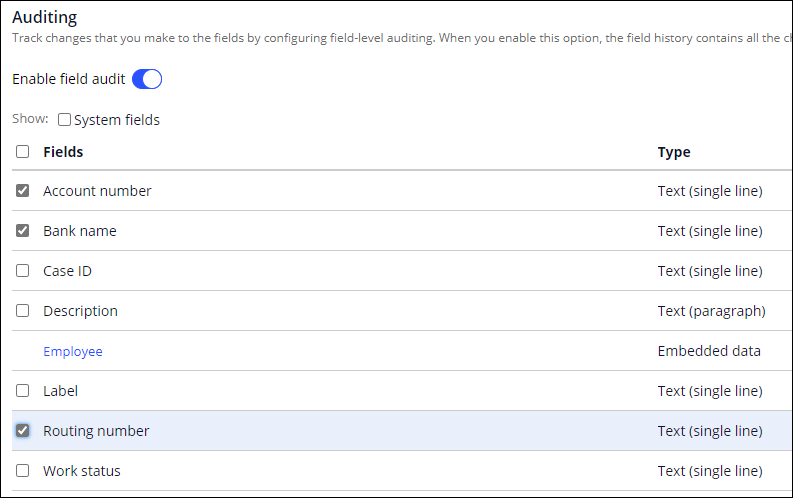
HRApps provides payroll setup for employees. For the Payroll Setup Case Type, an employee provides their bank information for direct deposit. When the employee changes the payment information, the auditing team wants to record the change in the Case history for availability during a potential audit. Configure HRApps to record changes to the Bank name, Account number, and Routing number fields in the Payroll Setup Case Type.
The following table provides the credentials you need to complete the challenge.
| Role | User name | Password |
|---|---|---|
| Senior System Architect | SSA@TGB | pega123! |
Genaue Übungsschritte
1 Configure the application to track changes
- In the Pega instance for the challenge, enter the following credentials:
- In the User name field, enter SSA@TGB.
- In the Password field, enter pega123!.
- In the navigation pane of App Studio, click Case types > Payroll Setup to open the Payroll Setup Case Type.
- Click Settings > Auditing.
- Turn on the Enable field audit switch to display the fields section.
- In the list of fields, select the following checkboxes:
- Account number
- Bank name
- Routing number
2 Configure Field Level Auditing tab
- In the Payroll Setup Case Type, click on the tab.
- In the tabs, create a new Field Level Auditing tab.
- In the Field Level Auditing tab, add the Field History view.

In der folgenden Mission verfügbar:
Wenn Probleme mit den Lerninhalten auftreten, lesen Sie bitte die Pega Academy Support FAQs.
Möchten Sie uns dabei helfen, diesen Inhalt zu verbessern?