
Adjusting the forecast
3 タスク
10 分
初級
英語
シナリオ
While Terry Mason, a sales representative, is reviewing the forecast, he sees the opportunity Smoke Detection Systems for Forest Gas in Q1 of 2022. Terry has heard a rumor that Forest Gas is evaluating all purchases for 2022 and will not approve anything over USD50000.
After some negotiation, Terry comes to an agreement with Forest Gas for USD50000 instead of the original USD70000. Unfortunately, the close date needs to be pushed back to June 30th, 2022.
Use the following credentials to log in to the exercise system:
| Role | User name | Password |
|---|---|---|
| Sales representative Terry Mason | tmason | rules |
Your assignment consists of the following tasks:
Task 1: Create a close plan for the Smoke Detection Systems for Forest Gas.
Task 2: Override the Smoke Detection Systems for Forest Gas opportunity.
Task 3: Verify that the opportunity moved from Q1 to Q2 and that the amount was reduced from USD70000 to USD50000.
チャレンジ ウォークスルー
詳細なタスク
1 Create close plan
- Log in to your exercise system as sales representative Terry Mason.
- Click Forecast. The forecast details are displayed.
- Open the Close plans tab.
- Select the following in the Filter by drop-downs:
- Custom
- Current Year
- Commit
- North East
- All AEs
- Click Apply.
- Locate and select the Smoke Detection Systems for Forest Gas.
- Click Add new.
- Enter the following information.
- Updates since last week: Rumors says that Forest Gas is holding back all purchases for 2022 and will not approve anything over USD50000.
- Next steps for the coming week: Contact Forest Gas to verify rumors and work out a solution.
- Click Save.
2 Update the opportunity
- Open the Details tab.
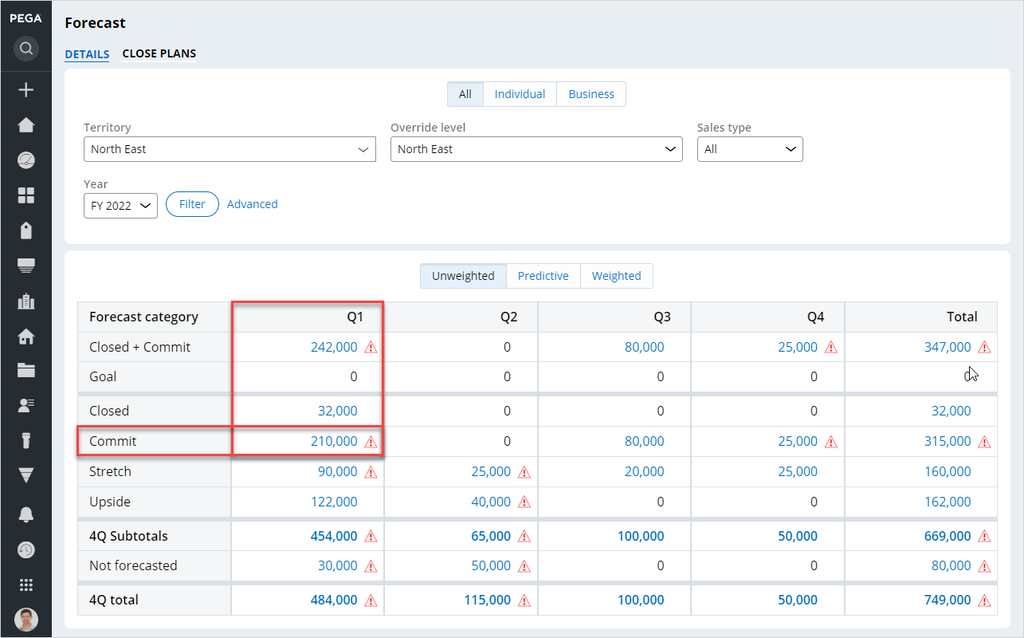
- From the Forecast category, in the Commit row, click the forecast amount for Q1. The amount is USD210000 for the forecast. The application displays opportunities for this forecast category and time period.
- Click the Smoke Detection Systems for Forest Gas opportunity label to open the opportunity.
- Select Actions > Forecast to override the forecast.
- In the Forecast override form, enter the following information:
- Amount: 50000
- Close date: 06/30/2022
- Category: Commit
- Comments: Moved out to Q2 and changed amount to 50000
- Click Submit. The application saves the change to the forecast.
3 Verify the update
- Open the Forecast.
- Click Filter to refresh the forecast.
- The forecast category amount for Q1 Commit has been reduced from USD210000 to USD140000.
- Change the Override level to Opportunity and click Filter.
- Confirm that Q1 Commit is USD210000.
トレーニングを実施中に問題が発生した場合は、Pega Academy Support FAQsをご確認ください。