
Roles dependency hierarchy
A dependent role enables you to create a custom Access Role that inherits privileges and Access of Role to Object (ARO) settings from a standard Pega role, such as PegaRULES:User4 or PegaRULES:WorkMgr4. Your custom role retains its overrides while automatically inheriting updates from the base role. This approach helps avoid cloning and supports easier maintenance.
To customize access for specific use cases while preserving standard permissions, define a dependency hierarchy. In earlier versions, teams cloned default roles and modified AROs. These clones required manual updates when new features were introduced. Dependent roles reduce this effort by automatically inheriting new privileges during upgrades.
Dependency hierarchy configuration
Using dependent roles helps to standardize permissions across applications and improve the maintainability of the access control model.
When you configure a custom Access Role to inherit from a standard Pega Platform™ role, you establish a layered security model. Dev Studio provides the interface for defining these relationships. The custom role references a base role (such as PegaRULES:User4) without duplicating its ARO records. This delegation allows the system to resolve authorization checks through the base role, streamlining permission inheritance.
When MyApp:User does not define its own AROs, authorization checks are deferred to its dependent role, PegaRULES:User4. This delegation supports the reuse of shared permissions and reduces configuration effort. If PegaRULES:User4 does not include an ARO for a specific MyApp Case Type, the RBAC algorithm evaluates the class hierarchy to locate applicable permissions. For example, an ARO defined for the Work- class applies to all MyApp Case Types that inherit from it. The final access decision depends on the outcome of the inherited ARO and any relevant production settings, such as the setting named Five, which might control read or write access.
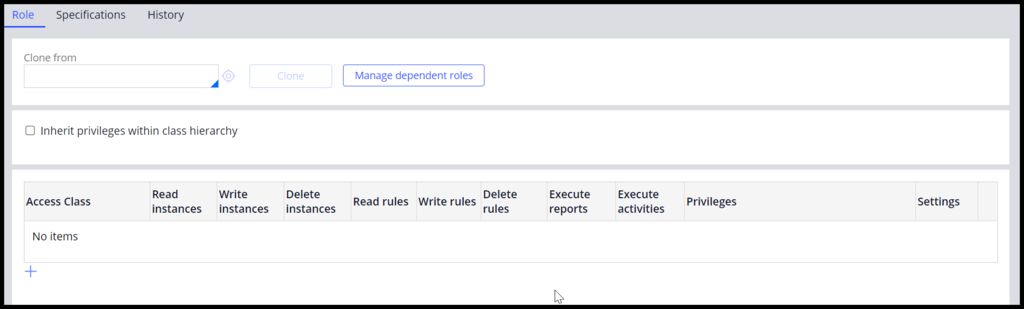
The following figure shows how to add a dependent role to a new Access Role. In the example, the MyApp:User Access Role does not yet have any dependent roles or Rule-Access-Role-Obj (RARO) Rules:
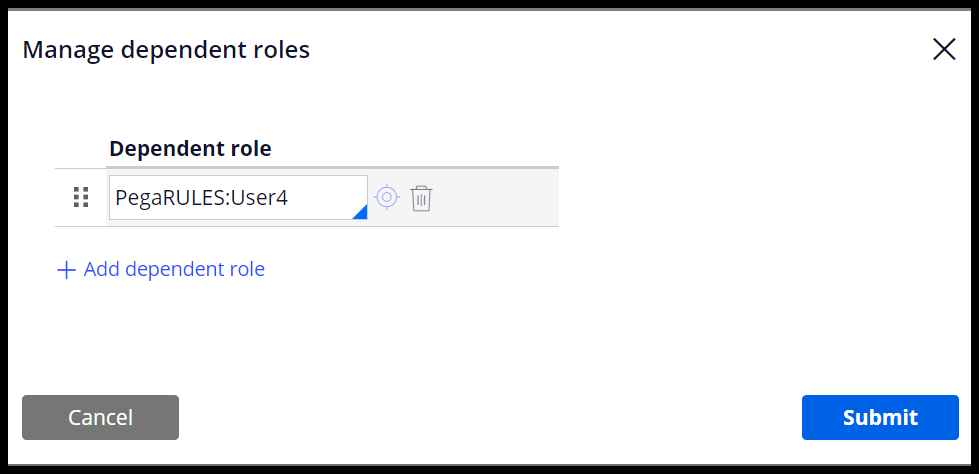
The following figure shows how to specify PegaRULES:User4 as a dependent role:
Specify multiple dependent roles
You can specify multiple dependent roles. Evaluate them in order from top to bottom. The system stops when an Access Role explicitly grants or denies access.
Override specific permissions
To override specific outcomes while inheriting most authorizations from an existing role, apply the following best practices:
- Define only the overriding AROs in the new role.
- Leave other ARO settings unspecified.
- The system defers unspecified checks to dependent roles.
Example use case
You want to restrict MyApp:User from updating Case Types in Resolved status. Add a single ARO with an application-specific Access When Rule. Leave other permissions (such as read access) unspecified to inherit from PegaRULES:User4.
Benefits of role hierarchies
Using dependent role hierarchies provides the following advantages:
-
Eliminate duplication of AROs
When your application, such as MyApp, requires one setting that differs from a reusable baseline, avoiding dependent roles forces you to duplicate all other settings on the ARO, and possibly other AROs, for the MyApp:User Access Role. -
Layer Access Roles for reuse
Create generic Access Roles that serve as the foundation for application-specific access roles, which share similar user responsibilities. These application-specific roles can depend on generic roles, which in turn can depend on Pega Platform access roles. With this structure, you can configure only the behavior that varies between layers. -
Support multiple dependencies
Configure Access Roles to depend on multiple other access roles. This setup enables authorization outcomes based on a combination of distinct access roles. For example, when users perform responsibilities across multiple roles, you can create an Access Role that depends on multiple sibling Access Roles in the same application. -
Reuse authorization from Pega Platform or your application
Pega Platform Access Roles for common user types (such as end users, managers, and system administrators) often cover most authorization needs. By creating application-specific Access Roles that depend on these platform roles, you establish a functional baseline without duplicating AROs. -
Improve maintainability
Configure only the authorization requirements that are specific to your application-specific Access Roles and defer the rest to dependent roles. This approach helps developers and maintainers understand how your application-specific authorization differs from a widely understood foundation. Without dependent roles, RBAC configurations often include many slightly modified clones of Pega Platform Access Roles, which can be difficult to identify and manage. -
Enhance updatability
By eliminating duplicated AROs and deferring to AROs in dependent roles, updates to Pega Platform or other applications automatically reflect authorization changes included in those updates.
If you do not use dependent roles, your application-specific Access Role is not connected to the updated Access Role in Pega Platform.
As a result:
- The application-specific Access Role overrides changes to the Pega Platform authorization model.
- New features in Pega Platform updates might require privileges that are not available because they are masked by the application-specific Access Role.
Check your knowledge with the following interaction:
このトピックは、下記のモジュールにも含まれています。
トレーニングを実施中に問題が発生した場合は、Pega Academy Support FAQsをご確認ください。