
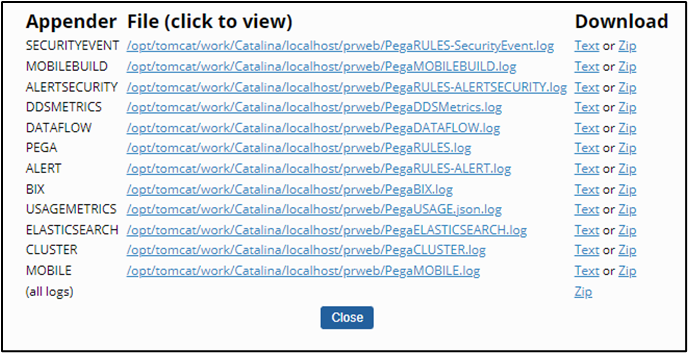
Security event logging
Security event logging in Pega Platform™ is an essential feature that is designed to enhance the security and compliance of applications by providing detailed records of security-related activities. In addition to data and rule modification auditing and recording work history, Pega software provides the ability to record security-related events to a file named PegaRULES-SecurityEvent.log. You can access this log file in Dev Studio by clicking Configure > System > Operations > Logs > Log files.
Examples of security event log entries:
Security administration event: This event is logged when there is a change in the security event configuration. The log includes details such as the application name, IP address, timestamp, and the operator who made the change.
Authentication event: This event is logged when there is a change in the operator record. The log includes details like the application name, IP address, timestamp, and the operator who made the change.
Security event categories
Pega Platform logs multiple security event types to support monitoring and compliance. Each event includes metadata such as timestamp, operator ID, IP address, node ID, and application context. Use these categories to design monitoring solutions that meet your security and compliance objectives:
Authentication events
- Successful logins
- Failed login attempts (include reason for failure)
- Password changes
- Password resets
- Multi-factor authentication events
- Session timeouts
- Logouts (user-initiated and system-forced)
Authorization events
- Access attempts to unauthorized resources
- Privilege escalation attempts
- Changes to access groups or roles
- Delegation of authority events
- Client-based access control (CBAC) policy violations
Data access events
- Access to sensitive data
- Bulk data exports
- Reports containing sensitive information
- Mass data operations
- Data encryption and decryption operations
Configuration and rule management events
- Rule creation, modification, and deletion
- Changes to application settings
- Security policy modifications
- System parameter changes
- Integration configuration changes
System administration events
- Security event configuration changes
- Operator account management
- Background agent modifications
- Database configuration changes
- System maintenance operations
Custom events
- Application-specific security events
- Business process security validations
- Industry-specific compliance checks
- Custom security policy validations
For enterprise implementations, identify event types that align with your security objectives and compliance requirements. Configure monitoring and alerting for each relevant category to ensure comprehensive coverage.
Security event configuration
Clicking Configure > Org & Security > Tools > Security > Security Event Configuration displays which type of events are recorded. Then, you can enable or disable Custom event logging.
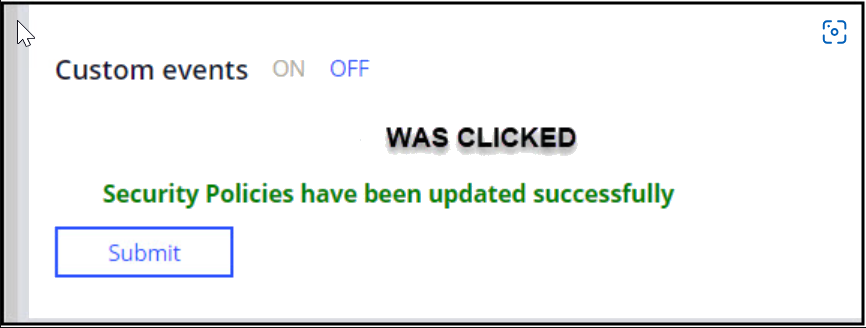
補足: The Security Event Configuration allows you to turn only custom events on or off.
Security event configuration setting does not provide control over when individual custom events are logged. For example, you can define a parameterized When rule used to control whether a step in a data transform or activity step records a custom security event. The When rule parameter can be used to perform a data page-mediated lookup to see whether logging of the custom event has been enabled.
Custom event logging can be used to facilitate the fulfillment of client-based access control (CBAC) auditing requirements.
Use the security event logger API for custom event logging:
<code translate="no">tools.getSecEventLogger().logCustomEvent("CustomCategory", "CustomEvent", customFlds);</code>
Use one of the following parameter values:
- eventType: Name of the event type to keep track of custom events
- outcome: The outcome of the event
- message: Any message that a user needs to log as part of the event.
- customFlds: A map of
<String,String>key-value pairs that log extra information for the event.
The Pega Community topic Adding a custom security event explains how to record a custom security event by creating a Java step within an activity.
Understanding security alerts and events in Pega Platform
Security alerts and security events serve different purposes in system monitoring. Understanding this distinction supports an effective security strategy.
Security Events
Security events record routine security-related activities in the system. These activities are informational and support auditing and troubleshooting. Examples of security events include:
- Successful user authentication
- Password changes
- User profile updates
- Security configuration changes
- Access to sensitive data
The system logs events in the PegaRULES-SecurityEvent.log file. Events typically do not require immediate action but provide historical context and help meet compliance requirements.
Security Alerts
Security alerts indicate potential security threats that require immediate attention. The system generates alerts when it detects conditions that may signal a breach or policy violation. Examples of security alerts include:
- Multiple failed login attempts
- Session hijacking attempts
- Unauthorized rule changes
- Privilege escalation attempts
- Unusual data access patterns
The system stores alerts in the PegaRULES-ALERTSECURITY.log file. A security administrator should investigate alerts promptly.
Design considerations
When defining your security architecture:
- Determine which activities should generate events and which should generate alerts.
- Avoid excessive alerts to prevent alert fatigue, which can reduce effectiveness.
- Do not classify critical security issues as events because this may allow breaches to go unnoticed.
A balanced approach ensures effective monitoring and efficient system operation. Consider implementing a tiered strategy:
- Common activities generate events for auditing and compliance.
- Critical or suspicious activities generate alerts for immediate investigation.
Check your knowledge with the following interaction:
このトピックは、下記のモジュールにも含まれています。
トレーニングを実施中に問題が発生した場合は、Pega Academy Support FAQsをご確認ください。