
Controls and presentation
User interface elements (such as text inputs and layouts) present information and actionable items on the user interface.
User interface elements in Pega Platform
Within the design architecture of Pega applications, the system pairs the field automatically with the optimal out-of-the-box control. The UI elements of Pega Platform™ include basic controls that you can use out of the box, including:
- Autocomplete controls
- Check boxes
- Drop-down lists
- Links
- Rich-text editors
- Text input
補足: For more information about the Field Types available, see Configuring fields.
Styling user interface elements
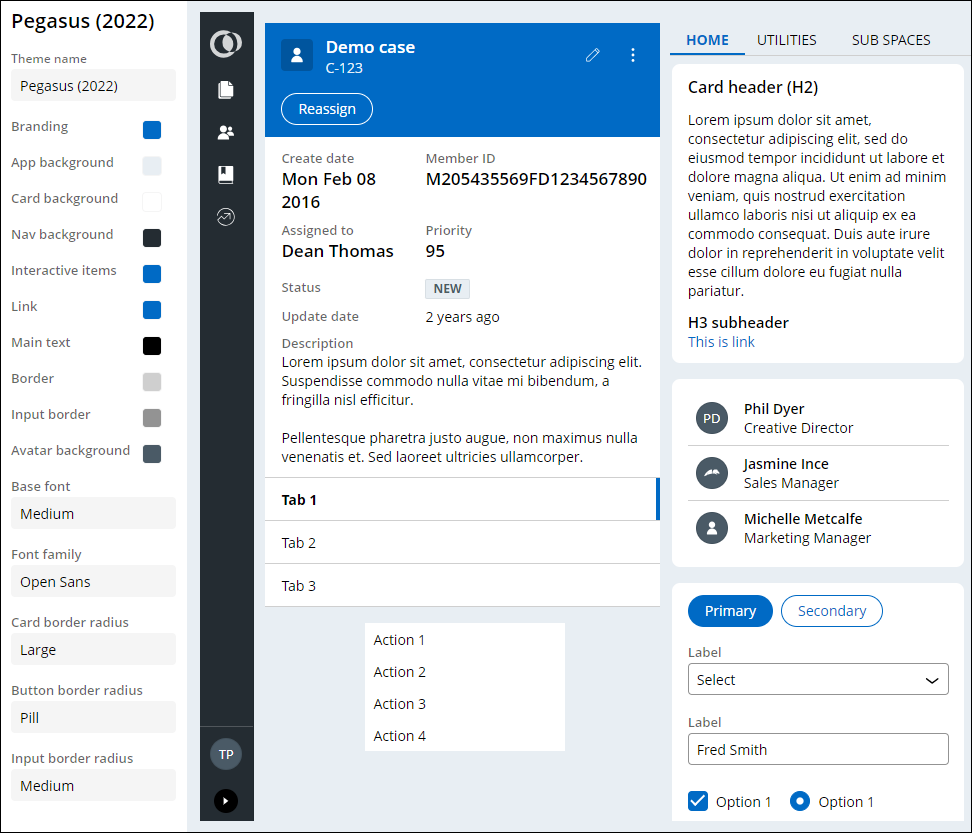
You can use themes to configure the styling of UI elements such as buttons, links, or headers, within the design arichitecture of Pega applications. Changes to a theme affect all UI elements across the application. Establishing a consistent look for UI elements in your application saves development time, gives your application a more predictable user interface, and makes it easier for users to complete forms.
The out-of-the-box Pegasus theme is displayed in the figure below:
補足: To learn more about styling an application, see Defining themes.
Check your knowledge with the following interaction:
このトピックは、下記のモジュールにも含まれています。
トレーニングを実施中に問題が発生した場合は、Pega Academy Support FAQsをご確認ください。