
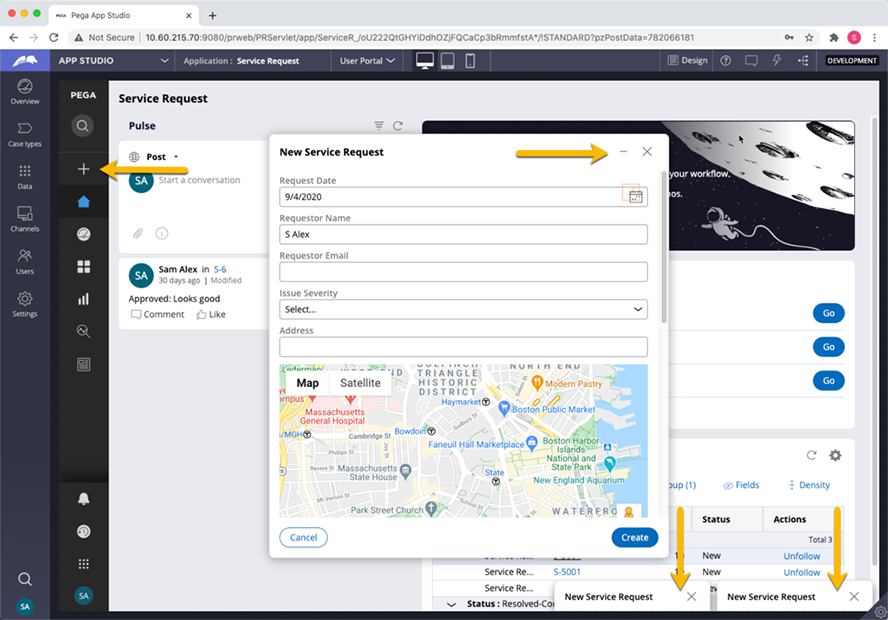
The new case modal in Pega Cosmos design system
When creating a new case, it is typical for users to see a prompt that requests initial data to begin the case.
When you create a new case in the end user portal, the form with fields for initial case data renders in a modal dialog box on top of your current context. Similar to creating a new email with an email application, users can minimize the case creation modal, navigate somewhere else in the portal to perform work, then restore the modal to continue populating data for the new case.
Users can also create and collapse several new modal dialog boxes simultaneously. Collapsed modal dialog boxes stack along the bottom of the browser window. This behavior cannot be modified.
ヒント: You can easily customize the form in the modal dialog box with App Studio.
The new case creation modal dialog box is not a traditional Pega Platform™ modal dialog box. It is implemented through front-end technology and the Pega Platform AJAX dynamic container, a new lightweight container to render documents such as work items, cases, and harnesses.
Check your knowledge with the following interaction.
トレーニングを実施中に問題が発生した場合は、Pega Academy Support FAQsをご確認ください。