
Modifying diagnostic settings
Modifying diagnostic settings
Follow these steps to modify the Studio Diagnostic settings.
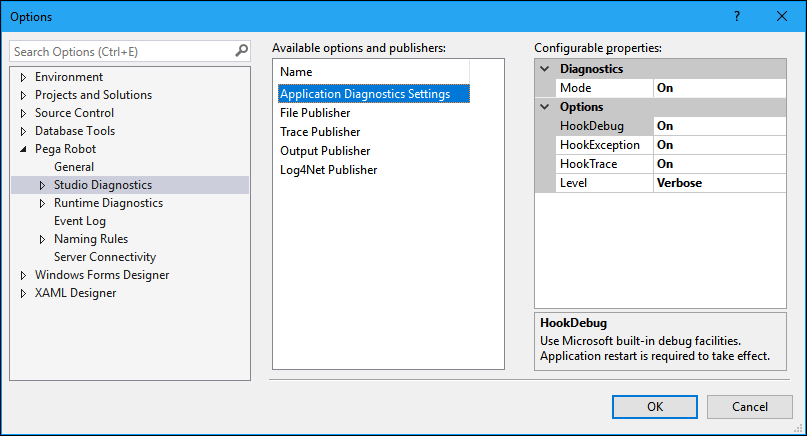
- From the menu, select Tools > Options. The Options window displays.
- On the left frame, locate the Pega Robotics category and click the Arrow to expand the category.
- Locate Studio Diagnostics, and click the Arrow to display the Log Categories.
- Click Studio Diagnostics to highlight. The center and right frames update.
- Depending on the need, select an available option or publisher in the center frame.
- In the Configurable Properties frame (right), modify the properties as necessary.
- In the left frame, click Log Categories. The window refreshes to display the log categories.
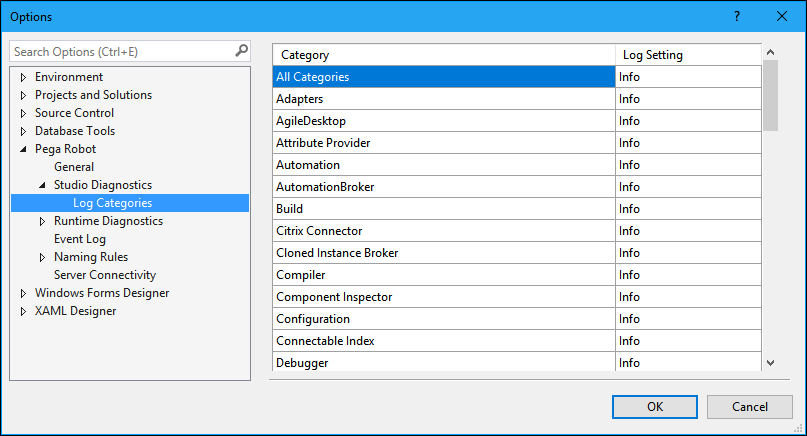
- Use the All Categories option or individual option to set the error levels of the log categories.
- Click OK to save the changes and close the window.
Note: You can repeat these steps to accommodate your local Runtime diagnostics by accessing the Runtime Diagnostics category on the same Options window.
If you are having problems with your training, please review the Pega Academy Support FAQs.
Want to help us improve this content?