
Pega and robotic automation integration overview
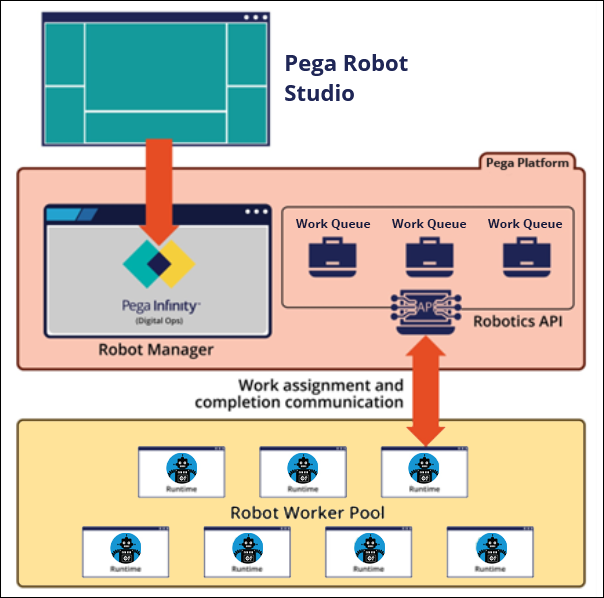
Pega Robotic Automation integrates with Pega Platform™ to streamline and automate portions of your case management workflow. To integrate systems with a Pega Platform application, robotic automations are necessary when systems do not have an accessible API or another mechanism to interact with them.
Pega Platform can leverage both unattended and attended automations to complete repetitive tasks faster and with fewer errors than manual handling. Unattended automations run without any intervention from an end-user, while attended automations start with an action from a user or an application to integrate and automate processes on the user’s desktop.
Unattended automations
An unattended automation is developed to run independently and execute a fully automated task. This process executes as part of Pega Platform case management. Case assignments are routed to robotic work queues where a robot retrieves the assignment from the queue. The robot obtains the case data that is associated with the assignment and performs the specified automation. After the robot processes the assignment, it sends any modified data back to the case and retrieves the next assignment in the robotic work queue.
For example, you can queue an automation to process one or more steps of an automobile insurance claim. After a claim is submitted, the claim can immediately route to a robot. The robot runs an automation that analyzes the information submitted with the claim, looks up and verifies policyholder information, and updates web and desktop applications with case information. If a robot performs multiple tasks, the tasks ideally are different steps in the case life cycle.
You can also configure your automations to source data pages in your application. Data pages provide access to data by populating page and page list properties with relevant data, depending on the circumstances and your business case.
Attended automations
As part of the case workflow, a human triggers attended automations either in a flow action or to retrieve data for a screen through data pages. Attended automations can be set to run before, during, or after case management steps to:
- Synchronize all desktop applications with a customer’s account information.
- Automatically launch or close applications on the desktop.
- Collect necessary data from desktop applications to display to the end user during the case life cycle.
- Send updated customer account information from your Pega Platform application to one or more web or desktop applications.
- Streamline users’ workspaces. By automating communication among various desktop applications, users do not need to switch between many applications to update information.
Automations that run on the desktop run from a flow action on a connector, modal, or overlay in your Pega Platform application. Automations can be run during pre-processing to obtain information from desktop applications to display in a form in the Pega application or post-processing to send information from your Pega Platform application to the automation.
Check your knowledge with the following interaction.
This Topic is available in the following Modules:
If you are having problems with your training, please review the Pega Academy Support FAQs.
Want to help us improve this content?