
Understanding Data Objects
One of the most important aspects of building a successful Case is identifying the data required to reach resolution. In Pega Platform™, data entities and the attributes that describe them are defined as Data Objects.
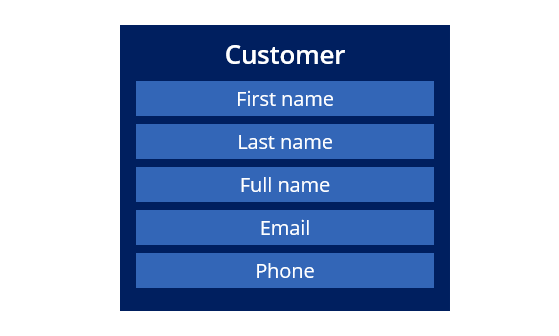
For example, a supermarket Online orders application might contain a Customer Data Object. As seen in the following image, the Customer Data Object includes fields that describe the supermarket's customer, such as First name, Last name, Full name, Email, and Phone:
Data Objects hold data for your application and simplify the organization of fields, user interface Views, and integration settings that your application needs to access the right data at the right time to successfully resolve a Case.
Note: The terms Data Object and Data Type, as well as field and Property, are often used interchangeably in projects and documentation. These terms refer to the same underlying structures, with the terminology varying based on context.
Data Objects and Case Types
Data Objects are defined as part of an application’s Data Model. Once created, a Data Object can be associated with a Case Type, enabling the workflow to access related data throughout the life cycle of the Case. A Data Object can be referenced in one or more Steps within a Case Type. The fields used to support Case resolution can vary by Step, allowing users to focus only on the data relevant to each Assignment.
For example, consider an application that includes an Account Data Object used in two Case Types: one that allows customers to transfer funds between bank accounts, and another that allows customers to update the address associated with an account. The Account Data Object includes fields such as Account Number, Current Balance, and Next Statement Date. Referencing the Account data object eliminates the need to define account-related fields separately for each Case Type. The following figure illustrates the relationship between the Transfer Funds and Change Address Case Types and the Account data object:

You can use a Data Object multiple times within an application. In the preceding example, the Transfer Funds Case Type references the Account Data Object to represent both the source and target accounts involved in a transfer.
Collectively, the Case Types and Data Objects configured in an application define its Data Model.
Check your knowledge with the following interaction:
Structure of a Data Object
Each Data Object consists of a collection of fields. Each field has a name and a Field Type, and is used to capture and present data as needed in an application. Collectively, these fields define the structure of the data object.
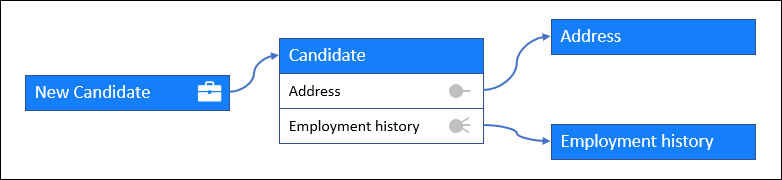
You can extend the structure of a Data Object by referencing other Data Object. When one Data Object references another, the fields of the referenced Data Object become part of the referencing Data Object. A Data Object can be referenced either once or multiple times, depending on the requirement.
For example, a Candidate Data Object may include additional information such as a mailing address and employment history. The address and employment history can be configured as separate Data Objects and referenced by the Candidate Data Object. The following figure illustrates the relationship between the New Candidate Case Type, the Candidate Data Object, the Address Data Object, and the Employment history Data Object:
In addition to grouping data elements, Data Objects can also group Views and other Rules related to the Data Object. For example, an HR application might include a Candidate Data Object to collect information about candidates for open job requisitions. The Candidate Data Object can include logic such as a calculation that combines a given name and surname into a full name, for example, John Smith.
Note: You can reuse common fields across related Data Objects by using inheritance. A parent Data Object defines shared fields, which child Data Objects automatically inherit and extend with fields specific to their purpose.
Sourcing Data Objects
Data for a Data Object can be sourced in different ways depending on where the data is stored and how it needs to be accessed. Data can either be maintained within the application or retrieved from external systems of record for reuse and consistency.
You can source data for Data Objects in the following ways:
- Local data source – Uses an internal data store where Data Records are maintained; data can be specific to a Case or reused across multiple Cases.
- External database – Connects to a client-managed data store, requiring setup and mapping of data structures to the Data Object; commonly used for systems such as inventory or HR databases.
- External API – Integrates with an external system of record through a connector (for example, REST), requiring setup and mapping between Data Object fields and request and response structures.
Note: For more information on Data Objects and their sourcing, see Data Objects and their sourcing.
Best practices
When designing a Data Model with Data Objects, follow these best practices to ensure consistency, reuse, and maintainability.
Reuse standard Data Objects
Whenever possible, use the standard, commonly used Data Objects provided by Pega Platform, such as Address‑Postal and Address‑Email. Reusing standard Data Objects helps ensure consistency and reduces the effort required for design and maintenance. You can also include additional relevant Data Objects as needed to support your application requirements.
Extend existing Data Objects when appropriate
If an existing Data Object partially meets your needs, extend it rather than creating a new one. Extension allows you to reuse the core structure while adding only the fields or logic you require. For example, to model employee information, you can extend the Person Data Object to create a Person‑Employee Data Object.
Create new Data Objects only when necessary
If no suitable Data Object exists and extension is not appropriate, create a new Data Object. For example, if you need to manage airport codes and no existing Data Object can be reused or extended, create a new Airport Codes Data Object in Pega Platform.
Check your knowledge with the following interaction:
This Topic is available in the following Module:
If you are having problems with your training, please review the Pega Academy Support FAQs.
Want to help us improve this content?