

Voice AI models
You can help train the models that Voice AI uses to transcribe customer conversations and identify topics and entities. Voice AI uses different AI models for transcription and for natural language processing (NLP).
- Speech Service AI model – Train custom AI models using customer data to improve accuracy of Voice AI transcription.
- Text Analyzer NLP models – Train models to better suggest cases and knowledge articles as well as to autofill forms.
AI model for the Speech Service
The Speech Service component of the Voice AI architecture transcribes audio from the customer conversation in real time. The Speech Service, as shown in the following diagram, uses an AI model to detect and transcribe the audio content:
Multi-language support using Amazon Transcribe
Pega Voice AI natively supports a set of built-in languages. To extend transcription and analysis to additional languages, customers can connect Voice AI to Amazon Web Services (AWS) Transcribe. This integration enables Voice AI insights for any language that AWS Transcribe classifies as having streaming support.
The following figure shows the Voice AI architecture with Amazon Transcribe:

Transcription Engine Options
Voice AI supports two transcription engines, selectable per interaction using the GetVoiceAISpeechEngine decision table:
| Engine | Description |
|---|---|
|
Speech |
Pega's native built-in transcription engine (default, used for en_US and other natively supported languages). Supported languages include Dutch, English, French, German, and Spanish. Note: These supported languages are enabled per customer need.
|
|
Transcribe |
Amazon AWS Transcribe -- used for languages not natively supported by Pega Voice AI. |
The engine selection can be driven dynamically by business logic. Both options can coexist in one implementation, with the decision table routing each call to the appropriate engine.
Language Selection options
The GetVoiceAILanguage decision table determines which language is applied per interaction. If this table returns an empty outcome, Voice AI falls back to the default language set in the CRM – Voice AI configuration set (en_US by default). The language can be resolved from the following sources:
| Source | Description |
|---|---|
|
Contact preferences |
Sets the language based on the contact's preferred language profile. |
|
CTI settings |
Sets the language based on computer telephony integration (CTI) data passed with the call. |
|
Agent location / time zone |
Sets the language based on the geographic location or time zone of the handling agent. |
|
Queue |
Sets the language based on the queue in which the conversation is taking place. |
|
Agent skills |
Sets the language based on the skill tags assigned to the agent handling the call. |
These same five sources also apply to transcription engine selection -- each has a corresponding decision table example for engine routing.
Key Configuration components for using AWS Transcribe
| Component | Purpose |
|---|---|
|
SetAWSUserDetails Data Transform |
Stores AWS credentials (username, password, secret hash, client ID, identity/user pool IDs, region, sample rate). |
|
AWSTemporaryCredentials job scheduler |
Refreshes temporary AWS credentials on a scheduled interval -- must run more frequently than the credential expiry interval (default expiry varies; default scheduler interval is 30 minutes). |
|
cxGetAILanguageParameters Data Transform |
Constructs the JSON payload for AWS Transcribe, including language code, engine, and access credentials. |
|
Amazon Cognito |
Provides federated authentication for the AWS Transcribe connection. Required setup before integration. |
AWS Transcribe Service Limits
By default, AWS has a streaming limit in Voice AI is 25 HTTP/2 streams, supporting approximately 12 concurrent calls. To support Voice AI demand, you need to scale up you AWS environment:
- Number of concurrent HTTP/2 streams = 2× your required concurrent calls.
- Transactions per second (StartStreamTranscription) = 2× the HTTP/2 stream quota.
Quota increases are requested directly in the AWS Service Quotas console.
For more information, see Implementing multi-language support.
Text Analyzer NLP models
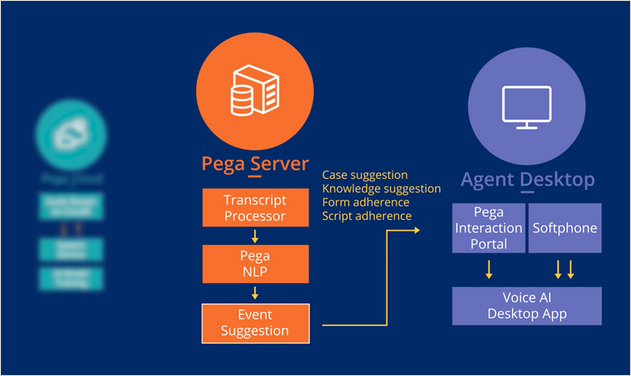
The Pega NLP component of the Voice AI architecture analyzes the customer conversation to identify topics and entities, and then pushes suggestions to CSRs in real time in the Interaction Portal. Pega NLP is part of the Pega Server, as shown in the following diagram.
When you create a Voice AI channel, a Text Prediction is generated. The Text Prediction includes models for topic, sentiment, and entity extraction. The following screen shows the models used with a sample Voice AI channel.
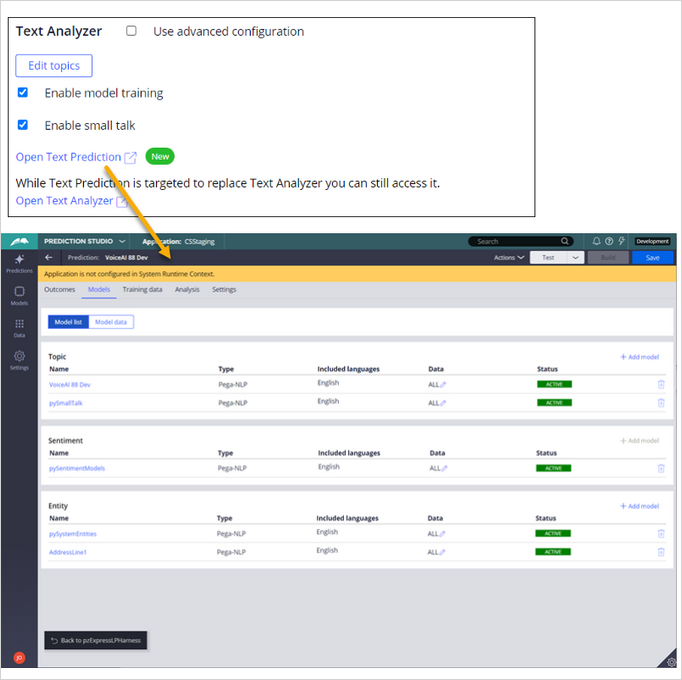
The topic models analyze the customer conversation to suggest the appropriate case type to the CSR.
Sentiment models detect the emotion expressed in a conversation as generally positive or negative.
The entity models detect words in the customer conversation that can be associated with case data, such as a name or address.
You can use the Prediction Studio to modify and train models. In most cases, a data scientist maintains the models.
Training data
You can help train a topic model by adding records to the model. Each training record is a combination of a topic and an associated word or phrase relevant to your organization. You classify each record by associating it with the appropriate topic. For example, the following screen shows a training record from a typical customer conversation.
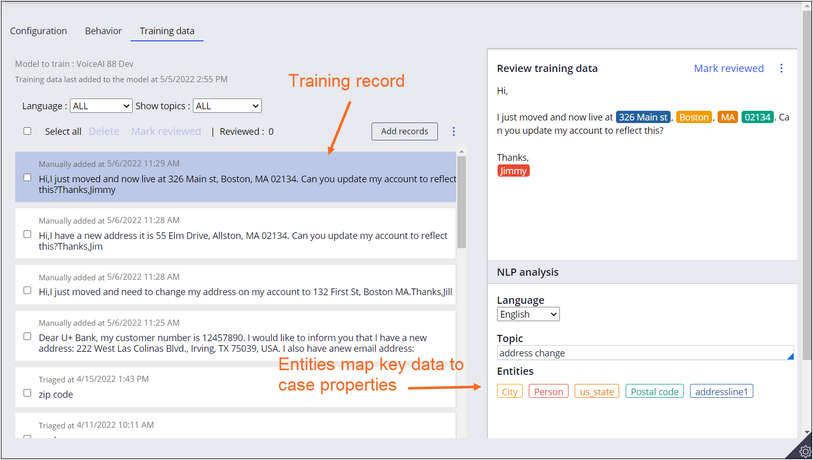
The NLP analysis for the selected record shows the identified entities, such as street address and city. This record is associated with the address change topic
You can review the NLP analysis and mark records as reviewed.
You can monitor a model for accuracy, rebuild a model, and export or import the models across different Pega environments. Each time you rebuild the model, Voice AI calculates a new score, which represents the overall accuracy of the model for all topics.
For more information about configuring and training NLP models, see the Pega Academy mission Pega NLP Essentials.
This Topic is available in the following Modules:
If you are having problems with your training, please review the Pega Academy Support FAQs.
Want to help us improve this content?