
Enabling auto tagging
Authors can delete or add other tags manually, but you can also enable auto-tagging to simplify this operation. The Pega AI-based text analyzer scans the article title, abstract, and content body to identify relevant topics and suggest related tags.
補足: Only Pega Knowledge administrators or site managers can enable auto-tagging.
- In the navigation pane of Pega Knowledge, click Configurations.
- Click Auto tagging.
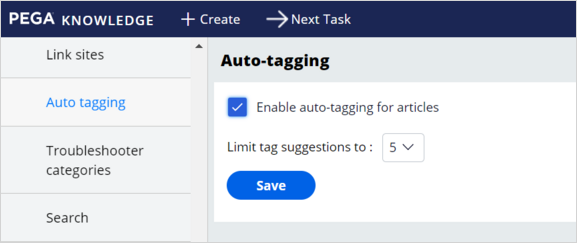
- On the Auto-tagging landing page, select the Enable auto-tagging for articles checkbox.
- In the Limit tag suggestions to list, select the number of automatic content tags to create, as shown in the following figure:
補足: The default limit is three suggestions.
- Click Save.
New content that authors create now receive auto-tagging from the Pega AI-based text analyzer.
このトピックは、下記のモジュールにも含まれています。
トレーニングを実施中に問題が発生した場合は、Pega Academy Support FAQsをご確認ください。